1
MASTERA
3: ICProg and PonyProg Software settings
3.1: ICProg
The user could use different software to control this programmer as already mentioned.
However the IC-Prog software of Mr. Bonny Gijzen is very complete and free on the Net. The
next paragraphs containing screens from this programmer. The program is very much selfexplaining and contains a good HELP function. This part of the manual is therefore not
intended as a user manual for the software but the could help you on the way in making the
correct settings to use it in combination with the Universal Programmer. Mr. Gijzen is
continuously improving his software and adding new devices, so check from time to time his
website for upgrades. The description below is created from IC-Prog Revision 1.04 newer
revisions could be slightly different.
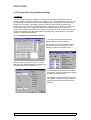
3.1.1: Port Settings and Hardware selection:
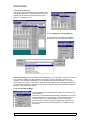
⇐ A similar, general overview screen is
displayed when IC-Prog is started.
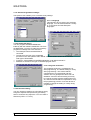
The first time you have to select the serial
port and the type of programmer: These
settings are entered as shown below: ⇓
Select the proper serial port (Com1 to Com4)
And select the JDM Programmer. For WIN9x you
should select Direct I/O. Windows API
could be selected for Windows NT. The
Communication checks boxes are usually
not required. These are intended for special
hardware and test purposes.
The settings are automatically stored when
the software is closed so you don’t have to
repeat this setup every time you start the
program!
MASTERA User Manual Rev 1.1 :
13/06/01
4/12