1
Linux Infrared HOWTO
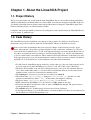
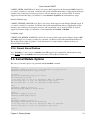
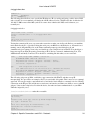
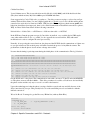
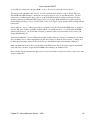
/etc/ppp/cebox.chat
TIMEOUT 3600
"CLIENT"
"CLIENT\c"
""
"SERVER\c"
The following file will allow you to specify the IP addresses, IR (or serial port if using a cable) device, DNS
and so forth. I do not recommend you change the 192.IP addresses below. WinCE really has an affection for
192.168.55.100 because all the MS synch tools seem to have it hardcoded. DNS can be whatever you
normally use.
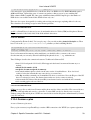
/etc/ppp/peers/cebox
/dev/ircomm0 115200 crtscts
connect '/usr/sbin/chat −v −f /etc/ppp/cebox.chat'
noauth
local
192.168.55.101:192.168.55.100
ms−dns 10.2.0.1
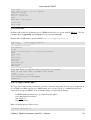
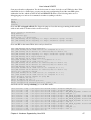
Testing the connection Ok, now you can test the connection to make sure it all works. Reboot your machine,
run irattach /dev/ttyS2 −s (/dev/ttyS2 being the serial port your BIOS sees the IR device as, if irattach is not
running, start it) Align the IR ports, at the Linux command prompt type /usr/sbin/cebox.sh, and
simultaneously press return to start cebox and double tap your connection icon in WinCE. You should get a
happy message from WinCE reporting Connecting to Host, Device Connected, Authenticating User, User
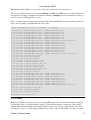
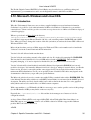
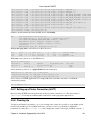
Authenticated and finally Connected. You should see something like this when you are connected:
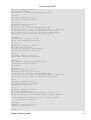
irda0
Link encap:IrLAP HWaddr 06:89:d0:58
UP RUNNING NOARP MTU:2048 Metric:1
RX packets:246 errors:0 dropped:0 overruns:0 frame:0
TX packets:251 errors:0 dropped:0 overruns:0 carrier:0
collisions:0 txqueuelen:8
ppp0
Link encap:Point−to−Point Protocol
inet addr:192.168.55.101 P−t−P:192.168.55.100 Mask:255.255.255.255
UP POINTOPOINT RUNNING NOARP MULTICAST MTU:1500 Metric:1
RX packets:10 errors:0 dropped:0 overruns:0 frame:0
TX packets:10 errors:0 dropped:0 overruns:0 carrier:0
collisions:0 txqueuelen:10
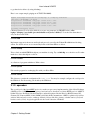
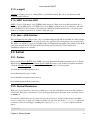
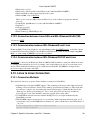
The following script sets up IrDA, establishes a ppp connection with WinCE, and then sets up IP
masquerading. It is provided as an example of how you can tie this all together. This is more or less a manual
approach. You can get creative, start irattach at boot and stick a line in inittab to constantly look for a WinCE
connection on the IR port. This will however, run down your batteries and limit your ability to access other IR
gadgets. I just use the script below. Position the device, run wince and start communications on your PDA
when the script tells you to.
/usr/local/bin/wince − make this executable
#!/usr/bin/perl
use strict;
#
# Enable IrDA, start ppp0 and set up WinCE masquerading
# A. Tyde − Linuxcare Inc.
#
print "\n−> Setting up IR infrastructure...\n";
system("killall irattach 2>/dev/null");
sleep 1;
system("/usr/sbin/cebox.sh");
Chapter 3. Specific Connections and IrDA − Protocols
24