1
QRG- Fast T-Jet 3
Adjustment Utilities
Head Angular Adjustment
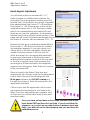
You will need to place a standard 8.5” x 11”
sheet of paper on a Shirtboard to perform this
procedure. Once the paper is loaded, press Print
and the Fast T-Jet 3 will print two groups of parallel
lines labeled Band Pass Incline 0 > > 80 and Band
Pass Incline 0 < < 80. These groups of lines will be
assigned numbers from -6 to 6. The lines to either
side of the numbered lines are marked NG and
these are not used for calibration. A third printout
labeled Head Incline will print at the bottom of the
page and will consist of seven boxes broken into horizontal line segments. The
five boxes of concern will be numbered 70 to – 70.
Examine the first group parallel lines labeled Band
Pass Incline 0 > > 80 and note which set contains
the straightest segment. If you look closely, you
will see most of the lines are slightly offset in the
middle. Note the number of the one with NO
offset and enter this in the applicable data field
by placing a checkmark in the Band box and
entering the line segment number in the box next
to the correct group name. Next, examine the
second group of lines and select the straightest
segment from that group. Enter that line’s number
in the next data field.
Place a check in the Raster Offset box and
examine the set of boxes under the heading Head
Incline. Select the set of interlocking lines that
fill the gaps between but DO NOT overlap any
line above or below it. Enter this number into the
applicable data field.
Good
Click on Input and the application will do some
calculations before placing its own data in the
fields. Once the calculations are complete, click
on Finish and you will be taken back to the main
selection screen.
Once you have entered data on this screen you must click on the
Input button FIRST and then click on Finish. If you do not follow this
sequence, or you click on any other buttons in between Input and
Finish, your data will not be stored properly and you must rerun this
calibration process.
2