1
QRG- Fast T-Jet 3
Adjustment Utilities
Auto Bi-Directional Adjustment
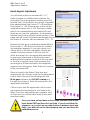
You will need to place a standard 8.5” x 11” sheet of paper on a Shirtboard
to perform this procedure. Once the paper is loaded, from the main selection
screen of the Adjustment Program, select the Auto Bi-D Adjustment routine.
On the next screen, select Perform and the routine will print automatically and
make the necessary calibrations. You will not need to input any data manually.
When the Auto Bi-Directional Adjustment procedure is complete, you MUST click
on Finish for the data to be properly stored. You will then be taken back to the
main selection screen.
PF Roller and Eject Roller Adjustments
(PF Adjustment Utility)
You will need to place a standard 8.5” x 11” sheet
of paper on a Shirtboard to perform each of these
procedures and both are run from the
PF Adjustment Utility.
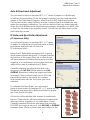
Select the PF Roller Utility and press Print. A group
offset boxes will print along with 7 colored boxes at
the bottom of the page. Each set of offset boxes
will have reference numbers that may be positive,
negative or a combination of both and these are
what will be used to calibrate the PF Roller.
Carefully examine the offset boxes and note
the group with NO GAP (White space) and NO
OVERLAP (Black line) where the upper and lower
one meet. Place a check mark next to PF in the
Input & Read section and enter the number
that corresponds with the two boxes you have
selected.
To calibrate the Eject Roller, you will need to
place a clean sheet of standard 8.5” x 11” paper on the
Shirtboard and select Eject Roller and Letter for paper
size. Press the Print button.
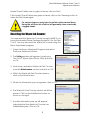
Good
A thick line will be printed with a series of small blocks
below it. These blocks will have reference numbers that
may be positive, negative or a combination of both.
Carefully examine the blocks and select the one that
TOUCHES the long bar above it, with NO GAP or OVERLAP
between them. Place a check mark next to Eject in the
3
Bad