1
4.3 Functions for Robot
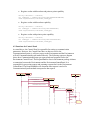
Sending and Receiving messages are core functions provided for Robot. Since messages
are passed to the Robot via the Environment, all these functions will be used by the
Environment. This sequence diagram describes how to send and receive message within
the Environment package.
Environment
: Robot
:
EnvironmentObjectRobot
:
CommunicationsSystem
1: output.write(message)
2: prepGetEvents()
3: queueEvents()
4: processMessageEventQueue(timestep)
5: myMessageEvent.remove(0)
6: action
7: sendMessage(action.message,timestep)
loop until
myMessageEvent
is empty
8: sendoutAllTheMessages(timestep)
9: getMyID()
10: ID
11: getMessage(ID,timestep)
12: messages[]
13: sendMessage(message)
14: output.write(message)
loop until messages is
empty
loop
EnvironmentObjectRobot is the class that establishes TCP/IP connection to Robot. Each
EnvironmentObjectRobot has a queue to keep incoming message from robot. In every
time step the Environment will read messages in this queue and forward to the
CommunicationsSystem by processMessageEventQueue method. The process of
receiving message is done by sendOutAllMessages method. The Environment calls
getMessage method from the CommunicationsSystem and forward these messages to the
EnvironmentObjectRobot to write out to the socket that connects to the robot.