1
III.Operation
NOTE: MegaTron, MegaTron SS and MegaTron XS controllers 4-20mA input capability provides a wide
range of customization and unique 4-20mA input control flexibility with advanced relay logic. Refer to
MegaTron Quick Step Guide for 4-20mA Input Programming Guide to customize the controller’s 4-20mA
input for desired name, units of measure, reading’s numerical range, set point, differential, alarming and
advanced relay logic.
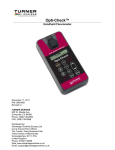
Turner Designs’ Little Dipper uses a Light Emitting Diode (LED) at a specific wavelength to excite the
fluorophore of interest in samples or source water. Upon excitation, the fluorophore emits a different
wavelength of light (fluorescence) that will be detected by the fluorometer’s photodiode.
After power is applied to the Little Dipper allow 5 seconds for the LED to stabilize. After 5 seconds
measurements can be taken continuously as current output (4 – 20 mA).
A. Initial Calibration
Sensors pre-connected to a MegaTron, SS or XS will typically not need calibration. If calibration is desired
follow these steps to calibrate the Little Dipper:
MegaTron can display a 4-20mA signal as any desired nurmerical range so we have used an example
range of 0-300 for the reading below.
1. Place Little Dipper in sealed calibration tee of non-treated source water free of any bubbles.
This water should represent the signal you intend to set as zero.
2. Once bubbles have been removed, allow the monitor’s signal to stabilize, and then use a
flathead screwdriver to rotate the marked 4 mA trimpot so that the monitor reads a minimum of 4
mA or 0 if it has been told to represent a 4mA signal as 0.
3. Drain sample tee of non-treated water and fill with a treated sample solution with a known
maximum concentration you intend to measure.
4. Once bubbles have been removed, allow the monitor’s signal to stabilize, and then use a
flathead screwdriver to rotate the marked 20 mA trimpot so that the monitor reads a maximum
of 20 mA or 300 if the defined numerical value your monitor has been told to represent a 20mA
signal as is 300.
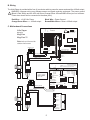
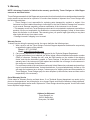
4mA Trimpot
!
WARNING: A quarter to one turn is the
typical maximum adjustment needed.
Do not exceed.
• Clockwise to increase signal
• Counterclockwise to decrease signal
20mA Trimpot
5. Install Little Dipper into sample stream you intend to monitor.
7