1
Appendix
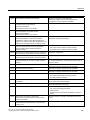
A.2 System Alarms
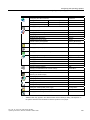
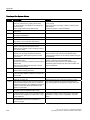
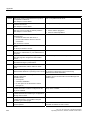
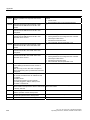
Number
Effect/cause
Remedy
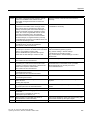
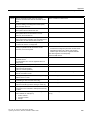
170001
The S7 diagnostics buffer cannot be viewed
because communication with the controller is shut
down.
Set the controller to online mode.
170002
The S7 diagnostics buffer cannot be viewed
because reading of the diagnostics buffer (SSL)
was canceled with error.
—
170003
An S7 diagnostics event cannot be visualized.
The system returns internal error %2.
—
170004
An S7 diagnostics event cannot be visualized.
The system returns an internal error of error
class %2, error number %3.
—
170007
It is not possible to read the S7 diagnostics buffer
(SSL) because this operation was canceled with an
internal error of class %2 and error code %3.
—
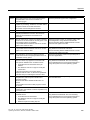
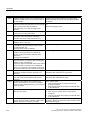
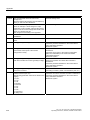
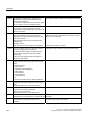
180000
A component/OCX received configuration data with
a version ID which is not supported.
Install a newer component.
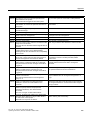
180001
System overload because too many actions
running in parallel. Not all the actions can be
executed, some are rejected.
Several remedies are available:
• Increase the configured cycle times or basic clock.
• Generate the alarms at a slower rate (polling).
• Initiate scripts and functions at greater intervals.
If the alarm appears more frequently:
Restart the HMI device.
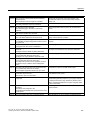
180002
The on-screen keyboard could not be activated.
Possible causes:
Reinstall WinCC flexible Runtime.
"TouchInputPC.exe" was not registered due to a
faulty Setup.
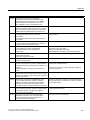
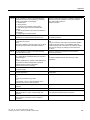
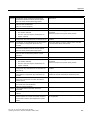
190000
It is possible that the tag is not updated.
—
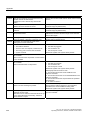
190001
The tag is updated after the cause of the last error
state has been eliminated
(return to normal operation).
—
190002
The tag is not updated because communication
with the controller is down.
Select the system function "SetOnline" to go online.
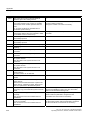
190004
The tag is not updated because the configured tag
address does not exist.
Check the configuration.
190005
The tag is not updated because the configured
controller type does not exist for this tag.
Check the configuration.
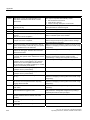
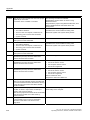
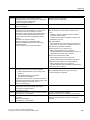
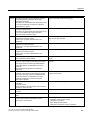
190006
The tag is not updated because it is not possible to
map the controller type in the data type of the tag.
Check the configuration.
190007
The tag value is not modified because the
connection to the controller is interrupted or the tag
is offline.
Set online mode or reconnect to the controller.
190008
The threshold values configured for the tag have
been violated, for example, by
• a value entered
• a system function
• a script
Observe the configured or current threshold values of
the tag.
TP 177A, TP 177B, OP 177B (WinCC flexible)
Operating Instructions, 08/2008, 6AV6691-1DG01-0AB1
349