1
USBCNC
Manual
Just move to the zero point of the work piece and there press the zero buttons in the
operate screen besides the position display.
For the advanced users: The zeroing can also be done using a measuring probe
connected to the probe input. An example is provided in the standard macro.cnc file.
Under user_1 you find automatic zeroing. Under user_2 you find interactive tool
length measurement.
If you want to do it a more advanced way, look at G55 .. G59.3 and also at the G92
variants.
When homing and zeroing is performed, the milling can start:
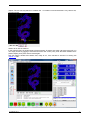
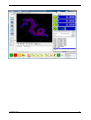
When the program is loaded, go to the graphics screen (Alt-g) and press update
preview, you will now see exactly where the part is going to be milled at the surface
of you machine bed.
Now press the F4 key or the run button to start milling, go to the graphic screen and
switch real time graph on to see what the machine is doing.
That’s all for this tutorial, happy milling!
27 March 2011
Release 3.50.5
55