1
OMRON
Advanced Tutorial
8.
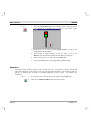
Add 6 Text objects with Display animations to display the points
selection_made,
coffee_amount,
water_amount,
milk_amount,
tea_amount, and sugar_amount.
9.
Add a ‘Close’ button with an animation to close the page.
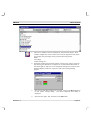
10. Open Main page and add an animation to the “Database” button to display
the new page called Database.
STEP 14 – SECURITY
Operations can be restricted to users with acceptable security privileges. We will only allow Supervisors or
those with higher privileges to open the machine.
1, 2, 3…
1.
Open the Main page
2.
Select the door lock on the bottom left of the machine.
3.
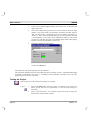
Open the Animation Editor and select the Display Page action previously
added. On the toolbar, change the Security Level for this operation from
All Users to Supervisor.
4.
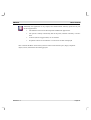
Add an Execute Script animation with the following code:
IF $SecurityLevel < 2 THEN
Message( "You are not authorized to open the machine")
ENDIF
Revision 1.3
Page 47