1
NexSens Technology, Inc.
4.2 Changing iSIC Configuration and Setup
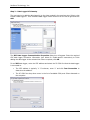
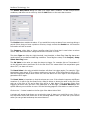
The main instrument control screen allows you to configure and setup your system to fit your
specific application needs. Select the data logger you would like to configure from the navigation
panel. Then click the Setup button located underneath that sensor’s readings.
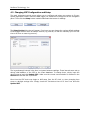
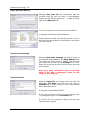
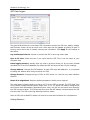
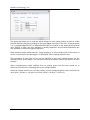
The Setup Device dialog box will appear. From here you can change the various default settings
iChart assigns devices such as sample interval, log interval, as well as manually sync the iSIC
time to PC time or erase log memory.
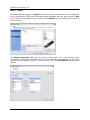
The log and sample interval is the time in minutes between readings. These intervals were set up
during initial addition of the iSIC to the iChart database. To change them, simply input the
desired interval and click Update iSIC. Make sure the correct communication is selected in the
General tab and the iSIC is powered.
Over time the iSIC clock may begin to drift away from the PC clock, or when changing time
zones or daylight savings time. Simply check the “Set device time to PC time” box and click
Update iSIC.
iSIC User’s Manual
34