1
5.3 Transfer of the Session key
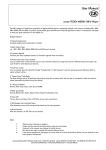
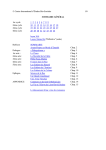
As soon as PWS and PWS-Program are connected, the PWS will establish a new Session key and this Session key will be
displayed in the second row of its display. Now, the dialog for entering the Session key will appear in the PWS-Program (see
figure 4).
figure 4: Entry of Session key
Here, you have to enter the Session key shown on the PWS. To do so, only the keys of a standard keyboard are required, the
Session key will not contain any special, national characters. After clicking on [bestätige Session-Key] your entry will be
verified.
If there was a wrong entry, "Session-Key-Hash ist ungleich" will appear in the message area. In this case, please click on
[neuen Session-Key vom PWS anfordern] and repeat the entry. Please not, that a new Session key will be established by the
PWS.
If the entry was correct, "Session-Key-Hash ist gleich" will appear in the message area and you will be able to continue.
cocos-promotions gmbh | talheimer straße 32-d | 74223 flein, germany | phone 0049 (0) 7131/649 38-0 | fax 0049 (0) 7131/649 38-19
www.cocos-promotions.de | www.cocos-promotions.com | www.usb-sticks.de
7