1
L
Visual SmartBrowser User’s Manual – NT version
Chapter 1: VSB Overview
Main Window
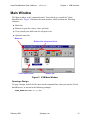
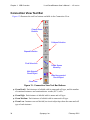
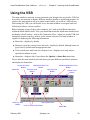
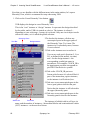
The Main window is the “command center” from which you control the Visual
SmartBrowser. Figure 3 illustrates the main window, which contains the following
elements:
●
Menu bar
●
Buttons to open the various views and tools
●
View control pane with icons for all open views
●
Optional status bar
Menu bar
Buttons for views and tools
View control pane
Status bar
Figure 3: VSB Main Window
Opening a Design
To open a design, include its file name on the command line when you start the Visual
SmartBrowser, as shown in the following example:
%$LMC_HOME%\bin\vsb design.ccn
February 2001
Synopsys, Inc.
15