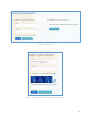
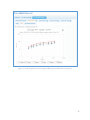
1
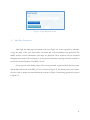
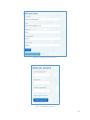
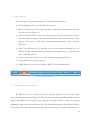
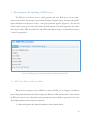
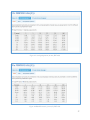
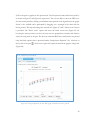
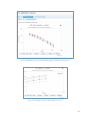
THE UNIVERSITY OF WESTERN ONTARIO DEPARTMENT OF CIVIL AND ENVIRONMENTAL ENGINEERING Water Resources Research Report Computerized Tool for the Development of Intensity-Duration-Frequency Curves under a Changing Climate Users Manual v.1.1 By: Andre Schardong Roshan K. Srivastav and Slobodan P. Simonovic Report No: 088 Date: February 2015 ISSN: (print) 1913-3200; (online) 1913-3219; ISBN: (print) 978-0-7714-3085-5; (online) 978-0-7714-3086-2; Computerized tool for the Development of Intensity-DurationFrequency-Curves under a Changing Climate www.idf-cc-uwo.ca User’s Manual Version 1.1 February, 2015 By Andre Schardong Roshan K. Srivastav and Slobodan P. Simonovic Department of Civil and Environmental Engineering The University of Western Ontario London, Ontario, Canada Executive Summary Municipal water management in Canada is heavily dependent on the use of IDF curves in planning, design, and operations of municipal water infrastructure. Many watershed management activities related to water supply, water quality management, flood control, and similar also rely on the use of IDF curves. This project focused on updating Intensity-Duration-Frequency (IDF) curves under a changing climate and developing an accessible, web-based tool available to anyone interested in developing IDF curves that incorporate projected climate change impacts. While there is a need in almost every Canadian municipality to adapt to changing climatic conditions, there is a lack of necessary expertise within municipalities for implementing current research related to the impact of climatic change on IDF curves. Thus, one of the primary aims of this project was to standardize the IDF update process and make the results of current research on climate change impacts on IDF curves accessible to everyone. The authors and supporting agencies believe that a freely available, computerized IDF update tool will aid in the selection of effective climate change adaptation options at the local level, advancing the decision making capabilities of municipalities and watershed management authorities. The tool will also provide a direct link between Canadian municipalities and the research community, creating opportunities for further research and innovation. This manual describes the major functionalities of the web-based IDF_CC tool. The tool is designed to assist users in developing and updating IDF curves using precipitation data from existing user provided or Environment Canada hydro-meteorological stations. Available precipitation data is integrated with predictions obtained from Global Climate Models to assess the impacts of climate change on IDF curves. The accompanying document, “Computerized Tool for the Development of Intensity-Duration-Frequency-Curves under a Changing Climate, Technical Manual” referred to as TechMan., presents the methodological background to the web-based IDF_CC tool. ii Table of Contents Computerized tool for the Development of Intensity-Duration-Frequency-Curves under a Changing Climate ............................................................................................................................ i Executive Summary ............................................................................................................................. ii Table of Contents................................................................................................................................ iii List of Figures ....................................................................................................................................... v 1 2 Introduction ................................................................................................................................... 1 1.1 System Components............................................................................................................. 2 1.2 Database ................................................................................................................................. 3 1.3 User Interface ........................................................................................................................ 4 1.4 Mathematical Models ........................................................................................................... 5 The IDF_CC tool Use.................................................................................................................. 7 2.1 Creating an Account ............................................................................................................. 7 2.2 Login and Password ............................................................................................................. 9 2.3 Main Page Description.......................................................................................................11 2.4 Menu Options .....................................................................................................................14 2.5 Exploring Map Functionalities .........................................................................................14 2.5.1 Locating an Existing Station on the Map ..................................................................16 2.5.2 Options for Background Maps....................................................................................19 2.5.3 Creating Station From the Map...................................................................................21 2.5.4 Deleting and Edit Station Data from the Map .........................................................23 2.5.5 Legend .............................................................................................................................24 2.6 Managing Stations and Data .............................................................................................25 2.6.1 Preparing and Providing Data for User-Created Stations .......................................30 iii 2.6.2 Companion Files ...........................................................................................................32 2.6.3 Sharing User Created Stations .....................................................................................33 3 Development and Updating of IDF Curves ...........................................................................35 3.1 IDF Curves Based on Historical Data .............................................................................35 3.2 Updated IDF under Climate Change...............................................................................41 3.3 Viewing and Exploring Results ........................................................................................44 4 Review of IDF Updating Procedures ......................................................................................51 5 Final Comments ..........................................................................................................................52 6 References ....................................................................................................................................53 Acknowledgments ..............................................................................................................................55 Appendix - A: Papers/Reports on Differential Evolution - DE ................................................56 Appendix - B: Previous reports in the Series .................................................................................58 iv List of Figures Figure 1. Major system components: User Interface, Mathematical Models and Database ................... 3 Figure 2. Screenshot of the IDF_CC tool user interface ............................................................................. 5 Figure 3. Screenshot of the User Account Creation page............................................................................ 8 Figure 4. An example of activation email message ....................................................................................... 8 Figure 5. Activation page of the IDF_CC tool ............................................................................................. 9 Figure 6. Message of account successfully activated and ready to use ....................................................... 9 Figure 7. Login page ........................................................................................................................................10 Figure 8. Captcha requested when the first login attempt fails .................................................................10 Figure 9. “Forgot Password” screen .............................................................................................................11 Figure 10. Main page screenshot ...................................................................................................................12 Figure 11. Logged user and IDF_CC tool version information ...............................................................12 Figure 12. Updating user information ..........................................................................................................13 Figure 13. Updating password .......................................................................................................................13 Figure 14. Main menu items ...........................................................................................................................14 Figure 15. Screenshot with map of Canada showing stations from Environment Canada and/or user provided stations ..............................................................................................................................................15 Figure 16. Stations map: Environment Canada (in green) and user provided (in blue) ........................16 Figure 17. Additional options on IDF_CC tool map .................................................................................17 Figure 18. Additional options on the IDF_CC tool map ..........................................................................17 Figure 19. Current location.............................................................................................................................18 Figure 20. Context menu option on the map ..............................................................................................18 Figure 21. Simple background map (IDF_CC tool’s default) ...................................................................19 Figure 22. Blue background map ...................................................................................................................20 Figure 23. Google’s default background map ..............................................................................................20 Figure 24. Arterial view background map – NASA imagery .....................................................................21 v Figure 25. Map source and map scale ...........................................................................................................21 Figure 26. Creating station from the map ....................................................................................................22 Figure 27. Required input for creating a station ..........................................................................................23 Figure 28. Context menu when right click selection is performed on a station .....................................24 Figure 29. Confirmation box when deleting a station ................................................................................24 Figure 30. Legend ............................................................................................................................................25 Figure 31. Station page: precipitation data editing, uploading files and sharing .....................................26 Figure 32. User created stations .....................................................................................................................27 Figure 33. Stations from Environment Canada...........................................................................................27 Figure 34. Options available for a selected station on list .........................................................................28 Figure 35. Users are not able to delete or edit station data for stations from official sources, including Environment Canada ......................................................................................................................................29 Figure 36. List tabs available on the station data page. ..............................................................................30 Figure 37. Editing/saving sub-daily daily maximums.................................................................................31 Figure 38. Formatting data in text files to paste on the IDF_CC tool’s website ...................................31 Figure 39. Saving/editing sub-daily yearly maximums ...............................................................................32 Figure 40. Uploading files ...............................................................................................................................33 Figure 41. Sharing stations with other users ................................................................................................34 Figure 42. IDF page with station information, historical and future IDF ..............................................35 Figure 43. Total precipitation (in mm) IDF table .......................................................................................37 Figure 44. Rainfall intensity (in mm/h) IDF table ......................................................................................37 Figure 45. Total precipitation (in mm) IDF graph for different return periods .....................................38 Figure 46. Rainfall intensity (in mm/h) IDF graph for different return periods ...................................39 Figure 47. Zooming on a plot and resetting zoom level ............................................................................39 Figure 48. Printing and exporting a plot as image.......................................................................................40 Figure 49. Fitted IDF equation to historical precipitation data ................................................................40 Figure 50. Selection of the CGM model and future time period ..............................................................42 Figure 51. Updated IDF tables for future climate conditions – total precipitation in mm ..................45 vi Figure 52. Updated IDF tables for future climate conditions – rainfall intensity in mm/h .................46 Figure 53. Total precipitation (in mm) updated IDF graph for different return periods .....................47 Figure 54. Rainfall intensity (in mm/h) updated IDF graph for different return periods ....................48 Figure 55. Fitted IDF equation to future scenario ......................................................................................49 Figure 56. IDF Comparison Graphs .............................................................................................................50 Figure 57. Updating IDF for future climatic conditions for an Environment Canada station ............51 Figure 58. Updating IDF for future climatic conditions for a user provided station ............................51 vii 1 Introduction Changes in climate observed over the recent decades are considered to be the cause of dramatic modifications of magnitude and frequency of occurrence of extreme events. The Fifth Assessment Report (AR5) of the Intergovernmental Panel on Climate Change (IPCC, 2013) has indicated a global surface temperature increase of 0.3 to 4.8 °C by the year 2100 compared to the reference period 1986-2005 and with larger changes in tropics and subtropics than in mid-altitudes. It is expected that the rising temperature will have a major impact on the magnitude and frequency of extreme precipitation events in some regions (Barnett et al., 2006; Wilcox et al., 2007; Allan et al., 2008, Solaiman et al. 2011). Assessment of climate change impacts and the implementation of the contemporary climate change research remains a challenge for many stakeholders and policymakers. The most likely reasons are: 1) complexity of the methods based on heavy analytical procedures and difficulties in their implementation; 2) a focus on publishing research findings under the rigorous peer review process with limited attention given to practical implementation; 3) political dimensions of climate change issues; and 4) a high level of uncertainty involved with future climate projections in presence of multiple climate models and emission scenarios. The implementation of a generic and simple webbased tool that allows users to easily incorporate impacts of climate change in the form of updated IDF curves into the storm water design and management is considered an effective strategy to increase climate change adaptation capacity in Canada. To accomplish this task, the IDF_CC tool has been developed. This tool combines a friendly web-based user interface with a powerful database system, and applies an efficient, sophisticated methodology for the update of IDF curves.1 Intensity duration frequency (IDFs) curves are typically developed by fitting a theoretical probability distribution to the annual maximum precipitation (AMP) time series. The AMP data is fitted using extreme value distributions including Gumbel, Generalized Extreme Value – GEV, Log Pearson, Log Normal, among other methods. The IDF curves provide precipitation accumulation depths for various return periods (T) and different durations, usually, 5, 10, 15, 20 30 minutes, 1, 2, 6, 12, 18 and 24 hours. Longer durations may also be used, depending on the use of IDF curves. 1 For more information on the methodology applied by the IDF_CC, see the accompanying document entitled “Computerized Tool for the Development of Intensity-Duration-Frequency-Curves under a Changing Climate, Technical Manual,” referred to as TechMan. 1 Hydrologic design of storm sewers, culverts, detention basins and other elements of storm water management systems are typically performed based on specified design storms derived from IDF curves (Solaiman and Simonovic, 2010). The web based IDF_CC tool developed for IDF update under changing climatic conditions has the usual Decisions Support System (DSS) components as presented in Figure 1. The user interface is built as a GIS based component using Google Maps™, allowing clear geographical representation of hydro-meteorological stations. User information, station data, and Global Circulation Model (GCM) outputs are stored in the IDF_CC tool’s database system. Mathematical models and algorithms are applied in the IDF development and update processes.2 The major objective of the IDF_CC tool is to automate and facilitate the IDF update procedure using historical observed precipitation data and precipitation predictions from available GCM models. A repository of stations from Environment Canada is available through the user interface with complete records of historical yearly maximums. If not available from Environment Canada, the tool allows users to provide historical hydro-meteorological data, which can be used to generate locally relevant updated IDF curves. The tool interface presents the IDF results in the form of tables and interactive graphs. GCM models developed for IPCC Assessment Report (AR) 5 (IPCC, 2013) are used to provide future climate scenarios for the various RCPs (representative concentration pathways). For more information of GCMs and RCPs used in the tool, see Section 3.2 and TechMan Sections 2.3 and 2.4. 1.1 System Components This section provides a brief description of the three major system components of the IDF_CC tool. These components include: Figure 11) the User Interface (UI); 2) Mathematical models and 3) the Database and GCM file repository (Figure 1). 2 For more information, see TechMan 2 Figure 1. Major system components: User Interface, Mathematical Models and Database 1.2 Database The database stores user data, information related to stations and their data, and information from the Global Climate Models (GCMs). The following information is stored in the database: • User information: to access the IDF_CC tool’s functionalities, users must create an account and provide data that are stored in the database, including their name, email, institution/municipality, intent of use and password. • IDF repository from the Environment Canada: the IDF_CC tool’s database stores the latest hydro-meteorological station information available from Environment Canada stations across the country. There are approximately 700 stations throughout the country and roughly 500 of these have at least 10 years of data, which is the minimum length of time series used by Environment Canada to develop IDF curves for a specific station. 3 • User provided stations and data: any registered user can create stations and provide data for them. The type of data and input options are discussed in section 2.5.5 of this manual. Usercreated stations can be shared among other users registered with the IDF_CC tool. • Global Climate Models (GCM) output files: original GCM models outputs are usually available in the netCDF format that is widely used for storing climate data. The direct use of netCDF with the web-based IDF_CC tool is not computationally efficient and would require huge storage space. Therefore, the netCDF files are converted into more efficient to use format. This converted climate data files are stored in the IDF_CC tool’s database. • Miscellaneous files: users can upload files that are related to a specific station. The files are also stored within the database and can be of type: text documents, spreadsheets and pdf files. 1.3 User Interface The user interface (Figure 2) provides for transparent communication between user and the other two DSS components: Mathematical Models and Database. The term “transparent communication” in this context means that the user is not aware of the processes that take place in the background in response to his/her actions. The major parts of the user interface are: • Google Maps™: the GIS component responsible for map operations; • Data manipulation: functionalities that allow users to manipulated stations and data; • Results visualization: functionalities that present the results to the user (tables, equations, interactive graphs). 4 Figure 2. Screenshot of the IDF_CC tool user interface 1.4 Mathematical Models The IDF_CC tool mathematical models IDF_CC are responsible for the calculations required to develop the IDFs curves based on historical data and to incorporate GCM output data into IDF curves. Models listed bellow are used with the IDF_CC tool: • Statistical analysis algorithms: statistical analysis is applied to fit the selected theoretical distribution to both historical and future precipitation data. The distribution applied by the 5 tool is Gumbel, which is fitted using Method of Moments. Please refer to TechMan section 3.1 for detailed description of Gumbel distribution. • Optimization algorithm: an algorithm used to fit the analytical relationships (equations) to the IDF curves. For each return period (T) an equation is fitted using “Differential Evolution” algorithm that is describe in Storn & Price (1997) and Vasan (2008) – Appendix - A. This algorithm is used to find the coefficients of the equation by minimizing the sum of the root square error of the IDF curve and calculated by the equation. • IDF update algorithm: the Equidistant Quantile Matching (EQM) algorithm is applied to the IDF updating procedure. This algorithm combines historical observed precipitation data with data from the GCM models to develop the IDF for future periods. A detailed description of this algorithm is presented on TechMan section 3.3 and Srivastav et al. (2014) – Appendix F of the TechMan. 6 2 The IDF_CC tool Use This section describes in detail the IDF_CC tool use. Two case studies are presented in order to illustrate all functionalities of the tool. The first example uses a station from Environment Canada. The second case study exemplifies use of the tool for locations where Environment Canada data are not available. In this case, the user creates a station and inputs their own hydro-meteorological data into the tool. 2.1 Creating an Account The user must create an account before accessing all IDF_CC tool functionalities. The account is necessary in order to allow user to customize map locations, create stations and provide data, visualize and export IDF curves fitted by the IDF_CC tool using historical data and updated IDF curves developed using future climate data. The following information is required from the user to create an account, as presented in Figure 3: Full Name, Email address, Affiliation, Occupation, Intent of Use and the Password. The email provided will be used as the username for access to the IDF_CC tool. Once information is provided an email is sent to the user with the activation code and/or activation link as shown in Figure 4. By clicking on the link provided, the user will activate their account. If for some reason the link does not work, the user will be required to provide an activation code when they first access the tool (Figure 5 and Figure 6). 7 Figure 3. Screenshot of the User Account Creation page Figure 4. An example of activation email message 8 Figure 5. Activation page of the IDF_CC tool Figure 6. Message of account successfully activated and ready to use 2.2 Login and Password After the account is created and activated, the user will be able to login using the email and password previously provided (Figure 7). Additionally a code (also known as Captcha) is requested for security reasons if the first login attempt fails (Figure 8). The user needs to solve the equation presented and enter the result. The user can recover his password by using the “Forgot Password” option. A new password will be provided to the user by email as illustrated in Figure 9. 9 Figure 7. Login page Figure 8. Captcha requested when the first login attempt fails 10 Figure 9. “Forgot Password” screen 2.3 Main Page Description After login, the main page is presented to the user (Figure 10). At the top portion, or header, a logo, the name of the tool, menu items, user name and version information are presented. The middle section is where information and maps are displayed. These functions will be described throughout this manual. The lower part, or footer, presents information and logo from the institutions involved in the development of the IDF_CC tool. On the top left of the header, name of the user is presented, together with the last access date and the date and version of the IDF_CC tool, as shown in Figure 11. By clicking on the user’s name, the user is able to update account information as shown in Figure 12 and change password as shown in Figure 13. 11 –– Figure 10. Main page screenshot Figure 11. Logged user and IDF_CC tool version information 12 Figure 12. Updating user information Figure 13. Updating password 13 2.4 Menu Options The menu options, as presented in Figure 14, are briefly described bellow: About: description of the tool and additional resources. Map: this option presents the map and stations from Environment Canada and those created by the user (Figure 15). Stations and Data: this item opens list of stations created by the user and allows them to select data, upload companion files, share with other users, delete and create stations. This page also allows users to see all stations from Environment Canada, as well as open the IDF screen. Help, FAQ and Terms of Use: provides access to help documents including the User Manual, TechMan, and other references, frequent ask question section – FAQ and terms of use of the IDF_CC tool. Contact: contact form of the Tool to send comments, report bugs and issues. Logout: disconnects the user’s session. Admin Menu: this item is only available to IDF_CC tool’s administrator(s). Figure 14. Main menu items 2.5 Exploring Map Functionalities The IDF_CC tool uses a GIS based map tool (Google Maps™) to assist user in locating stations and other functionalities (Figure 15). This map shows all stations available from Environment Canada and additional user-created stations. Regions with higher station coverage are grouped (depending on the zoom level) and shown as dots. The number inside the dot is the number of stations in that region. The colors indicate station density (blue for lower density, to red for high density). As 14 users zoom in on a specific region of the map, stations are shown individually with their names, as presented in Figure 16. Stations created by the user are presented with an icon in blue while those from Environment Canada are shown in green (Figure 16). The name of the station is shown bellow the icon. Figure 15. Screenshot with map of Canada showing stations from Environment Canada and/or user provided stations 15 Figure 16. Stations map: Environment Canada (in green) and user provided (in blue) 2.5.1 Locating an Existing Station on the Map The stations can be visually located on the map or the user can search for stations using the “search for stations” box located in the top left corner of the screen, above the map. As the user types in the box, the list of station names is searched and filtered based on the text provided, as in Figure 17. If one of the filtered stations is selected by the user the map is zoomed-in and centered on the selected station (Figure 17). 16 Figure 17. Additional options on IDF_CC tool map In the top right corner over the map screen, some additional functions are available, as shown in Figure 18. These functions include: Current Location: the IDF_CC tool will try to obtain the user’s current location using “Geo Location.” A green pin is placed on the location if found as in Figure 19. The user will also be asked to allow this operation (the web browser will present this request and the message may vary depending on the browser). Home Location: the IDF_CC tool allows user to set a home location by right clicking on a specific location on the map and selecting option “Set as Home Location” as shown in Figure 20. Home location is also were the map will open after login, once it is set. Full Extent: shows the entire map of Canada as in Figure 15. Show/Hide Legend Figure 18. Additional options on the IDF_CC tool map 17 Figure 19. Current location By right-clicking on the map a context menu will be presented as in Figure 20. One of the options is “set as home location” that will store this location as the “home location” for the logged user. “Center map here” simply centres the map on the selected location. “Create station here” will open the pop-up window for creating a new station. This option will be explained later in the manual. The advantage of creating a station from the map is that it will automatically provide the coordinates and location (city and province) of the station on the map. Figure 20. Context menu option on the map 18 2.5.2 Options for Background Maps The tool provides four different options for the background map that differ in the level of detail. The options are: - Simple Map: this is the default map and is simplified map with only major roads and major points of interests. The example map is presented in Figure 21. - Blue Map: similar to the previous map with a different color for water bodies (darker blue) and more details (road names) (Figure 22). - Map: this is the default map used by Google (Figure 23). - Hybrid: combines satellite images (arterial view) with Google’s default map (Figure 24). The map also presents the source of the background map in use and the graphical scale of the map, as shown in Figure 25. Figure 21. Simple background map (IDF_CC tool’s default) 19 Figure 22. Blue background map Figure 23. Google’s default background map 20 Figure 24. Arterial view background map – NASA imagery Figure 25. Map source and map scale 2.5.3 Creating Station From the Map Another function on the context menu (activated by right click on the map) is “create station here” that can be used to create a station at the selected location. This option will open a new popup window with the new station page as presented in Figure 26. Using this function, some information will be automatically filled in for the user: Latitude and Longitude (in degrees), City and Province (Figure 26). Other information is required from the user: - Name (required): station name. - Station ID (required): unique ID has to be provided. The IDF_CC tool will check if provided ID is already in use. 21 - Description (optional): a description of the station. - Sub-daily Maximums (required): the sub-daily precipitation maximums used or considered in the analysis. The defaults selected are: 5, 10, 15, 30 minutes, 1, 2, 6, 12, 24 hours. - Additional Information (optional): any other relevant additional information about the station. - City and Province (optional): city and province of the station location. Figure 26. Creating station from the map 22 Figure 27. Required input for creating a station The user created station will be plotted on the map based on the provided coordinates. The coordinate system used is the same as used by Google Maps™, which is World Geodetic System (WGS) also kwon as WGS 84 or ESPG 4326. Stations created by users are visible only to the creators. The creator can share and make the station accessible to other users within the tool. Please see Section 2.6.3 for more detail. The next section explains how to provide data for a station, generate the IDFs for historical and future periods, share station and upload files. 2.5.4 Deleting and Edit Station Data from the Map User created stations can be deleted from the IDF_CC tool’s database directly from the map by right clicking on the station icon, as shown in Figure 28. A confirmation will be provided (Figure 29) before the station and all related data are permanently deleted. Figure 28 also shows two additional options: “Edit Data” and “Edit Information”. “Edit Station Data” will open the page to provide and edit precipitation data that will be explained later in this Manual. “Edit Information” allows user to modify or update station’s information. 23 Figure 28. Context menu when right click selection is performed on a station Figure 29. Confirmation box when deleting a station 2.5.5 Legend The legend helps the user identify the elements on the map. The elements are quickly described below. The legend becomes visible on the screen by selection “Show legend” option, as presented in Figure 30. The list of items are: Regions with low density of stations (between 1 and 9) Regions with medium density of stations (between 9 and 99) Regions with high density of stations (above 100) 24 Stations created by the user Stations from Environment Canada Stations with less than 10 years of data Stations shared with you Figure 30. Legend 2.6 Managing Stations and Data As presented previously, the user can access stations from the tool’s map view. Additionally the “Stations and Data” option from the main menu will open a station page as shown in Figure 31. This page will show all stations created by the user and allow (i) precipitation data editing, (ii) uploading files and (iii) sharing the station with other users. These options are presented as tabs in Figure 31. 25 Figure 31. Station page: precipitation data editing, uploading files and sharing The station list will only include stations created by the logged-in user and those shared with the user by other users, as in Figure 32. The user can search the list of stations by typing text within the search textbox above the list. A checkbox “Show Env. Canada Stations” allows the user to see all stations in the database from Environment Canada, as shown in Figure 33. Stations that are shared as full access with the logged-in user will be identified with “(full access)” after the station’s name, as in Figure 32. If the other user shares the station as read-only, the “(read-only)” will be added instead of “(full access)”. For more information on sharing user generated stations and station data, see Section 2.6.3. 26 Figure 32. User created stations Figure 33. Stations from Environment Canada Below the list of stations, a few additional functions are available when a specific station has been selected from the list, as illustrated in Figure 34: - “Generate/Show IDF”: generates and shows the IDF curve and presents the page for updating IDF curves for future climate conditions. The user can also perform these functions by selecting a station on the map. - “Edit Station”: allows user to edit station’s basic information (location, name, ID, etc.). - “Create Station”: allows user to create a new station, and serves as an alternative to creating a station by right clicking on the map. When using this approach for creating a new station, no information about coordinates and location (city/province) will be provided and the user will have to provide this information manually. 27 - “Delete Station”: allows user to delete station and all associated data, and serves as an alternative to deleting the station directly from the map. - “Create a Copy”: allows user to copy a station to his account. Users can copy stations from Environment Canada and add or modify data. Similar to user created stations, copied stations can be deleted and edited by users. Figure 34. Options available for a selected station on list In case the selected station is from an official source (e.g., Environment Canada), the “Edit Station” and “Delete Station” options will not be available, as shown in Figure 35. 28 Figure 35. Users are not able to delete or edit station data for stations from official sources, including Environment Canada Selecting (clicking) one station from the list will enable the Tabs on the right side of the page, as shown in Figure 36. Each Tab is described as follows: - Station Info: basic station information, name, coordinates, ID - User Data: data provided by the user. This is presented in detail in section 2.6.1. - Official Data: data from Environment Canada. No editing is possible and the yearly subdaily precipitation maximums are presented as “read only” data to the user. - Companion Files: allows user to upload or download supporting files (see Section 2.6.2). - Share Station: share station with other users registered with the IDF_CC tool (see Section 2.6.3). 29 - Daily Precipitation: daily precipitation data provided by the user. This data is used for calculation of the “skill score” that assists with the selection of GCM models to generate IDF curves under climate change. Please refer to TechMan section 3.2 for a detailed description of skill scores. Figure 36. List tabs available on the station data page. 2.6.1 Preparing and Providing Data for User-Created Stations The IDF_CC tool allows users to provide precipitation data in two forms: daily sub-daily maximums or yearly sub-daily maximums (Figure 37). When selecting the option “Daily Maximums” the starting and ending date for the precipitation series is requested. Once the date range is defined the “Change Dates” button, when selected, will prepare the spreadsheet and allow the user to provide precipitation data within the specified range. As shown in Figure 37 the dates are shown continuously from start to the end date. Days without precipitation events can be left blank (null) or with negative values. In the processing steps the IDF_CC tool’s algorithms will ignore null or negative values. It is recommended that the user prepare data using a spreadsheet processor, like Microsoft Excel ™, and then copy data into the IDF_CC tool by using Ctrl + C (to copy) from Excel and Ctrl + V (to paste) on the IDF_CC tool’s spreadsheet. If the dataset is large (e.g., more than 20 years of daily data) the paste operation may take some time. After the data is pasted into the spreadsheet, it can be saved to the database by selecting “Save Daily Data”. Other data formats can also be used, such as formatted text files. Excel spreadsheets and text files (Figure 38) should be organized in columns, where each column represents a sub-daily maximum, following the order on the IDF_CC tool’s spreadsheet (Figure 37). The user will need to provide data for sub-daily durations specified in station information (i.e., 5min, 10min ... 1hr, 2hr ... 24h), otherwise the IDF_CC tool will neither be able to fit the IDF curves not to update them. 30 Figure 37. Editing/saving sub-daily daily maximums Figure 38. Formatting data in text files to paste on the IDF_CC tool’s website 31 When yearly sub-daily maximums are available, they can be entered into the system instead of daily data (see Figure 39). Starting and ending year are required for yearly sub-daily maximums. After defining the range and applying changes with the “Change Years” menu button, the spreadsheet will be ready to receive data. Data can also be copied using Microsoft Excel™ or formatted text files. Each column represents one sub-daily duration. Users are requested to provide data for sub-daily durations (i.e., 5 min, 10 min, 15 min, 30 min, 1hr ... 24hr) specified in the station information otherwise the IDF_CC tool will neither be able to fit the IDF curves nor update them. Figure 39. Saving/editing sub-daily yearly maximums 2.6.2 Companion Files Additional files can be uploaded and downloaded for each station using the “Companion Files” tab. The types of files that can be uploaded include documents, spreadsheets, text and PDF 32 files. These files will be available for download by the user who created the station and users with which the user has shared the station. Shared users will have either full access or read only access as specified by the user who created and shared the station (Figure 40). The file name, file size, and file type (icon) are also presented in the Tab. Users may delete uploaded documents by selecting the red “x” in the last column, if authorized to do so. Figure 40. Uploading files 2.6.3 Sharing User Created Stations The “Share Station” Tab allows the user to share user created stations with other users as illustrated in the Figure 41. There are two different levels of access: 1) “Full Access” allows the user to change data and information and view historical and updated IDFs; and 2) “Read Only” allows read only access to the specific station. This type of access will allow users who have been granted access to the station to view and generate updated IDFs, but will not allow these users to edit or delete station data. The station is shared providing the email of the person with whom the user would like to share the station. If the email is associated with an account already registered within the Tool’s 33 database, the user will only receive an email with an invitation to view the station. If the email is not registered, a temporary account will be created and on the first access the user will need to complete his registration for an account (requiring Name, Email, Affiliation, etc.). The creator of the station can also change editing/viewing permissions for users with which they have shared stations using the “Remove share” option. Figure 41. Sharing stations with other users 34 3 Development and Updating of IDF Curves The IDF_CC tool allows users to simply generate and view IDF curves for any hydrometeorological station. By selecting a station from the map or using the option “Generate/Show IDF” option described in the previous section, a new pop-up window appears (Figure 42). The first tab (“Station Info”) presents the name, ID, location and information and record lengths for the station. The other two tabs, “IDF, historical data” and “IDF under climate change” are described in sections 3.1 and 3.2, respectively. Figure 42. IDF page with station information, historical and future IDF 3.1 IDF Curves Based on Historical Data When the user requests to view an IDF for a station, the IDF_CC tool triggers a calculation process using mathematical models in the background. When the “IDF, historical data” tab is selected, an IDF curve based on the observed historical precipitation data available is presented to the user. The background data analysis steps are as follows: 1) Read and organize data from the database for the selected station. 35 2) Data analysis (ignore negative and zero values) and extraction of yearly maximums. 3) Calculate statistical distribution parameters (Gumbel) using Method of Moments. For more detail on Gumbel distribution please refer to TechMan section 3.1.1 and 3.1.2. 4) Calculate IDF (please refer to TechMan section 2.1 and 3.1.2 for more detail). 5) Fit interpolated equations to the IDF curve using optimization algorithm (Differential Evolution): refer to Storn & Price (1997) and Vasan (2008) for more detail on Differential Evolution optimization (available in Appendix - A). 6) Organize data for display (tables, plots, and equations). After the calculation steps are completed the IDF is presented in the form of tables, total precipitation, intensity graphs and the fitted equation. These results are presented by selecting “IDF, historical data” Tab as in Figure 43. The IDF is fitted to the historical data using Gumbel distribution and results are presented in the flowing forms: 1) Tables: the IDFs are presented in traditional table format with duration (in minutes and hours) and return period (T) as in Figure 43. Both total precipitation (Figure 43 in mm and intensity (Figure 44) in mm/h are presented and the user can toggle between these two options. 36 Figure 43. Total precipitation (in mm) IDF table Figure 44. Rainfall intensity (in mm/h) IDF table 37 2) Plots: the plots or graphs are also presented as Total Precipitation (in mm) and Intensity (mm/h) as shown in Figure 45 and Figure 46, respectively. The user can hide or show the IDF curve for each return period by clicking on individual return periods in the legend below the graph. Zoom is also available and is performed by dragging out a rectangle in the chart with the mouse pointer. The map will enlarge the selected area (Figure 47) and a “Reset zoom” button is provided. The “Reset zoom” option will revert the initial zoom level (Figure 45). By hovering the mouse pointer over dots, the user can view precipitation, intensity and duration values for each point on the plot. The dots are calculated IDF values and the lines are plotted using the fitted equation that is presented under “Interpolation Equation” tab. A button on the top left of the plot ( ) allows user to print and export/download the graph to images file (Figure 48). Figure 45. Total precipitation (in mm) IDF graph for different return periods 38 Figure 46. Rainfall intensity (in mm/h) IDF graph for different return periods Figure 47. Zooming on a plot and resetting zoom level 39 Figure 48. Printing and exporting a plot as image 3) “Interpolation Equations”: an optimization algorithm is used to fit equations to the calculated IDF values. The equations are presented under the “Interpolation Equations” Tab as shown in Figure 49. Three coefficients A, B and t0 are calculated by the optimization algorithm for each return period (T) and presented as a table in Figure 49. This equation can be applied as and expedite method for interpolation and calculation of design storms. Figure 49. Fitted IDF equation to historical precipitation data 40 3.2 Updated IDF under Climate Change By selecting the “IDF under climate change” tab, the user can generate IDF curves that account for future climate conditions. To generate the updated IDFs for future climate, the user can select all models (ensemble option) or individual GCM and projection period as shown in Figure 50. There are 22 models available on the IDF_CC Tool listed in Table 1. The available range for the future time period is 2006 to 2100 (Sept 1 in Figure 50) . A skill score procedure is implemented for the selection of the recommended GCM model for each station (if the station has the daily precipitation data, in addition to the sub-daily maximums data). The detailed presentation of the procedure is in the TechMan section 2.3 and 3.2. The CGMs are listed in ascending order according to their skill score (best model is presented first). In theory, the better the score the most suitable the model is for the selected station. With respect to GCM selection, to generate IDF curves that account for climate change, the user has three options: select all models (ensemble option), select the model with the best skill score or select any model from the list of GCMs provided in the tool (Step 2 in Figure 50). The users are encouraged to test different models due to the uncertainty associated with climate modeling. The user is also able to select whether the Tool should use the complete series from the GCM historical runs or match the length of the observed station data (Step 3 in Figure 50) for the IDF updating procedure described in TechMan section 3.3. By using the complete series, the resulting updated IDF will be less affected by extremes that may occur when extracting only parts of the series. Therefore, the use of complete GCM series is recommended, especially if the observed data series length is short. Comparison of the results using both of the provided options can be useful. The following steps are performed by the IDF_CC tool to update IDF curves for future climate. Please see TechMan section 3.3 for more information on each of the steps: 1) Extract precipitation data series from GCM grid points for the selected station (e.g., using Canadian CanESM2 model, 80 series have to be extracted). 2) Organize data and extract yearly maximums. 41 3) Apply Equidistant Quantile Matching (EQM) algorithm (refer to TechMan section 3.3 and Srivastav et al. 2014 - Appendix F for more detail). 4) Estimate distribution parameters and calculate IDFs for each future climate scenario (RCPs and their runs). 5) Generate median IDF from the results of step 4 for each RCP. 6) Organize data for display (tables, plots, and equations, uncertainty range plot). Figure 50. Selection of the CGM model and projection period The Fifth Assessment Report (AR5) (IPCC 2013) provides four RCP scenarios: RCP2.6, RCP 4.5, RCP 6.0 and RCP 8.5. The following definitions are directly adopted from AR5 and are briefly described below (refer to TechMan section 2.3 for more detail): RCP 2.6: pathway where radiative forcing peaks at approximately 3 W m–2 before 2100 and then declines; RCP 4.5 and RCP6.0: Two intermediate stabilization pathways in which radiative forcing is stabilized at approximately 4.5 W m–2 and 6.0 W m–2 after 2100; 42 RCP 8.5: high pathway for which radiative forcing reaches greater than 8.5 W m–2 by 2100 and continues to rise for some time. The future emission scenarios used in the IDF_CC tool are RCP 2.6, RCP 4.5 and RCP 8.5. RCP 2.6 represents a low greenhouse gas concentration scenario, followed by RCP 4.5 as an intermediate scenario and RCP 8.5 as a high concentration scenario. RCP 4.5 scenario was selected over RCP 6.0 as an intermediate scenario largely because more GCM models have results for RCP 4.5 than RCP 6.0. The future emission scenarios for each GCM has different Runs based on their initial conditions imposed on the model. The number of updated IDF curves from a particular RCP scenario will be equal to the number of runs available for a selected GCM. (Please refer to TechMan section 2.3 for more detail). Table 1 – GCM model list used in the IDF_CC Tool Centre Country Acronym Model China BCC bcc_csm1_1 China BCC bcc_csm1_1 m China BNU BNU-ESM Canada CCCma CanESM2 USA CCSM CCSM4 France CNRM CNRM-CM5 Australia CSIRO3.6 CSIRO-Mk3-6-0 USA CESM CESM1-CAM5 China LASGCESS FGOALS_g2 USA NOAA GFDL GFDL-CM3 Centre Name Beijing Climate Center, China Meteorological Administration Beijing Climate Center, China Meteorological Administration College of Global Change and Earth System Science Canadian Centre for Climate Modeling and Analysis National Center of Atmospheric Research Centre National de Recherches Meteorologiques and Centre Europeen de Recherches et de Formation Avancee en Calcul Scientifique Australian Commonwealth Scientific and Industrial Research Organization in collaboration with the Queensland Climate Change Centre of Excellence National Center of Atmospheric Research IAP (Institute of Atmospheric Physics, Chinese Academy of Sciences, Beijing, China) and THU (Tsinghua University) National Oceanic and Atmospheric Administration's GCM Number of Resolutions Ensembles (Lon. vs (PPT) Lat.) 1 2.8 x 2.8 1 1 2.8 x 2.8 5 2.8 x 2.8 1 1.25 x 0.94 1 1.4 x 1.4 10 1.8 x 1.8 1 1.25 x 0.94 1 2.55 x 2.48 1 2.5 x 2.0 43 Centre Country Acronym Model NOAA GFDL GFDL-ESM2G MOHC HadGEM2-AO MOHC France USA Centre Name Geophysical Fluid Dynamic Laboratory National Oceanic and Atmospheric Administration's Geophysical Fluid Dynamic Laboratory GCM Number of Resolutions Ensembles (Lon. vs (PPT) Lat.) 1 2.5 x 2.0 Met Office Hadley Centre 1 1.25 x 1.875 HadGEM2-ES Met Office Hadley Centre 2 1.25 x 1.875 IPSL IPSL-CM5A-LR Institut Pierre Simon Laplace 4 3.75 x 1.8 France IPSL IPSL-CM5A-MR Institut Pierre Simon Laplace 4 3.75 x 1.8 Japan MIROC MIROC5 3 1.4 x 1.41 Japan MIROC MIROC-ESM 1 2.8 x 2.8 Japan MIROC MIROC-ESM-CHEM 1 2.8 x 2.8 Germany MPI-M MPI-ESM-LR 3 1.88 x 1.87 Germany MPI-M MPI-ESM-MR 3 1.88 x 1.87 Japan MRI MRI-CGCM3 1 1.1 x 1.1 Norway NOR NorESM1-M 3 2.5 x 1.9 United Kingdom United Kingdom 3.3 Japan Agency for Marine-Earth Science and Technology Japan Agency for Marine-Earth Science and Technology Japan Agency for Marine-Earth Science and Technology Max Planck Institute for Meteorology Max Planck Institute for Meteorology Meteorological Research Institute Norwegian Climate Center Viewing and Exploring Results Upon completion of the IDF update calculations, the results are presented in the form of tables, total precipitation, rainfall intensity graphs and uncertainty range graphs. These results are presented for each RCP future scenario: 2.6, 4.5 and 8.5. Each RCP scenario is displayed as a set of Tabs as shown in Figure 51. Updated IDF curves for future climate conditions for all three RCPs are presented as tables, plots and uncertainty ranges, as described here: 1) “Tables”: the IDF is presented in the traditional table format for all durations (in minutes and hours) and return periods (T) as illustrated in Figure 51. Both total precipitation in mm 44 (Figure 51) and rainfall intensity in mm/h (Figure 52) are available and the user can toggle between these two options using the available radio buttons. The IDF curves presented in Figure 51 and Figure 52 are a median from all Runs available for each emission scenario (see TechMan section 2.3). Figure 51. Updated IDF tables for future climate conditions – total precipitation in mm 45 Figure 52. Updated IDF tables for future climate conditions – rainfall intensity in mm/h 2) “Plots”: the plots or graphs are also available for total precipitation (in mm) and rainfall intensity (mm/h) as presented in Figure 53 and Figure 54, respectively. The user can hide or show the IDF curve for each return period by clicking on individual return periods in the legend below the graph. Zoom is also available and is performed by dragging out a rectangle in the chart with the mouse pointer. The area selected is zoomed-in (Figure 47) and a “Reset zoom” button will be visible. The “Reset zoom” option will revert the zoom level to the original state. By hovering the mouse pointer over dots, the user can view precipitation, intensity and duration values for each point on the plot. The dots are calculated IDF values and the lines are plotted using the fitted equation that is presented under “Interpolation Equations” tab. 46 Figure 53. Total precipitation (in mm) updated IDF graph for different return periods 47 Figure 54. Rainfall intensity (in mm/h) updated IDF graph for different return periods 3) “Interpolation Equations”: an optimization algorithm is used to fit equations to the calculated IDF values. The equations are presented under the “Interpolation Equations” Tab as shown in Figure 55. Three coefficients A, B and t0 are calculated by the optimization algorithm for each return period (T) and presented as a table in Figure 55. This equation can be applied as and expedite method for interpolation and calculation for design storms. 48 Figure 55. Fitted IDF equation to future scenario 4) “Comparison Graphs”: this graph presents the summary and comparison between the IDF based on historical data and the median IDF for future periods (RCP 2.6, 4.5 and 8.5) as shown in Figure 56. The graphs are presented for each return period, i.e.: 2, 5, 10, 25, 50 and 100 years. The dots in Figure 56 represent the IDF table and the lines are plotted from the “Interpolation Equations”. 49 Figure 56. IDF Comparison Graphs 50 4 Review of IDF Updating Procedures As presented in the previous sections, there are two ways to obtain the updated IDFs for future climatic conditions based on the selected GCM models. The first and more direct way is to use an existing station form Environment Canada. The user should follow the three easy steps to update the IDF for future climatic conditions as illustrated in Figure 57: 1) First, one station should be selected, either from the map or from the list of stations; 2) after selection of the station from the map, the IDF_CC tool will calculate the historical IDF (intermediate step) that can be used for comparison with the updated IDF for the future climatic conditions; and 3) select the GCM model and projection period and generate updated IDF curve for future climatic conditions. Figure 57. Updating IDF for future climatic conditions for an Environment Canada station The second option includes one additional step where the user creates its own station by providing information and data as shown in Figure 58. The remaining steps are the same as in the previous option. Figure 58. Updating IDF for future climatic conditions for a user provided station 51 5 Final Comments This report presents the User’s Manual for the Computerized IDF_CC tool for the Development of Intensity-Duration-Frequency-Curves Under a Changing Climate. It aims to assist in the updating of IDF curves for future climatic conditions. The IDF_CC tool uses a sophisticated though efficient methodology that incorporates changes in the distributional characteristics of GCMs between the baseline period and the projection period. The IDF_CC tool is easy to use and radically simplifies the IDF update process by automating very demanding procedures like downloading, extracting and manipulating data from various GCM models. The IDF_CC tool’s website www.idf-cc-uwo.ca should be regularly visited for the latest updates of the IDF_CC tool, new functionalities and updated documentation. 52 6 References Allan RP, Soden BJ. (2008). Atmospheric warming and the amplification of precipitation extremes. Science 321: 1480–1484. Barnett DN, Brown SJ, Murphy JM, Sexton DMH, Webb MJ. (2006). Quantifying uncertainty in changes in extreme event frequency in response to doubled CO2 using a large ensemble of GCM simulations. Climate Dynamics 26(5): 489–511, DOI: 10.1007/S00382-005-0097-1. IPCC, 2013: Summary for Policymakers. In: Climate Change 2013: The Physical Science Basis. Contribution of Working Group I to the Fifth Assessment Report of the Intergovernmental Panel on Climate Change [Stocker, T.F., D. Qin, G.-K. Plattner, M. Tignor, S.K. Allen, J. Boschung, A. Nauels, Y. Xia, V. Bex and P.M. Midgley (eds.)]. Cambridge University Press, Cambridge, United Kingdom and New York, NY, USA. Solaiman, T. A. e Simonovic, S. P. (2011). Development of Probability Based Intensity-Duration Frequency Curves under Climate Change. Water Resources Research Report no. 072, Facility for Intelligent Decision Support, Department of Civil and Environmental Engineering, London, Ontario, Canada, 89 pp. ISBN: (print) 978-0-7714-2893-7; (online) 978-0-7714-2900-2. Solaiman, T. A., King, L. M., Simonovic, S. P. (2011), Extreme precipitation vulnerability in the Upper Thames River basin: uncertainty in climate model projections. Int. J. Climatol., 31: 2350–2364. doi:10.1002/joc.2244 Srivastav, R. K., Schardong. A., Simonovic, Slobodan P. (2014) Equidistance Quantile Matching Method for Updating IDFCurves under Climate Change, Water Resources Management. DOI 10.1007/s11269-014-0626-y. Storn, R. and Price, K. (1997), ‘Differential Evolution - A Simple and Efficient Heuristic for Global Optimization over Continuous Spaces’, Journal of Global Optimization, 11, pp. 341–359. Wilcox EM, Donner LJ. (2007). The frequency of extreme rain events in satellite rain-rate estimates and an atmospheric general circulation model. Journal of Climate 20(1): 53–69. 53 Vasan A. (2008). Optimization Using Differential Evolution. Water Resources Research Report no. 060, Facility for Intelligent Decision Support, Department of Civil and Environmental Engineering, London, Ontario, Canada, 38 pp. 54 Acknowledgments The authors would like to acknowledge the financial support by the Canadian Water Network Project under Evolving Opportunities for Knowledge Application Grant to the third author and Dan Sandink from ICLR - Institute for Catastrophic Loss Reduction for his support and assistance with this project. 55 Appendix - A: Papers/Reports on Differential Evolution - DE Vasan A. (2008) - Optimization Using Differential Evolution. Water Resources Research Report no. 060, Facility for Intelligent Decision Support, Department of Civil and Environmental Engineering, London, Ontario, Canada, 38 pp: http://www.eng.uwo.ca/research/iclr/fids/publications/products/60.pdf 56 Storn, R. and Price, K. (1997), ‘Differential Evolution - A Simple and Efficient Heuristic for Global Optimization over Continuous Spaces’, Journal of Global Optimization, 11, pp. 341–359. http://link.springer.com/article/10.1023%2FA%3A1008202821328 57 Appendix - B: Previous reports in the Series ISSN: (Print) 1913-3200; (online) 1913-3219 In addition to 53 previous reports (No. 01 – No. 53) prior to 2007 Predrag Prodanovic and Slobodan P. Simonovic (2007). Dynamic Feedback Coupling of Continuous Hydrologic and Socio-Economic Model Components of the Upper Thames River Basin. Water Resources Research Report no. 054, Facility for Intelligent Decision Support, Department of Civil and Environmental Engineering, London, Ontario, Canada, 437 pages. ISBN: (print) 978-0-77142638-4; (online) 978-0-7714-2639-1. Subhankar Karmakar and Slobodan P. Simonovic (2007). Flood frequency analysis using copula with mixed marginal distributions. Water Resources Research Report no. 055, Facility for Intelligent Decision Support, Department of Civil and Environmental Engineering, London, Ontario, Canada, 144 pages. ISBN: (print) 978-0-7714-2658-2; (online) 978-0-7714-2659-9. Jordan Black, Subhankar Karmakar and Slobodan P. Simonovic (2007). A web-based flood information system. Water Resources Research Report no. 056, Facility for Intelligent Decision Support, Department of Civil and Environmental Engineering, London, Ontario, Canada, 133 pages. ISBN: (print) 978-0-7714-2660-5; (online) 978-0-7714-2661-2. Angela Peck, Subhankar Karmakar and Slobodan P. Simonovic (2007). Physical, economical, infrastructural and social flood risk - vulnerability analyses in GIS. Water Resources Research Report no. 057, Facility for Intelligent Decision Support, Department of Civil and Environmental Engineering, London, Ontario, Canada, 79 pages. ISBN: (print) 978-0-7714-2662-9; (online) 978-07714-2663-6. Predrag Prodanovic and Slobodan P. Simonovic (2007). Development of rainfall intensity duration frequency curves for the City of London under the changing climate. Water Resources Research Report no. 058, Facility for Intelligent Decision Support, Department of Civil and Environmental Engineering, London, Ontario, Canada, 51 pages. ISBN: (print) 978-0-7714-2667-4; (online) 978-07714-2668-1. Evan G. R. Davies and Slobodan P. Simonovic (2008). An integrated system dynamics model for analyzing behaviour of the social-economic-climatic system: Model description and model use guide. Water Resources Research Report no. 059, Facility for Intelligent Decision Support, Department of Civil and Environmental Engineering, London, Ontario, Canada, 233 pages. ISBN: (print) 978-07714-2679-7; (online) 978-0-7714-2680-3. 58 Vasan Arunachalam (2008). Optimization Using Differential Evolution. Water Resources Research Report no. 060, Facility for Intelligent Decision Support, Department of Civil and Environmental Engineering, London, Ontario, Canada, 38 pages. ISBN: (print) 978-0-7714-2689-6; (online) 978-07714-2690-2. Rajesh R. Shrestha and Slobodan P. Simonovic (2009). A Fuzzy Set Theory Based Methodology for Analysis of Uncertainties in Stage-Discharge Measurements and Rating Curve. Water Resources Research Report no. 061, Facility for Intelligent Decision Support, Department of Civil and Environmental Engineering, London, Ontario, Canada, 104 pages. ISBN: (print) 978-0-7714-2707-7; (online) 978-0-7714-2708-4. Hyung-Il Eum, Vasan Arunachalam and Slobodan P. Simonovic (2009). Integrated Reservoir Management System for Adaptation to Climate Change Impacts in the Upper Thames River Basin. Water Resources Research Report no. 062, Facility for Intelligent Decision Support, Department of Civil and Environmental Engineering, London, Ontario, Canada, 81 pages. ISBN: (print) 978-0-77142710-7; (online) 978-0-7714-2711-4. Evan G. R. Davies and Slobodan P. Simonovic (2009). Energy Sector for the Integrated System Dynamics Model for Analyzing Behaviour of the Social-Economic-Climatic Model. Water Resources Research Report no. 063, Facility for Intelligent Decision Support, Department of Civil and Environmental Engineering, London, Ontario, Canada, 191 pages. ISBN: (print) 978-0-7714-2712-1; (online) 978-0-7714-2713-8. Leanna King, Tarana Solaiman and Slobodan P. Simonovic (2009). Assessment of Climatic Vulnerability in the Upper Thames River Basin. Water Resources Research Report no. 064, Facility for Intelligent Decision Support, Department of Civil and Environmental Engineering, London, Ontario, Canada, 62 pages. ISBN: (print) 978-0-7714-2816-6; (online) 978-0-7714-2817-3. Slobodan P. Simonovic and Angela Peck (2009). Updated rainfall intensity duration frequency curves for the City of London under the changing climate. Water Resources Research Report no. 065, Facility for Intelligent Decision Support, Department of Civil and Environmental Engineering, London, Ontario, Canada, 64 pages. ISBN: (print) 978-0-7714-2819-7; (online) 978-0-7714-2820-3. Leanna King, Tarana Solaiman and Slobodan P. Simonovic (2010). Assessment of Climatic Vulnerability in the Upper Thames River Basin: Part 2. Water Resources Research Report no. 066, Facility for Intelligent Decision Support, Department of Civil and Environmental Engineering, London, Ontario, Canada, 72 pages. ISBN: (print) 978-0-7714-2834-0; (online) 978-0-7714-2835-7. Christopher J. Popovich, Slobodan P. Simonovic and Gordon A. McBean (2010). Use of an Integrated System Dynamics Model for Analyzing Behaviour of the Social-Economic-Climatic System in Policy Development. Water Resources Research Report no. 067, Facility for Intelligent Decision Support, 59 Department of Civil and Environmental Engineering, London, Ontario, Canada, 37 pages. ISBN: (print) 978-0-7714-2838-8; (online) 978-0-7714-2839-5. Hyung-Il Eum and Slobodan P. Simonovic (2009). City of London: Vulnerability of Infrastructure to Climate Change, Background Report #1 - Climate and Hydrologic Modeling. Water Resources Research Report no. 068, Facility for Intelligent Decision Support, Department of Civil and Environmental Engineering, London, Ontario, Canada, 103 pages. ISBN: (print) 978-0-7714-2844-9; (online) 978-0-7714-2845-6. Dragan Sredojevic and Slobodan P. Simonovic (2009). City of London: Vulnerability of Infrastructure to Climate Change, Background Report #2 - Hydraulic Modeling and Floodplain Mapping. Water Resources Research Report no. 069, Facility for Intelligent Decision Support, Department of Civil and Environmental Engineering, London, Ontario, Canada, 147 pages. ISBN: (print) 978-0-77142846-3; (online) 978-0-7714-2847-0. Tarana A. Solaiman and Slobodan P. Simonovic (2011). Quantifying Uncertainties in the Modelled Estimates of Extreme Precipitation Events at Upper Thames River Basin. Water Resources Research Report no. 070, Facility for Intelligent Decision Support, Department of Civil and Environmental Engineering, London, Ontario, Canada, 167 pages. ISBN: (print) 978-0-7714-2878-4; (online) 978-07714-2880-7. Tarana A. Solaiman and Slobodan P. Simonovic (2011). Assessment of Global and Regional Reanalyses Data for Hydro-Climatic Impact Studies in the Upper Thames River Basin. Water Resources Research Report no. 071, Facility for Intelligent Decision Support, Department of Civil and Environmental Engineering, London, Ontario, Canada, 74 pages. ISBN: (print) 978-0-7714-28920; (online) 978-0-7714-2899-9. Tarana A. Solaiman and Slobodan P. Simonovic (2011). Development of Probability Based IntensityDuration-Frequency Curves under Climate Change. Water Resources Research Report no. 072, Facility for Intelligent Decision Support, Department of Civil and Environmental Engineering, London, Ontario, Canada, 89 pages. ISBN: (print) 978-0-7714-2893-7; (online) 978-0-7714-2900-2. Dejan Vucetic and Slobodan P. Simonovic (2011). Water Resources Decision Making Under Uncertainty. Water Resources Research Report no. 073, Facility for Intelligent Decision Support, Department of Civil and Environmental Engineering, London, Ontario, Canada, 143 pages. ISBN: (print) 978-0-7714-2894-4; (online) 978-0-7714-2901-9. Angela Peck, Elisabeth Bowering, and Slobodan P. Simonovic (2011). City of London: Vulnerability of Infrastructure to Climate Change, Final Report. Water Resources Research Report no. 074, Facility for Intelligent Decision Support, Department of Civil and Environmental Engineering, London, Ontario, Canada, 66 pages. ISBN: (print) 978-0-7714-2895-1; (online) 978-0-7714-2902-6. 60 M. Khaled Akhtar, Slobodan P. Simonovic, Jacob Wibe, Jim MacGee and Jim Davies (2011). An Integrated System Dynamics Model for Analyzing Behaviour of the Social-Energy-Economy-Climate System: Model Description. Water Resources Research Report no. 075, Facility for Intelligent Decision Support, Department of Civil and Environmental Engineering, London, Ontario, Canada, 211 pages. ISBN: (print) 978-0-7714-2896-8; (online) 978-0-7714-2903-3. M. Khaled Akhtar, Slobodan P. Simonovic, Jacob Wibe, Jim MacGee and Jim Davies (2011). An Integrated System Dynamics Model for Analyzing Behaviour of the Social-Energy-Economy-Climate System: User's Manual. Water Resources Research Report no. 076, Facility for Intelligent Decision Support, Department of Civil and Environmental Engineering, London, Ontario, Canada, 161 pages. ISBN: (print) 978-0-7714-2897-5; (online) 978-0-7714-2904-0. Nick Millington, Samiran Das and Slobodan P. Simonovic (2011). The Comparison of GEV, LogPearson Type 3 and Gumbel Distributions in the Upper Thames River Watershed under Global Climate Models. Water Resources Research Report no. 077, Facility for Intelligent Decision Support, Department of Civil and Environmental Engineering, London, Ontario, Canada, 53 pages. ISBN: (print) 978-0-7714-2898-2; (online) 978-0-7714-2905-7. Andre Schardong and Slobodan P. Simonovic (2011). Multi-objective Evolutionary Algorithms for Water Resources Management. Water Resources Research Report no. 078, Facility for Intelligent Decision Support, Department of Civil and Environmental Engineering, London, Ontario, Canada, 167 pages. ISBN: (print) 978-0-7714-2907-1; (online) 978-0-7714-2908-8. Samiran Das and Slobodan P. Simonovic (2012). Assessment of Uncertainty in Flood Flows under Climate Change. Water Resources Research Report no. 079, Facility for Intelligent Decision Support, Department of Civil and Environmental Engineering, London, Ontario, Canada, 67 pages. ISBN: (print) 978-0-7714-2960-6; (online) 978-0-7714-2961-3. Rubaiya Sarwar, Sarah E. Irwin, Leanna King and Slobodan P. Simonovic (2012). Assessment of Climatic Vulnerability in the Upper Thames River basin: Downscaling with SDSM. Water Resources Research Report no. 080, Facility for Intelligent Decision Support, Department of Civil and Environmental Engineering, London, Ontario, Canada, 65 pages. ISBN: (print) 978-0-7714-2962-0; (online) 978-0-7714-2963-7. Sarah E. Irwin, Rubaiya Sarwar, Leanna King and Slobodan P. Simonovic (2012). Assessment of Climatic Vulnerability in the Upper Thames River basin: Downscaling with LARS-WG. Water Resources Research Report no. 081, Facility for Intelligent Decision Support, Department of Civil and Environmental Engineering, London, Ontario, Canada, 80 pages. ISBN: (print) 978-0-7714-29644; (online) 978-0-7714-2965-1. 61 Samiran Das and Slobodan P. Simonovic (2012). Guidelines for Flood Frequency Estimation under Climate Change. Water Resources Research Report no. 082, Facility for Intelligent Decision Support, Department of Civil and Environmental Engineering, London, Ontario, Canada, 44 pages. ISBN: (print) 978-0-7714-2973-6; (online) 978-0-7714-2974-3. Angela Peck and Slobodan P. Simonovic (2013). Coastal Cities at Risk (CCaR): Generic System Dynamics Simulation Models for Use with City Resilience Simulator. Water Resources Research Report no. 083, Facility for Intelligent Decision Support, Department of Civil and Environmental Engineering, London, Ontario, Canada, 55 pages. ISBN: (print) 978-0-7714-3024-4; (online) 978-07714-3025-1. Abhishek Gaur and Slobodan P. Simonovic (2013). Climate Change Impact on Flood Hazard in the Grand River Basin, Ontario, Canada. Water Resources Research Report no. 084, Facility for Intelligent Decision Support, Department of Civil and Environmental Engineering, London, Ontario, Canada, 92 pages. ISBN: (print) 978-0-7714-3063-3; (online) 978-0-7714-3064-0. Roshan Srivastav and Slobodan P. Simonovic (2014). Generic Framework for Computation of Spatial Dynamic Resilience. Water Resources Research Report no. 085, Facility for Intelligent Decision Support, Department of Civil and Environmental Engineering, London, Ontario, Canada, 81 pages. ISBN: (print) 978-0-7714-3067-1; (online) 978-0-7714-3068-8. Angela Peck and Slobodan P. Simonovic (2014). Coupling System Dynamics with Geographic Information Systems: CCaR Project Report. Water Resources Research Report no. 086, Facility for Intelligent Decision Support, Department of Civil and Environmental Engineering, London, Ontario, Canada, 60 pages. ISBN: (print) 978-0-7714-3069-5; (online) 978-0-7714-3070-1. Sarah Irwin, Roshan Srivastav and Slobodan P. Simonovic (2014). Instruction for Watershed Delineation in an ArcGIS Environment for Regionalization Studies. Water Resources Research Report no. 087, Facility for Intelligent Decision Support, Department of Civil and Environmental Engineering, London, Ontario, Canada, 45 pages. ISBN: (print) 978-0-7714-3071-8; (online) 978-07714-3072-5. 62