1
1. Introduction
queue PC and USB driver which support WIA and TWAIN standards.
After installing the USB driver and queue application, you can use the software to:
¾
Control the Visual Presenter.
¾
Capture and record images.
¾
Annotate images, highlight important details and save them for later use.
2. System requirement
¾
¾
¾
¾
¾
¾
MAC OS X v10.4.10, v10.5
CPU: PowerPC G4 866MHz or Intel Pentium® 1.83GHz Intel Core 2 Duo processor
Memory: 512MB
1,024x768 screen resolution and 24-bit color display
Minimum Hard Disc Space Required: 1GB
QuickTime 7.4.5 above
3. Install
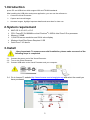
<Very Important> To ensure successful installation, please make sure each of the
following steps is completed.
3.1. Connect the power cord of the Visual Presenter.
3.2. Turn on the Visual Presenter.
3.3. Connect USB cable to the Visual Presenter and your computer.
3.4. Go to Lumens™ website http://www.lumens.com.tw/eng/goto.asp and select the model you
have purchased.
2