1
2
1. System Startup
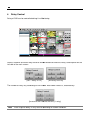
MacViewer is the software for Mac OS based PC. It provides many essential functions such as
Live Monitoring up to 16 channels and VOD Playback with Intelli
Intelli-Search Bar through network
connection to DVR.
1.1
System Requirement
[Recommended Specification]
Category
OS
CPU
RAM
1.2
Content
Mac OS X 10.6 or Higher
Intel x86 or x64 series
1GB or Over
VGA
1200×700 or Over
HDD
30MB
0MB free space for installation
Software Installation
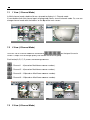
Execute MacViewer_1.0.dmg
.dmg file and start application installation manager.
In application manager, drag MacViewer.app icon to Application folder icon. Then the installation
process is finished.
Note It will be registered to MacAPP Store for easy download, installation & update.
1.3
System Startup
Execute MacViewer.app file in Applications to run MacViewer.