1
7
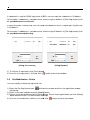
If subdomain is used for DDNS registration at DVR, user can input the subdomain in IP Address.
For example, if subdomain is “yourddnsname”,, then the right IP Address in [Site Registration] shall
be “yourddnsname.cctv-link.net”.
In case of Dyndns is being used, user can input the subdomain which is registered in Dyndns.org
in IP Address.
For example, if subdomain is “yourddnsname”,, then the right IP Address in [Site Registration] shall
be “yourddnsname.dyndns.org”.
[Using cctv-link.net]
link.net]
[Using Dyndns]
3) To initialize all input data, click [Clear] button.
4) Once the site registration is finished, click
button to close the window.
2.2
Site Modification / Delete
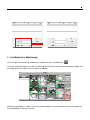
User can modify or delete the registered site.
1) Select the Site Registration icon
on the main window and then site registration window
will pop-up.
2) Select a site to be modified and click [Modify] button.
3) Select a site to be deleted and click [Delete] button. Please check again before you click [Delete]
button because there is no confirmation message.
4) Once the site modification / delete is finished, click
button to close the window.