1
7 Troubleshooting
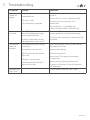
Problem
Cause
Solution
The disc
cannot be
played
Incorrectly loaded
Re-load the disc with the label facing
upwards
Unreadable disc
The disc is dirty
Disc format not supported
Ensure the disc is not scratched or dirty.
Clean and re-insert the disc or try
another disc
Ensure the disc is compatible see
‘Technical Specifications’ (Section 6.4)
No picture
or sound
The TFT button has been
pressed disabling the image
on the internal display
Incorrect connections made
if using external source or TV.
The remote
does not
respond
Re-check the connections, see Section 3.5
for details.
The batteries may be inserted
incorrectly.
Check the polarities match & the batteries
are correctly inserted.
The batteries may be low.
Replace the batteries.
Obsticle between the remote
& the unit.
Remove the obsticle.
Remote is too far away
Remote not aimed at the IR
sensor on the unit.
Forgotten the
Pass Code
Press the TFT button on the remote to
resume playback on the internal display.
Move closer. The range of the remote
is approx 6m
Make sure you aim the remote at the
IR sensor on the front of the unit near the
LED indicators
Use the default override code ‘1369’.
GDVDPLY01