1
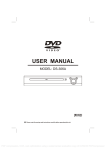
2 Your Portable DVD Player
2.2
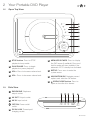
Open Top View
A
STOP
PLAY/PAUSE
B
VOL+
C
VOL-
D
MENU /
ECO POWER
E
F
SETUP
G
OK
H
A STOP button. Press to STOP
playback of any media.
B PLAY/PAUSE. Press to begin
playback or pause playback.
C VOL+. Press to increase volume level.
D VOL-. Press to decrease volume level.
E MENU/ECO PWER. Press to display
the DVD menu (if available). Press and
hold to wake unit from standby if the
automatic ‘ECO’ standby has activated.
F SETUP. Press once to enter the
system menu.
G NAVIGATION/OK. Navigate menus/
options and selection OK button.
H
2.3
OPEN/CLOSE button. Press to
open or close the disc drawer.
Side View
I
EARPHONE. Earphone
output socket.
I
J
K
L
M
J AV OUT. Output socket.
K AV IN. Input socket.
L OFF/ON. Power on/off
switch.
EARPHONE AV OUT
AV IN
OFF/ON
DC IN 9-12V
M DC IN 9-12V. Power input/
charging socket.
GDVDPLY01