1
Instructors
Submission Errors
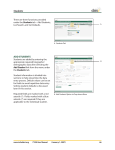
Note: If the information entered for an
instructor is not valid or is incomplete,
an error message will be displayed in
red type near the top of the screen.
Any error messages displayed must
be resolved before the instructor’s
information can be saved successfully.
I
I. Error Message
List/Search Instructors
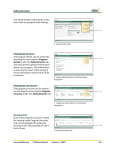
Instructor information can be edited
and reviewed under the Instructors
tab by selecting the List/Search option
from the menu.
Note: There is a sub-menu available on
this screen under the heading. Hover
over the option to display the link.
J
K
L
List All – displays all instructors without
regard for search criteria.
Add New – brings up a new instructor
entry screen. This is the same screen
displayed under the Add New function
previously discussed.
www.iccbdaisi.org
FY08 User Manual
J. List/Search Option in Drop-down Navigation
K. Add New Link
L. List All Link
(January 1, 2007)
25