1
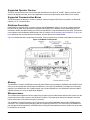
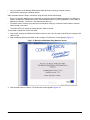
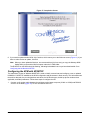
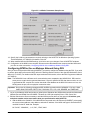
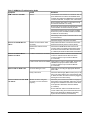
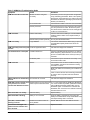
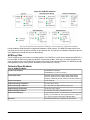
Figure 23: LonWorks Parameters Setup Screen
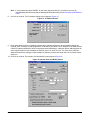
18. Specify the LONWORKS parameters as required, referring to the NCSETUP for Windows Operating System
Technical Bulletin (LIT-6360251d) for details. Click OK.
19. When satisfied with the NOVRAM settings, click OK to save your changes. Close all NCSETUP windows.
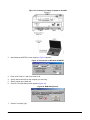
20. Configuration of the NCM is now complete. Disconnect the cable between the computer and the NCM serial
port. Go on to the next section, Configuring NCM for Use on Metasys Network Using DDL.
Configuring NCM for Use on Metasys Network Using DDL
After you have configured the NCM using NCSETUP, you need to configure its database using the DDL. If you wish
to perform these steps online at the OWS, refer to the Defining Devices section of the Operator Workstation User’s
Manual (LIT-120165). For details on the DDL steps mentioned in this section, refer to the DDL Programmer’s Manual
(LIT-630010).
Note: The NCM45x0-2 has a different set of communication ports compared to the NCM350/361. DDL restricts
some ports to certain device types and baud rates. If a port is specified in DDL that does not exist, no error
is generated at DDL compile time or after download of the database to the NCM. If this were to occur, the
NCM ignores the port, since no physical connection exists.
Important: Do not use the following unsupported DDL/UNDDL keywords with the NCM45x0-2: C210A, C260A,
CARD, D600, DELCARD, DELTZ, DSC, DSC8500, FPU, LCD, LCG, READER, and TIMEZONE.
1. Log on to the Metasys OWS and perform a global upload. Shutdown the OWS and de-compile the Workstation
Network/Port and Global files with UNDDL. Rename the .UND (de-compiled) files to .DDL source files.
2. Edit the Global source file as necessary to add the NCM as a new device on the network. All address, port,
and phone number entries must match what you specified earlier with NCSETUP.
a. Add the NCM to the Global file. If this NCM will be connected on the N1 Ethernet (N1DIRECT), also specify
the correct subnet address, node address, and static IP address. If the NCM code type is General with NT,
use 9600 for the NT baud rate. Example:
NC "NC45", "NCM4500",,, 1, 45, "N2",, "ENG", 9600
NCM45x0-2 Network Control Module Commissioning Guide
25