1
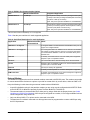
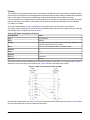
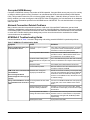
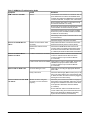
Table 7: NCM45x0-2 Troubleshooting Guide
Symptom
Cause
NCM is offline to the OWS.
Various
Solutions
The NCM was downloaded with a database that has
ports defined that are valid for an NCM300 Series
controller, but invalid for the NCM45x0-2 model. Make
corrections with DDL, recompile, then re-download.
Be sure that 24 VAC power is connected correctly
and that the RUN LED is on steady.
Be sure that communication terminal blocks and other
communication connectors are firmly in place.
Check that the wiring is the correct size (18 AWG
minimum for power, 18 AWG for N2 Bus, 26 AWG
for Ethernet communication).
Check that you have set the correct baud rate on each
connected device.
Check the integrity of the wires and cables.
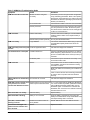
Devices on NCM N2 Bus are
offline.
Devices on NCM LONWORKS
Network are offline.
N2 Bus not connected or wired
incorrectly.
Verify that the N2 Bus is connected to the FC Bus
terminal and securely wired in correct polarity.
N2 Bus EOL switches not set
properly
Check that the NCM N2 Bus EOL switch is set
correctly. Refer to the Setting Terminations section
of the N2 Communications Bus Technical Bulletin
(LIT-636018) for details on N2 Bus EOL terminations.
LONWORKS network not connected. Verify that the LONWORKS network is connected to the
LONWORKS network terminal. Also refer to the
LONWORKS Network Layout Technical Bulletin
(LIT-1162150).
LONWORKS EOL devices not installed. Verify that the LONWORKS network EOL devices are
installed at the proper locations. Refer to the
LONWORKS Network Layout Technical Bulletin
(LIT-1162150).
Ethernet LED on NCM is Off.
Cannot communicate with NCM
via modem.
Incorrect cable type in use.
Verify that you are using the appropriate Ethernet
patch cable.
Faulty connections
Check the cable integrity. Make sure the port you are
using is an active Ethernet port. Check that the hub
or switch into which the LAN connector is plugged is
working and connected correctly.
Modem has been configured
incorrectly or is not connected
properly.
Check the port connector and cable for integrity for
each modem. On the OWS side, make sure you have
the right driver installed for the modem used. Refer
to the Operator Workstation Technical Bulletin
(LIT-636013).
On the NCM side, make sure NCSETUP has the
correct modem string for the external modem used.
Refer to the NCSETUP for Windows Operating
System Technical Bulletin (LIT-6360251d).
NCM45x0-2 Network Control Module Commissioning Guide
30