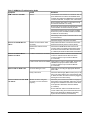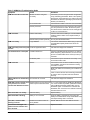
1
•
•
•
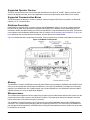
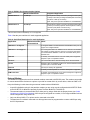
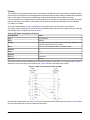
NCM350/361 can be moved to RS232C B/Port 5 on the NCM45x0-2. Serial Ports 2, 4, and 6 on the NCM350/361
models are not offered on the NCM45x0-2.
N1 communication at 10 or 100 Mbps is supported. Connection at 100 Mbps greatly increases the speed of
uploads and downloads.
The NCM45x0-2 is powered with a 24 VAC power transformer, ordered separately. The adapter requires a
standard power outlet near the NCM.
The code for the NCM45x0-2 is downloaded and updated with a tool called the Metasys NCM Update Utility,
available on the Branch Purchase Package (BPP). If you try to download both code and data from an Operator
Workstation (OWS), only the data is downloaded.
•
To return the NCM to factory condition, the device must be reflashed with the Metasys NCM Update Utility. There
is no switch or jumper on the NCM45x0-2 that can be used to return the unit to its default factory condition (Gate
1, Node 99). After the device is reflashed, it must be reconfigured with NCSETUP because the flash process
erases the Non-Volatile Random Access Memory (NOVRAM) settings.
•
The NCM45x0-2 is smaller than the NCM300 Series and in most situations can fit in the same location as the
NCM300 if it is replacing it.
The N2 Bus terminal connector on the NCM45x0-2 is called Field Controller (FC) Bus. Also, this connector has
four terminals, including a termination for an optional shield.
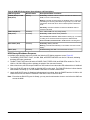
Two LEDs on the NCM45x0-2 indicate failure: Fault and Batt Fault. The LEDs do not indicate diagnostic error
codes, nor do they indicate the network address of the NCM while it is booting. For details, see NCM LED Status
Indicators.
•
•
•
•
•
•
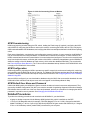
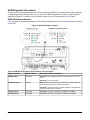
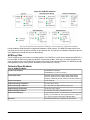
Do not push the Reload switch (Figure 2) on the NCM45x0 to initiate a device reload. It does not have the same
function as the Reload button on the NCM300.
The NCM error log records the use of any invalid ports that may have been configured on the NCM45x0-2. To
determine if an invalid port is defined, open the NCM error log file from the OWS and look for the entry Error
Adding IO Device. Even though the controller functions normally with invalid ports defined, it is good practice
to correct invalid port definition.
If Serial Port 3 (RS232C A/Port 3 on the NCM45x0-2) is selected for OT use, a direct connection with NCSETUP
to that port is no longer available; in this case, use WNCSETUP from the OWS.
The NCM45x0-2 does not support remote NT connections. This capability is lost if an NCM45x0-2 replaces an
existing NCM300 that uses remote NT connections.
Required Software
The NCM45x0-2 requires Metasys Person-Machine Interface (PMI) Release 12.04 software. The M-Series Workstation
Software at Release 5.4 is also supported. With either system, be sure that the most recent Quick Patch has been
applied.
Supported NCM Types
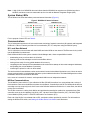
The two NCM code download types that the NCM4510-2 (N2 Bus version) model supports are General with OT and
General with NT. For the NCM4520-2 (LONWORKS network) model, only the General with NT type is supported. No
other NCM download types are supported on either model.
Both NCM types support the following N2 Bus devices: Air Handling Units (AHUs), Variable Air Volume (VAV)
controllers, VAV Modular Assemblies (VMAs), Unitary (UNT) controllers, Lab and Central Plant Controllers (LCPs),
Phoenix Lab and Fume Hood (PHX) Interface Modules, DC-9100s, DR9100s, DX-9100s, TC9100s, Intelligent Fire
Controller (IFC-2020 or IFC-1010) panels, Extension Modules, Generic Vendor Devices, and Metasys Integrator®
units.
For the NCM with the LONWORKS network, these devices are supported: DX9200, TCU1200, VMA1200 and other
non Johnson Controls® LONWORKS compatible devices.
Unsupported devices include: Intelligent Lighting Controller (ILC), Intelligent Access Controller (IAC-600), N2 Dialer
Module (NDM), and DX9120/DX9121. The various migration NCM types, such as Network Port, S2 Migration, and
JC/85 Gateway, also are not supported.
NCM45x0-2 Network Control Module Commissioning Guide
5