1
5.
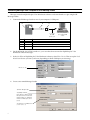
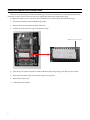
Select the new Message Loader site. Then attach messages to this site by selecting Messages > Add:
In this example, these two
messages have been attached
to the Message Loader site.
6.
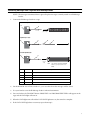
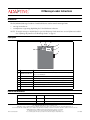
Press and then release the TRANSMIT button.
7.
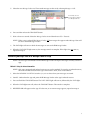
Wait at least two seconds. Select the Message Loader site and then choose File > Transmit.
NOTE: When a site is selected (like Message Loader), all the messages that appear under Message Name will
be sent to the IR Message Loader.
8.
The DATA light will turn on while the messages are sent to the IR Message Loader.
9.
When the DATA VALID light turns on, the message transfer is complete. If this light does not turn on,
repeat from step 5.
Transferring messages from an IR Message Loader to a sign
NOTE: The messages transmitted from the IR Message Loader will replace messages currently stored in a
sign.
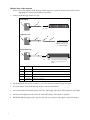
Method 1: Using the infrared transmitter
NOTE: Only signs equipped with infrared receivers can use this method. If a sign has an infrared receiver,
the receiver will be located on the sign’s front under a small, clear or red window.
1.
Move the MEMORY LOCATION switch to 1, 2, or 3 to select where your messages are stored.
2.
Stand 5 - 30 feet from the sign and point the IR Message Loader at the sign’s infrared receiver.
3.
Press and hold the TRANSMIT button. The DATA VALID light will turn on, followed by the DATA light.
4.
When the DATA light turns off, release the TRANSMIT button. The transfer is complete.
5.
RECEIVED OK will appear on the sign. If it does not, or an error message appears, repeat from step 2.
3