1
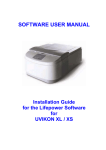
INSTALLATION GUIDE for the UVS SOFTWARE
for UVIKON 900 / XS / XL
3. Installation
NOTICE
Only the PC’s Administrator can install the UVS software and register the
software. Users without Administrator rights cannot access the log-in and
registration sections of the UVS software.
3.1. Installing the Operating System and Printer Driver
If MS-Windows has not already been installed on your PC, first install it using Microsoft’s instructions and
Windows CD. There are no special installation requirements for the UVS software with respect to the
operating system. Be sure to install the printer (i.e., its driver) at this time, as an already-installed printer
driver is essential for operation of the UVS software.
Important :
Please install network driver even there is no network connected and the system is standalone
before you install UVS.
3.2. Adobe Acrobat Reader Software
The documentation for this software is provided as an Adobe Acrobat Portable Document File (“PDF”). If
your PC does not already have the free Adobe Reader installed (and Acrobat Reader is required in order
to view and print this documentation file), then see section 3.3.2.1 below.
3.3. UVS Software Installation
3.3.1. Pre-installation
Before installing the UVS software, please do the following:
Temporarily disable any virus checking software and close any other open applications before
installing the UVS software. After installation, re-enable your virus checking application.
Completely uninstall any previous version of the UVS software using the ‘Add/Remove Programs’
applet in the Windows Control Panel.
If you have previously been working with Version 1.00 or higher of the UVS software, then it is not
normally necessary to completely remove the UVS directory and its content. When the new version of
UVS launches, it will generate a backup (Zip file) of the old database.
Prior to upgrading from any version earlier than version 1.00, you should first copy its data to an
alternate location, then uninstall the software (see above) and then manually delete its complete
directory and its content.
If you need earlier data to be converted into a format suitable for use with Version 1.00 or higher,
please contact your local representative or supplier.
UVS Software
Installation Guide
Manual Version 2.20, Feb. 2008
Page 4 of 19