1
BB 8100 SS Operator’s Manual & Troubleshooting Guide
7.
7.1
GENERAL SCALE OPERATION
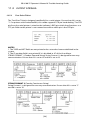
Weighing An Item
1. Select the desired weighing unit by pressing the UNITS key until that unit is
indicated on the display.
2. If necessary, press the ZERO/OFF key to obtain a weight reading of zero.
3. If weighing an item in a container, place the empty container on the scale’s platter
and, after allowing the weight indication to stabilize, press the TARE key. The display
shows zero weight and turns the NET annunciator on
4. Place the object to be weighed on the scale’s platter and allow the weight
indication to stabilize. If the item weight exceeds the scale’s weight capacity, it
displays “oooooo”.
5. Read the weight shown on the display. If you have established a tare, you may
toggle between the gross weight and the net weight by pressing the NET/GROSS key
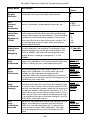
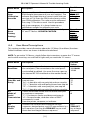
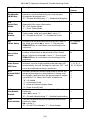
WEIGHING ANIMALS Here are some tips when using the automatic hold function
(A11) to weigh animals:
•
•
•
Use a setting of “8” or lower for F6 (Digital Filter). Using higher settings will
likely cause the indicator to lock onto the wrong weight prematurely.
Use the Motion Band setting (F5) to adjust for the motion of the loads. If the
setting is too low, then the indicator may never lock onto a weight. If the
setting is too high, the indicator may not lock the weight accurately.
Another approach is to completely disable automatic hold (A11) and use a
large setting for Digital Filter (F6).
[20]