1
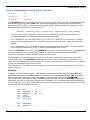
For this example the OUT1 output will turn off half way through the motor movement of
6400 steps at the 3200 step mark. (Note that it implies a fixed mechanical relationship
between the motor and whatever it is driving. For instance if the drive includes belts that
could slip, etc, then there would be no guaranteed fixed relationship between a specific
number of counts and a particular position).
An example might be turning on an indicator after a screw-jack has moved past a specific
position. Another might be initiating a saw or guillotine at a certain feed table position.
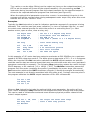
An interesting option is to synchronise two Hyperdrives so one is waiting in its program for
an input transition that is given by the other as it passes a given position. At that point the
second Hyperdrive begins its sequence synchronised exactly with the first.
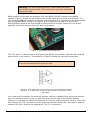
This is implemented by connecting wires from the OUT1 terminal pair of the initiating or
master Hyperdrive to the nominated pair of input terminals on the slave Hyperdrive (IN1
through IN4). At the given step position of the master the OUT1 line will change state
which the slave can detect and act upon.
Note that this is a case where a power source will be required so that the OUT1 transistor
turning on will cause the required 7 milliamps or so to flow through the given INx circuit.
This could be from the +5V source of either Hyperdrive.
Power (PW)
Set motor torque
Program:
YES
Interactive:
YES
Parameter:
REQUIRED
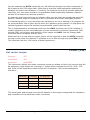
This instruction defines the motor maximum torque by setting a limit to the current that will
be delivered. Legal values are 1 through 4. These values correspond to 20%, 50%, 75%
and 100% of the Hyperdrive rated current of 3.5 amperes. The current settings are
therefore:
Parameter
Percentage
3.5 amp Unit
1
20%
0.7 amps
2
50%
1.75 amps
3
75%
2.625 amps
4
100%
3.5 amps
The actual peak and average currents will depend on the supply voltage and the resistance
and inductance of the particular motor concerned.
Kremford Pty Ltd
Hyperdrive KF086B User Manual
67