1
LED Chaser
LED Chaser Assembly Instructions & Technical Manual
Description
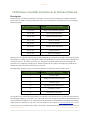
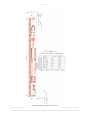
The LED Chaser is an animation controller for 32 LEDs. The current software implements 12 different animation
patterns that are settable via a three-position DIP switch. Seven of the patterns can be directly selected according to
the following table:
DIP SWITCH SETTING
A N I M AT I O N PAT T E R N
Off Off Off
Displays all 12 patterns sequentially.
On Off Off
Cylon/Knight Rider Scanner
Off On Off
Random Computer Lights
On On Off
Broadway Marquis
Off Off On
Two-eyed Scanner
On Off On
Snowfall with Accumulation
Off On On
Targeting Scanner
On On On
Binary Clock Display
When power is first applied to the LED Chaser, all the LEDs light up sequentially from right to left to help verify that
all the LEDs are working correctly. The rightmost LEDs corresponding to the current software revision light up next:
one LED for version 1, two LEDs for version 2, etc. The pattern associated with the current switch setting is displayed next in a continuously repeating cycle. With all switches off, all 13 patterns are displayed sequentially on a
rotating basis with each pattern active for about 10 seconds.
The additional five patterns that are not switch selectable (but are displayed with all switches off) are:
E X T R A PAT T E R N S
A N I M AT I O N PAT T E R N
0
Runway Lights
8
Double Scan with eyes moving out
9
Animated Sparks
10
Quadruple Scanner with four eyes
11
Fast Binary Counter
12
Double Scan to the Center
It is possible for any of these animation patterns to be assigned to the switches however you like provided you have a
MicroChip IDE, debugger, and compiler. The code for this board was developed using their free MPLAB X IDE V1.30
along with the XC8 C compiler V1.10. The LED Chaser board includes a standard PICKit-compatible programming/
debug connector at reference P2. The source code is available from our web site at www.c-inspirations.com. You can
also develop your own animations by creating a list of LEDs. The default times between animation steps can be set to
C o m p u t e r I n s p i r a t i o n s!
A s s e m b l y & Te c h n i c a l M a n u a l
1