1
LED Chaser
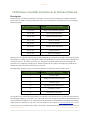
anything from 1 mS to about a minute. Any number of LEDs from one to 32 can comprise a
scene. However, the brightness of each LED decreases as the number of LEDs in a scene increases. See below for more details.
Assembling the LED Chaser Kit
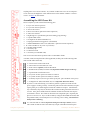
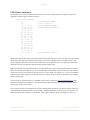
Please verify that your kit contains the following parts:
1.
1.
2.
2.
3.
4.
5.
6.
7.
8.
9.
10.
11.
12.
13.
2 – 2.2 "F 16V ceramic capacitors
2 – 0.1 "F 50V ceramic capacitors
4 – 120 # ¼ W resistors
2 – 2K # ¼ W resistors (optional for future expansion)
4 – 10K # ¼ W resistors
1 – Right-angle 0.1” 6-pin header (optional for debug/programming)
1 – 3-position DIP switch
1 – 5V Regulator IC (MCP1702-5002E/TO)
1 – Preprogrammed microcomputer IC (PIC16F1829)
1 – 256Kbit EEPROM IC with I2C bus (24LC256P – optional for future expansion)
32 – 5mm red LEDs (or any color of your choice)
1 – Rectifier diode (1N4001)
1 – 9V battery clip
1 – LED Chaser PCB
1 – 9V battery (not included in kit)
Note: P3 is reserved for future expansion and is not included in the kit.
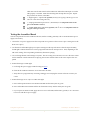
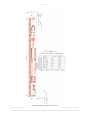
Assemble, solder, and clip the leads (where applicable) of these parts in the following order
(refer to PCB outline at the left):
4 – 120 # resistors located at R1 to R4.
4 – 10K # resistors located at R6, R8 – R10.
2 – 2K # resistors (optional) located at R5 and R7.
1 – Rectifier diode (1N4001) located at D33 (Important: banded end goes to the top).
1 – 3-position DIP switch located at S1.
2 – 2.2 "F 16V ceramic capacitors located at C2 and C3.
2 – 0.1 "F 50V ceramic capacitors located at C1 and C4.
1 – 9V battery clip at P1 (red wire goes to the square pad - pin 2 and black wire to pin 3).
1 – 5V Regulator IC (MCP1702-5002E/TO) at U1 (Important: flat end as shown).
If you have a volt meter handy, you could now perform a quick test to make sure the
power supply is working correctly. Connect the positive lead of the voltmeter to P2 pin 2
(square pad is pin 1) and the negative lead of the voltmeter to P2 pin 3. Attach the battery to the battery clip and you should see the voltmeter reading somewhere from 4.95 V
to 5.05 V. If not, please double check the soldered connections and make sure all parts
are oriented as shown. Also check for shorts between components pins—especially the
pins of U1 and C1 to C4. If you see the 9V battery voltage at the banded end of D33, then
the problem is likely a bad solder joint or U1 is missing or not working. Disconnect the
battery before continuing.
32 – 5mm red LEDs as marked (Important: notch goes to the top as shown) at D1 to
D32. Install one LED at a time and solder only one pin of the LED to hold it in place.
C o m p u t e r I n s p i r a t i o n s!
A s s e m b l y & Te c h n i c a l M a n u a l
2