1
ESM Setpoints
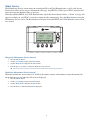
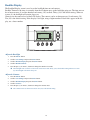
Energy Saving Mode (ESM) Setpoints are the setpoints used when the Energy Saving Mode schedule is selected in the Schedule Mode screen.
Energy Saving Mode Setpoings
ESM - Heat
ESM - Cool
Done
80
+
65
-
Adjust ESM Setpoints
1. Press the MENU button.
2. Scroll to ESM Setpoints and press the Select button.
3. To adjust the heat setpoint, scroll to ESM - Heat. Press the plus (+) or minus (-) buttons to adjust the setpoint.
4. To adjust the cool setpoint, scroll to ESM - Cool. Press the plus (+) or minus (-) buttons to adjust the setpoint.
15