1
Connection Types ____________________________________________________________ HOBLink X11
5 Connection Types
5.1 X11 Connection Types
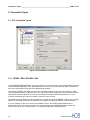
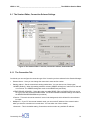
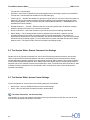
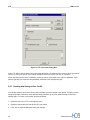
Figure 4: Session Editor, Connection tab
5.1.1 REXEC / RSH / RLOGIN / SSH
To use REXEC/RSH/RLOGIN/SSH, you have to create a connection scheme in the Session Editor and select
"REXEC/RSH/RLOGIN/SSH" in the “Starting Method” scroll box on the connection tab. (SSH is available at
extra cost, when HOBLink SSH has been additionally purchased.)
The methods "REXEC" and "RSH" can be used to automate the Host Access and start X Clients, in which
case the protocols REXEC or RSH are used. You can use this Startup Program to enter an individual control
command to execute at the host or to call up a local Startup File which automatically starts one or more
X Clients. At this time the X Server is started, if this has not yet occurred.
To be able to execute Startup your Host System has to support the protocols REXEC or RSH, and, of course,
REXEC or RSH rights will have to be assigned to the machine requesting an REXEC or RSH connection.
If you use "Startup" to start your X Server and XDMCP is active, the XDMCP Startup Method will be
deactivated. This occurs because otherwise it is very likely that the Host XDM Script will run before your
control command or your command does – if the host also supports the XDMCP Protocol.
14
Connectivity from