1
HOBLink X11 ___________________________________________________ The HOBLink Session Editor
8.4 The Session Editor, Display Settings
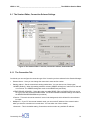
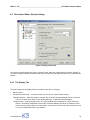
Figure 8: Display scheme tab
The session's display settings are made on these five tabs, which are displayed when the folder "Display" or
one of the "Display" sessions contained in that folder are selected in the right-hand pane of the session Editor
window.
8.4.1 The Display Tab
The basic settings for the display scheme are made on this tab, for example:
•
Scheme Name
•
Window Mode at Startup: – In this scroll field, you can set one of three window modes:
• Multiple Windows – When this option is selected, the scroll field "Window Manager" below is activated
and you can there select either "Local Window Manager" or "Remote Window Manager."
• Single Window – With this display mode, all X Client windows will be displayed in a single X Session
window. The window management and all other X Window Manager functions are controlled in this
window, which is started at the host. The familiar "Look and Feel” of the host is thus preserved, but at
a cost of increased data traffic on the network.
Connectivity from
25