1
Appendix - Parameter List
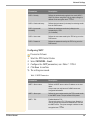
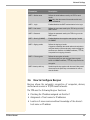
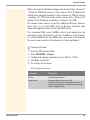
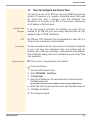
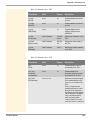
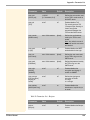
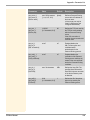
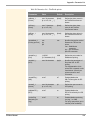
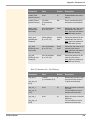
Table 19: Parameter List - POP3
Parameters
Value
Default
Description
pop3
[POP3]
on/off
off
Enables/disables the POP3
functionality.
pop3_srv
[Server name]
max. 128 characters
[blank]
Defines a POP3 server via the
IP address or the host name.
A host name can only be used
if a DNS server was
configured beforehand.
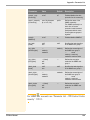
pop3_port
[Server port]
1–65535
[1–5 characters; 0–9]
110
Defines the port of the POP3
server used by the TPR for
receiving emails.
When using SSL/TLS, enter
995 as port number.
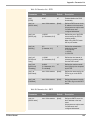
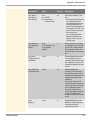
pop3_sec
[Security]
0–2
[1 character; 0–2]
0
Defines the authentication
method to be used.
0 = no security
1 = APOP
2 = SSL/TLS
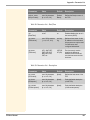
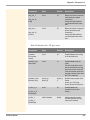
pop3_poll
[Check mail
every]
1–10080
[1–5 characters; 0–9]
15
Defines the time interval (in
minutes) for retrieving emails
from the POP3 server.
pop3_limit
[Ignore mail
exceeding]
0–4096
[1–4 characters; 0–9;
0 = unlimited]
10
Defines the maximum email
size (in Kbyte) to be accepted
by the TPR.
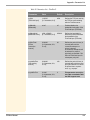
pop3_usr
[User name]
max. 128 characters
[blank]
Defines the name used by the
TPR to log on to the POP3
server.
pop3_pwd
[Password]
max. 128 characters
[blank]
Defines the password used by
the TPR to log on to the POP3
server.
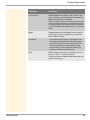
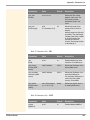
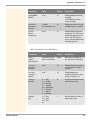
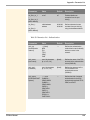
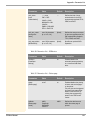
Table 20: Parameter List - SMTP
TPR User Manual
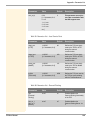
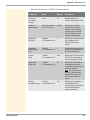
Parameters
Value
Default
Description
smtp_srv
[Server name]
max. 128 characters
[blank]
Defines an SMTP server via
the IP address or the host
name.
A host name can only be used
if a DNS server was
configured beforehand.
105