1
General Information
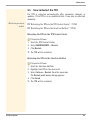
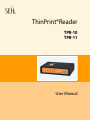
Optionally, you can use the ThinPrint technology with the TPR. The
TPR contains a fully integrated ThinPrint Client. This ThinPrint
Client allows you to receive and decompress print data in ThinPrint
environments. A network printer can be quickly and easily
embedded into the network by means of the integrated ThinPrint
Client.
Features
The TPR supports the following features (amongst others):
• The connection between the TPR and the Personal Printing
server is protected by means of the Personal Printing SSL/TLS
encryption.
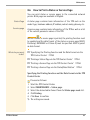
• The feature AutoConnect allows you to automatically create the
required printer objects for the relevant client on the server.
AutoConnect will automatically connect all selected printers on
the server with a ThinPrint port; provided that templates exist.
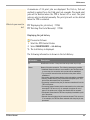
• The ThinPrint Connection Service allows you to print to
ThinPrint clients, that are found behind a firewall, for example.
This allows the connection via masked networks as well as the
assignment of the relevant print job to the respective end
device.
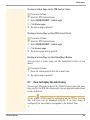
• By means of the ThinPrint SSL/TLS encryption, the print data is
protected during the transmission and will be decrypted by the
ThinPrint clients or gateways before printing.
System
Requirements
TPR User Manual
The TPR has been designed for the use in TCP/IP-based networks. A
Personal Printing server must be integrated within the network. The
network printers involved must support RAW or socket printing
(printing via TCP/IP ports), IPP printing or LPD printing. When using
the ThinPrint function, a ThinPrint Server needs to be integrated
within the network. If you want to use ThinPrint or the ThinPrint
Connection Service, you need the relevant licenses.
7