1
A. Touch Screen Panel and Touch Monitor Installation
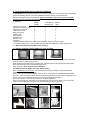
1. Introduction: Please identify the Magic Touch model you purchased. Check all the parts in the package
against the following parts list. Follow the installation instruction only for your specific model.
NOTE: Please read the instructions carefully. Improper installation may cause permanent damages,
which may not be covered by the warranty.
2. Parts List:
Add-On
Touch Monitor
Built-In
(KTMT)
(KTSC/KTLC)
(KTT)
External touch screen
1
0
0
Hangers & accessories* (set)
1
0
0
Integrated touch monitor
0
1
0
Internal touch screen
0
0
1
Magic pen (stylus)
1
1
1
Cleaning cloth
1
1
1
User’s manual
1
1
1
Installation CD
1
1
1
Warranty card
1
1
1
Controller **
1
1
1
* Notebook models (KTMT-1214, KTMT-1500, and KTMT-154W) do not have hangers.
** Controller is either a box or a board (SB model) with USB cable (USB-XD) or serial cable (ProE-X).
3.
Magic Touch Add-On Kits (KTMT series) mounting:
3.1. KTMT for notebook computer (KTMT-1214, 1500 and 154W):
3
2
1
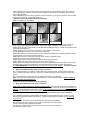
3.1.1. Open the cover. Remove the protective film on the touch screen and mount the touch screen to the
notebook using the Velcro straps (picture 1).
3.1.2. Buckle the horizontal straps to the back of the notebook (picture 2) and pull the two vertical straps
down and adhere them to the horizontal strap (picture 3).
3.1.3. Continue to B. Controller & Driver Installation.
3.2. KTMT for monitors (KTMT-1315, 1700, 1900 and 1921):
3.2.1. For Mounting on LCD monitor: There are two sets of hangers included; one pair of hard plastic
hangers and one pair of Velcro hangers.
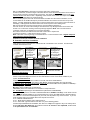
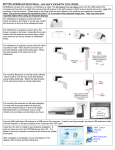
3.2.1.1. You may use the plastic hangers. Place the touch screen panel on a flat table with the backside
facing up. Screw two hangers into the back of the panel using the top screw holes on the hanger (picture 1).
3.2.1.2. Adhere two Velcro strips provided on the top of the display as indicated by
the arrows in picture 2. Mount the touch screen to the display (picture 3).
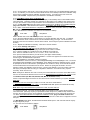
3.2.1.3. If you find the top of the touch screen is blocking the view area of the display; you may raise the
touch screen by adding the rectangular foam pad underneath the hangers (picture 4).
1
2
3
4
5
6
7
8