1
operation2.book
Page 126 Wednesday, January 7, 2004
10:04 AM
Section 7
APPENDIX
Troubleshooting
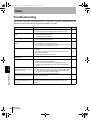
This section describes countermeasures for temporary hardware problems.Check the
malfunction in this section before sending the hardware for repair.
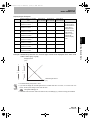
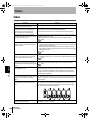
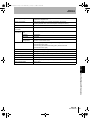
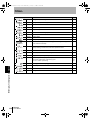
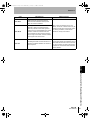
Problem
Pages
• Is the power supply device connected correctly?
• Are the Interface and Calculating Units connected correctly?
p.27
p.21
Judgements not output to external
device.
• Are all cables connected correctly?
• Is the signal line disconnected?
• Are reset inputs short-circuited?
p.27
No input signal received.
• Are all cables connected correctly?
• Is the signal line disconnected?
p.27
No communications with personal
computer.
•
•
•
•
p.27
p.26
p.142
p.140
Strange linear output levels.
• Is the switch on the bottom of the Amplifier Unit set to the correct
position?
• Has the correct selection (voltage/current) been made in the
monitor focus settings?
• Linear output levels can be fine-tuned.
p.95
• Has the number of display digits been set to zero?
p.112
Nothing displayed on main display
or sub-display.
Section 7 Troubleshooting
126
Probable cause and possible countermeasure
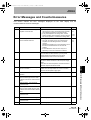
Device restarts during operation.
Is the cable connected correctly?
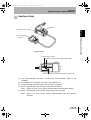
Is the Interface Unit connected correctly?
Is the switch under the Interface Unit on the side without the tab?
Is the connector pin arrangement correct?
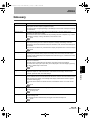
The main display remains on [-----]. • Has a timing input been made while hold is enabled and the
trigger type has been set to TIMIG?
• If the hold function is enabled and the trigger type is [UP] or
[DOWN], has the self-trigger level been set to an appropriate
value?
p.76
Abnormal distance is displayed
when the object is clearly outside
measurement range.
• This problem may occur due to the characteristics of the sensor.
Make sure that the distance to the sensing object is appropriate.
• This problem may be solved by selecting a fixed measurement
gain in the measurement sensitivity setting.
p.74
[LDDWN] is displayed on the main
display when the power is turned
ON.
The laser of the sensor head has deteriorated.
Replace the Sensor Head.
p.21
The measured values fluctuate and This problem may be due to temperature characteristics. Execute
are not stable depending on day
zero reset periodically using the standard object to correct this
and time.
problem.
ZX-L-N
User’s Manual
p.116