1
operation2.book
Page 67
Wednesday, January 7, 2004
10:04 AM
Section 5
DETAILED SETTINGS
Changing Display Scales
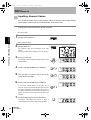
Change the display scale when you want to display a value on the main display that is different
from the actual measured value.
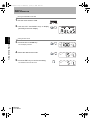
Place an actual sensing object in position.
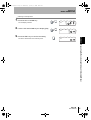
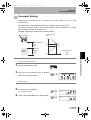
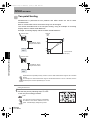
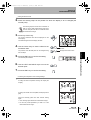
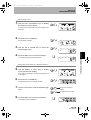
Two setting methods are available: one-point and two-point scaling methods.
• The scaling set here is reflected in the display only.
If you want to change the linear output of the displayed value, the monitor focus function must be used.
The minimum display value is -19999, and the maximum display value is 59999. Values (scaling
correction values) that exceed the minimum or maximum display value even if the object is located within
the measuring range cannot be set. An error will occur if such a value is set.
p.95
• To calculate the thickness, refer to “Performing Calculations” in “Measuring with Multiple Amplifier Units”.
p.108
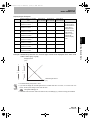
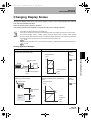
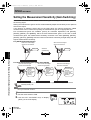
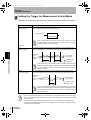
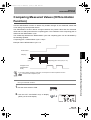
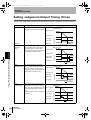
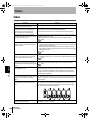
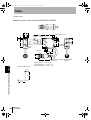
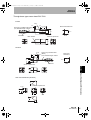
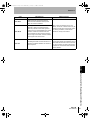
Scaling Application Example
Purpose
Method
Offset the display value.
One-point
scaling
(Not
inverted.)
Displayed value
(mm)
Light block width
6mm
Receiver
Emitter
p.69
15
Sensing
object
6
Actual measured
Height of sensing object
0
15mm
To display the height of the sensing object
(Reflective type sensor head)
value
6
(mm)
Offset the display value and invert the
relationship between display and reference
values.
Displayed value
Sensor head
Sensing
object
One-point
scaling
(Inverted)
p.69
(mm)
Actual measured
value
40mm
Section 5 Changing Display Scales
To display the height of the sensing object
(Through-beam type sensor head)
50
40
Value to be
Actual
displayed
measured
50mm
value
40
(mm)
ZX-L-N
User’s Manual
67