1
operation2.book
Page 72
Wednesday, January 7, 2004
10:04 AM
Section 5
DETAILED SETTINGS
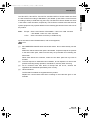
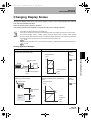
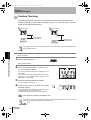
Two-point Scaling
Measurement is performed at two positions and offset values are set for those
measurements.
Both an overall offset can be set and the range can be changed.
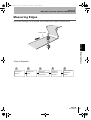
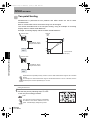
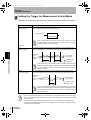
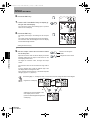
This section describes how to set two-point scaling, using an example of correcting
display values to match actual distances.
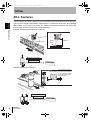
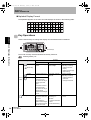
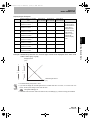
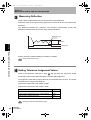
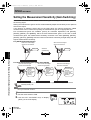
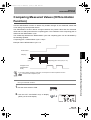
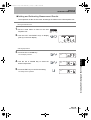
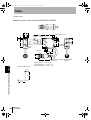
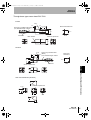
Example: Correcting Display Values to Match Actual Distances
Sensor head
Displayed
value
(mm)
40
Actual distance: 40mm
Displayed value: 38mm
Sensing
38
33
32
object
Section 5 Changing Display Scales
32
Actual measured
value (mm)
Sensor head
Actual distance: 32mm
Displayed value: 33mm
Sensing
object
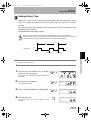
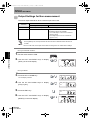
Separate the two specified points by at least 1% of the rated measurement range for the connected
Sensor.
For example, the rated measurement range for the ZX-LD40 Sensor is 20 mm. Therefore, the two
specified points must be separated by 0.2 mm min.
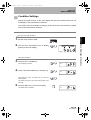
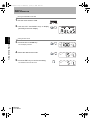
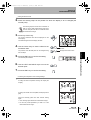
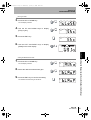
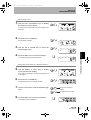
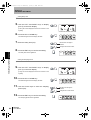
Setting the First Point
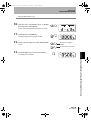
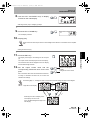
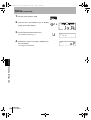
1. Set the first point by following steps 1. to 11.
of the one-point scaling procedure.
p.69
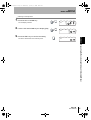
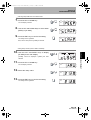
The range for two-point scaling is automatically
set based on the values entered for the two
points. Inverted display settings are ignored.
72
40
ZX-L-N
User’s Manual