1
Page 12.
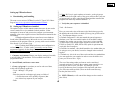
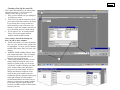
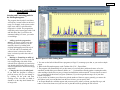
What everything in the Locus
Window means?!
1.
2.
3.
4.
5.
6.
Tests – lists all of the existing primer
groups or locus rule sets.
Size Standard – make sure the size
standard selected for the locus corresponds the standards used during
ABI sequencing run.
Loci – lists all the loci in the selected
primer group. Highlight a loci of
interest to view its parameters.
Channel – corresponds to the color
designation of that locus/primer. Blue
(e.g., 6-FAM)-Channel 1 Green
(e.g., VIC)-Channel 2 Yellow
(e.g., NED)-Channel 3 Red (e.g.,
PET)-Channel 4
Purple (e.g., LIZ) – Channel 5
Allele Info - In the ‘Allele Info’ box
are the expected sizes of the sequence
for the primer from the smallest to the
largest, spacing between the numbers
a comma, then a space, then semicolon (e.g.
122, ;124, ;126, ; and so on). If you
input even numbers the machine will
round even, and odd numbers will
round odd. In this example, we
expected an even di-nucleotide repeat
defined when creating the locus).
so we can get away with inputing the
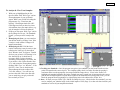
sequence sizes spaced two bps apart. 7. Move Up, Move Down - The ‘Move Up’ and ‘Move Down’ buttons will change the order of the primers
within a primer group. The way that they are ordered in Loci Rules will determine the order in the
Analysis Script, Rounding Script,
Electropherogram window during your analysis.
and Globals - The Analysis and
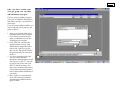
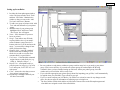
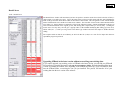
Rounding Script boxes contain pa- * If you ever need to make adjustments of your locus parameters, you can do it manually by changing the
information in Boxes 1-7. For example, say in the primer group and locus above, your max range expanded to
rameters for calling and estimating
150bp and the color of your primer was actually green not yellow. First in the Allele Info box add sizes 148 and
peak sizes based on the information
150 spaces with a comma, space (or letter designation) and a semi-colon (142,L;144,M;146,N;148,O;150,P;).
in the Globals box. The Globals box
Next in the Globals box change RangeMax to be 150, M (your ‘standard’ allele to set binning) to be 146, and
contains the specific parameters for
Plane (same as Channel) to 2. Lastly change Channel box to read 2 as well.
that locus (the same ones that you