1
Tapper
Test and Automation Infrastructure
User Manual
Steffen Schwigon, Maik Hentsche
c 2008-2011 AMD Operating System Research Center
Copyright i
Table of Contents
1
Synopsis . . . . . . . . . . . . . . . . . . . . . . . . . . . . . . . . . . . . . . . . . . . . . . . . . . . . . . . . 1
1.1
1.2
2
1
1
1
1
1
2
2
2
2
2
2
2
2
2
Technical Infrastructure. . . . . . . . . . . . . . . . . . . . . . . . . . . . . . . . . . . . . . . 3
2.1
3
Tapper infrastructure . . . . . . . . . . . . . . . . . . . . . . . . . . . . . . . . . . . . . . . . . . . . . . . . . . . . . . . . . . . . . .
Vocabulary . . . . . . . . . . . . . . . . . . . . . . . . . . . . . . . . . . . . . . . . . . . . . . . . . . . . . . . . . . . . . . . . . . . . . . . .
1.2.1 Master Control Program (MCP) . . . . . . . . . . . . . . . . . . . . . . . . . . . . . . . . . . . . . . . . . . . . . .
1.2.2 Program Run Control (PRC) . . . . . . . . . . . . . . . . . . . . . . . . . . . . . . . . . . . . . . . . . . . . . . . . .
1.2.3 Reports Receiver . . . . . . . . . . . . . . . . . . . . . . . . . . . . . . . . . . . . . . . . . . . . . . . . . . . . . . . . . . . . .
1.2.4 Reports API . . . . . . . . . . . . . . . . . . . . . . . . . . . . . . . . . . . . . . . . . . . . . . . . . . . . . . . . . . . . . . . . . .
1.2.5 Web User Interface . . . . . . . . . . . . . . . . . . . . . . . . . . . . . . . . . . . . . . . . . . . . . . . . . . . . . . . . . . .
1.2.6 Reports DB . . . . . . . . . . . . . . . . . . . . . . . . . . . . . . . . . . . . . . . . . . . . . . . . . . . . . . . . . . . . . . . . . .
1.2.7 Testrun DB . . . . . . . . . . . . . . . . . . . . . . . . . . . . . . . . . . . . . . . . . . . . . . . . . . . . . . . . . . . . . . . . . .
1.2.8 Testrun. . . . . . . . . . . . . . . . . . . . . . . . . . . . . . . . . . . . . . . . . . . . . . . . . . . . . . . . . . . . . . . . . . . . . . .
1.2.9 Preconditions . . . . . . . . . . . . . . . . . . . . . . . . . . . . . . . . . . . . . . . . . . . . . . . . . . . . . . . . . . . . . . . . .
1.2.10 Report . . . . . . . . . . . . . . . . . . . . . . . . . . . . . . . . . . . . . . . . . . . . . . . . . . . . . . . . . . . . . . . . . . . . . .
1.2.11 Test Anything Protocol (TAP) . . . . . . . . . . . . . . . . . . . . . . . . . . . . . . . . . . . . . . . . . . . . . . .
1.2.12 TAP archives . . . . . . . . . . . . . . . . . . . . . . . . . . . . . . . . . . . . . . . . . . . . . . . . . . . . . . . . . . . . . . . .
Adding a new host into automation . . . . . . . . . . . . . . . . . . . . . . . . . . . . . . . . . . . . . . . . . . . . . . . .
2.1.1 Make machine remote hard resetable . . . . . . . . . . . . . . . . . . . . . . . . . . . . . . . . . . . . . . . . . .
2.1.2 Make machine PXE boot aware . . . . . . . . . . . . . . . . . . . . . . . . . . . . . . . . . . . . . . . . . . . . . . .
2.1.3 Configure TFTP on central MCP machine . . . . . . . . . . . . . . . . . . . . . . . . . . . . . . . . . . . .
2.1.4 Make the hosts known in the TestrunDB . . . . . . . . . . . . . . . . . . . . . . . . . . . . . . . . . . . . . .
2.1.5 Optionally: enable ‘temare’ to generate tests for this host . . . . . . . . . . . . . . . . . . . . .
3
3
3
4
4
4
Test Protocol . . . . . . . . . . . . . . . . . . . . . . . . . . . . . . . . . . . . . . . . . . . . . . . . . . 7
3.1
3.2
Test Anything Protocol (TAP). . . . . . . . . . . . . . . . . . . . . . . . . . . . . . . . . . . . . . . . . . . . . . . . . . . . . 7
Tutorial . . . . . . . . . . . . . . . . . . . . . . . . . . . . . . . . . . . . . . . . . . . . . . . . . . . . . . . . . . . . . . . . . . . . . . . . . . . 7
3.2.1 Just plan and success . . . . . . . . . . . . . . . . . . . . . . . . . . . . . . . . . . . . . . . . . . . . . . . . . . . . . . . . . 7
3.2.2 Succession numbers . . . . . . . . . . . . . . . . . . . . . . . . . . . . . . . . . . . . . . . . . . . . . . . . . . . . . . . . . . . 7
3.2.3 Test descriptions. . . . . . . . . . . . . . . . . . . . . . . . . . . . . . . . . . . . . . . . . . . . . . . . . . . . . . . . . . . . . . 7
3.2.4 Mark tests as TODO . . . . . . . . . . . . . . . . . . . . . . . . . . . . . . . . . . . . . . . . . . . . . . . . . . . . . . . . . 8
3.2.5 Comment TODO tests with reason. . . . . . . . . . . . . . . . . . . . . . . . . . . . . . . . . . . . . . . . . . . . 8
3.2.6 Mark tests as SKIP (with reason) . . . . . . . . . . . . . . . . . . . . . . . . . . . . . . . . . . . . . . . . . . . . . 8
3.2.7 Diagnostics . . . . . . . . . . . . . . . . . . . . . . . . . . . . . . . . . . . . . . . . . . . . . . . . . . . . . . . . . . . . . . . . . . . 8
3.2.8 YAML Diagnostics . . . . . . . . . . . . . . . . . . . . . . . . . . . . . . . . . . . . . . . . . . . . . . . . . . . . . . . . . . . 8
3.2.9 Meta information headers for reports. . . . . . . . . . . . . . . . . . . . . . . . . . . . . . . . . . . . . . . . . . 9
3.2.10 Report sections . . . . . . . . . . . . . . . . . . . . . . . . . . . . . . . . . . . . . . . . . . . . . . . . . . . . . . . . . . . . . 10
3.2.11 Meta information headers for report sections . . . . . . . . . . . . . . . . . . . . . . . . . . . . . . . . 10
3.2.12 Meta information structure summary . . . . . . . . . . . . . . . . . . . . . . . . . . . . . . . . . . . . . . . 11
3.2.13 Explicit section markers with lazy plans . . . . . . . . . . . . . . . . . . . . . . . . . . . . . . . . . . . . 12
3.2.14 Developing with TAP. . . . . . . . . . . . . . . . . . . . . . . . . . . . . . . . . . . . . . . . . . . . . . . . . . . . . . . 13
3.2.15 TAP tips . . . . . . . . . . . . . . . . . . . . . . . . . . . . . . . . . . . . . . . . . . . . . . . . . . . . . . . . . . . . . . . . . . . 13
3.3 Particular use-cases . . . . . . . . . . . . . . . . . . . . . . . . . . . . . . . . . . . . . . . . . . . . . . . . . . . . . . . . . . . . . . 14
3.3.1 Report Groups . . . . . . . . . . . . . . . . . . . . . . . . . . . . . . . . . . . . . . . . . . . . . . . . . . . . . . . . . . . . . . 14
3.3.1.1 Report grouping by same testrun . . . . . . . . . . . . . . . . . . . . . . . . . . . . . . . . . . . . . . . 14
3.3.1.2 Report grouping by arbitrary idenitifier . . . . . . . . . . . . . . . . . . . . . . . . . . . . . . . . . 14
3.4 TAP Archives . . . . . . . . . . . . . . . . . . . . . . . . . . . . . . . . . . . . . . . . . . . . . . . . . . . . . . . . . . . . . . . . . . . . 14
ii
Tapper User Manual
3.5
4
Reporting TAP to the reports receiver . . . . . . . . . . . . . . . . . . . . . . . . . . . . . . . . . . . . . . . . . . . . 14
3.5.1 Submitting raw TAP . . . . . . . . . . . . . . . . . . . . . . . . . . . . . . . . . . . . . . . . . . . . . . . . . . . . . . . . 14
3.5.2 Submitting TAP Archives . . . . . . . . . . . . . . . . . . . . . . . . . . . . . . . . . . . . . . . . . . . . . . . . . . . 15
Test Suite Wrappers . . . . . . . . . . . . . . . . . . . . . . . . . . . . . . . . . . . . . . . . . 17
4.1
Available test suite wrappers . . . . . . . . . . . . . . . . . . . . . . . . . . . . . . . . . . . . . . . . . . . . . . . . . . . . . 17
4.1.1 tapper-testsuite-autotest . . . . . . . . . . . . . . . . . . . . . . . . . . . . . . . . . . . . . . . . . . . . . . . . . . . . . 17
4.2 Environment variables . . . . . . . . . . . . . . . . . . . . . . . . . . . . . . . . . . . . . . . . . . . . . . . . . . . . . . . . . . . . 17
5
Preconditions . . . . . . . . . . . . . . . . . . . . . . . . . . . . . . . . . . . . . . . . . . . . . . . . . 19
5.1
5.2
5.3
5.4
5.5
5.6
5.7
5.8
5.9
SYNOPSIS . . . . . . . . . . . . . . . . . . . . . . . . . . . . . . . . . . . . . . . . . . . . . . . . . . . . . . . . . . . . . . . . . . . . . . .
Layers of preconditions . . . . . . . . . . . . . . . . . . . . . . . . . . . . . . . . . . . . . . . . . . . . . . . . . . . . . . . . . . .
Precondition repository . . . . . . . . . . . . . . . . . . . . . . . . . . . . . . . . . . . . . . . . . . . . . . . . . . . . . . . . . . .
Overview Precondition Types . . . . . . . . . . . . . . . . . . . . . . . . . . . . . . . . . . . . . . . . . . . . . . . . . . . . .
Details Precondition Types . . . . . . . . . . . . . . . . . . . . . . . . . . . . . . . . . . . . . . . . . . . . . . . . . . . . . . .
Macro Preconditions . . . . . . . . . . . . . . . . . . . . . . . . . . . . . . . . . . . . . . . . . . . . . . . . . . . . . . . . . . . . .
Testplans . . . . . . . . . . . . . . . . . . . . . . . . . . . . . . . . . . . . . . . . . . . . . . . . . . . . . . . . . . . . . . . . . . . . . . . .
Precondition Producers . . . . . . . . . . . . . . . . . . . . . . . . . . . . . . . . . . . . . . . . . . . . . . . . . . . . . . . . . . .
Layers of preconditions . . . . . . . . . . . . . . . . . . . . . . . . . . . . . . . . . . . . . . . . . . . . . . . . . . . . . . . . . . .
5.9.1 Normal preconditions . . . . . . . . . . . . . . . . . . . . . . . . . . . . . . . . . . . . . . . . . . . . . . . . . . . . . . . .
5.9.2 Macro preconditions . . . . . . . . . . . . . . . . . . . . . . . . . . . . . . . . . . . . . . . . . . . . . . . . . . . . . . . . .
5.9.3 Testplans . . . . . . . . . . . . . . . . . . . . . . . . . . . . . . . . . . . . . . . . . . . . . . . . . . . . . . . . . . . . . . . . . . . .
5.10 Precondition repository. . . . . . . . . . . . . . . . . . . . . . . . . . . . . . . . . . . . . . . . . . . . . . . . . . . . . . . . . .
5.11 Overview Precondition Types. . . . . . . . . . . . . . . . . . . . . . . . . . . . . . . . . . . . . . . . . . . . . . . . . . . .
5.11.1 Overview: Action precondition types. . . . . . . . . . . . . . . . . . . . . . . . . . . . . . . . . . . . . . . .
5.11.2 Overview: Highlevel precondition types . . . . . . . . . . . . . . . . . . . . . . . . . . . . . . . . . . . . .
5.12 Details Precondition Types . . . . . . . . . . . . . . . . . . . . . . . . . . . . . . . . . . . . . . . . . . . . . . . . . . . . . .
5.12.1 installer stop . . . . . . . . . . . . . . . . . . . . . . . . . . . . . . . . . . . . . . . . . . . . . . . . . . . . . . . . . . . . . . .
5.12.2 grub . . . . . . . . . . . . . . . . . . . . . . . . . . . . . . . . . . . . . . . . . . . . . . . . . . . . . . . . . . . . . . . . . . . . . . .
5.12.3 package . . . . . . . . . . . . . . . . . . . . . . . . . . . . . . . . . . . . . . . . . . . . . . . . . . . . . . . . . . . . . . . . . . . .
5.12.4 copyfile. . . . . . . . . . . . . . . . . . . . . . . . . . . . . . . . . . . . . . . . . . . . . . . . . . . . . . . . . . . . . . . . . . . . .
5.12.5 fstab . . . . . . . . . . . . . . . . . . . . . . . . . . . . . . . . . . . . . . . . . . . . . . . . . . . . . . . . . . . . . . . . . . . . . . .
5.12.6 image . . . . . . . . . . . . . . . . . . . . . . . . . . . . . . . . . . . . . . . . . . . . . . . . . . . . . . . . . . . . . . . . . . . . . .
5.12.7 repository . . . . . . . . . . . . . . . . . . . . . . . . . . . . . . . . . . . . . . . . . . . . . . . . . . . . . . . . . . . . . . . . . .
5.12.8 type: prc . . . . . . . . . . . . . . . . . . . . . . . . . . . . . . . . . . . . . . . . . . . . . . . . . . . . . . . . . . . . . . . . . . .
5.12.9 type: exec . . . . . . . . . . . . . . . . . . . . . . . . . . . . . . . . . . . . . . . . . . . . . . . . . . . . . . . . . . . . . . . . . .
5.12.10 type: hint . . . . . . . . . . . . . . . . . . . . . . . . . . . . . . . . . . . . . . . . . . . . . . . . . . . . . . . . . . . . . . . . .
5.12.11 quote subtleties . . . . . . . . . . . . . . . . . . . . . . . . . . . . . . . . . . . . . . . . . . . . . . . . . . . . . . . . . . .
5.12.12 type: reboot . . . . . . . . . . . . . . . . . . . . . . . . . . . . . . . . . . . . . . . . . . . . . . . . . . . . . . . . . . . . . .
5.12.13 type: autoinstall . . . . . . . . . . . . . . . . . . . . . . . . . . . . . . . . . . . . . . . . . . . . . . . . . . . . . . . . . .
5.12.14 type: testprogram . . . . . . . . . . . . . . . . . . . . . . . . . . . . . . . . . . . . . . . . . . . . . . . . . . . . . . . . .
5.12.15 type: virt . . . . . . . . . . . . . . . . . . . . . . . . . . . . . . . . . . . . . . . . . . . . . . . . . . . . . . . . . . . . . . . . .
5.12.16 General precondition keys “mountfile” . . . . . . . . . . . . . . . . . . . . . . . . . . . . . . . . . . . . .
5.13 Macro Preconditions . . . . . . . . . . . . . . . . . . . . . . . . . . . . . . . . . . . . . . . . . . . . . . . . . . . . . . . . . . . .
5.13.1 A real live example - kernel boot test . . . . . . . . . . . . . . . . . . . . . . . . . . . . . . . . . . . . . . .
5.14 Testplans . . . . . . . . . . . . . . . . . . . . . . . . . . . . . . . . . . . . . . . . . . . . . . . . . . . . . . . . . . . . . . . . . . . . . . .
5.15 Precondition Producers. . . . . . . . . . . . . . . . . . . . . . . . . . . . . . . . . . . . . . . . . . . . . . . . . . . . . . . . . .
5.15.1 Lazy precondition . . . . . . . . . . . . . . . . . . . . . . . . . . . . . . . . . . . . . . . . . . . . . . . . . . . . . . . . . .
5.15.2 Producer API . . . . . . . . . . . . . . . . . . . . . . . . . . . . . . . . . . . . . . . . . . . . . . . . . . . . . . . . . . . . . .
5.15.3 Existing producers . . . . . . . . . . . . . . . . . . . . . . . . . . . . . . . . . . . . . . . . . . . . . . . . . . . . . . . . .
5.15.4 Example: “Kernel” precondition producer . . . . . . . . . . . . . . . . . . . . . . . . . . . . . . . . . .
5.15.4.1 Lazy precondition . . . . . . . . . . . . . . . . . . . . . . . . . . . . . . . . . . . . . . . . . . . . . . . . . . . . .
5.15.4.2 Resulting preconditions . . . . . . . . . . . . . . . . . . . . . . . . . . . . . . . . . . . . . . . . . . . . . . . .
19
19
19
19
19
19
19
19
19
19
20
20
20
20
20
21
21
21
21
22
22
22
22
23
23
24
24
24
25
25
25
25
26
27
27
29
30
31
31
31
31
32
32
iii
6
Command line interface . . . . . . . . . . . . . . . . . . . . . . . . . . . . . . . . . . . . . 33
6.1
6.2
7
33
33
33
34
34
35
Web User Interface. . . . . . . . . . . . . . . . . . . . . . . . . . . . . . . . . . . . . . . . . . . 37
7.1
7.2
8
Commandline Synopsis . . . . . . . . . . . . . . . . . . . . . . . . . . . . . . . . . . . . . . . . . . . . . . . . . . . . . . . . . . .
Scheduling . . . . . . . . . . . . . . . . . . . . . . . . . . . . . . . . . . . . . . . . . . . . . . . . . . . . . . . . . . . . . . . . . . . . . . .
6.2.1 Create new queue and new host and bind both together . . . . . . . . . . . . . . . . . . . . . .
6.2.2 Change queue priority . . . . . . . . . . . . . . . . . . . . . . . . . . . . . . . . . . . . . . . . . . . . . . . . . . . . . . .
6.2.3 requested features . . . . . . . . . . . . . . . . . . . . . . . . . . . . . . . . . . . . . . . . . . . . . . . . . . . . . . . . . . .
6.2.4 Cancel current testrun on host . . . . . . . . . . . . . . . . . . . . . . . . . . . . . . . . . . . . . . . . . . . . . . .
Usage . . . . . . . . . . . . . . . . . . . . . . . . . . . . . . . . . . . . . . . . . . . . . . . . . . . . . . . . . . . . . . . . . . . . . . . . . . . .
Understanding Tapper Details . . . . . . . . . . . . . . . . . . . . . . . . . . . . . . . . . . . . . . . . . . . . . . . . . . . .
7.2.1 Part 1 Overview . . . . . . . . . . . . . . . . . . . . . . . . . . . . . . . . . . . . . . . . . . . . . . . . . . . . . . . . . . . . .
7.2.2 Part 2 Details . . . . . . . . . . . . . . . . . . . . . . . . . . . . . . . . . . . . . . . . . . . . . . . . . . . . . . . . . . . . . . .
7.2.3 Part 3 Testrun . . . . . . . . . . . . . . . . . . . . . . . . . . . . . . . . . . . . . . . . . . . . . . . . . . . . . . . . . . . . . .
37
37
37
37
38
Reports API . . . . . . . . . . . . . . . . . . . . . . . . . . . . . . . . . . . . . . . . . . . . . . . . . . 41
8.1
8.2
Overview . . . . . . . . . . . . . . . . . . . . . . . . . . . . . . . . . . . . . . . . . . . . . . . . . . . . . . . . . . . . . . . . . . . . . . . . .
Raw API Commands . . . . . . . . . . . . . . . . . . . . . . . . . . . . . . . . . . . . . . . . . . . . . . . . . . . . . . . . . . . . .
8.2.1 upload aka. attach a file to a report. . . . . . . . . . . . . . . . . . . . . . . . . . . . . . . . . . . . . . . . . .
8.2.1.1 upload Synopsis . . . . . . . . . . . . . . . . . . . . . . . . . . . . . . . . . . . . . . . . . . . . . . . . . . . . . . . .
8.2.1.2 Parameters . . . . . . . . . . . . . . . . . . . . . . . . . . . . . . . . . . . . . . . . . . . . . . . . . . . . . . . . . . . . .
8.2.1.3 upload Payload . . . . . . . . . . . . . . . . . . . . . . . . . . . . . . . . . . . . . . . . . . . . . . . . . . . . . . . . .
8.2.1.4 upload Example usage . . . . . . . . . . . . . . . . . . . . . . . . . . . . . . . . . . . . . . . . . . . . . . . . . .
8.2.2 download - download a file which is attached to a report . . . . . . . . . . . . . . . . . . . . .
8.2.2.1 download Synopsis . . . . . . . . . . . . . . . . . . . . . . . . . . . . . . . . . . . . . . . . . . . . . . . . . . . . . .
8.2.2.2 download Parameters . . . . . . . . . . . . . . . . . . . . . . . . . . . . . . . . . . . . . . . . . . . . . . . . . . .
8.2.2.3 download Example usage . . . . . . . . . . . . . . . . . . . . . . . . . . . . . . . . . . . . . . . . . . . . . . .
8.2.3 mason - Render templates with embedded query language . . . . . . . . . . . . . . . . . . . .
8.2.3.1 mason Synopsis . . . . . . . . . . . . . . . . . . . . . . . . . . . . . . . . . . . . . . . . . . . . . . . . . . . . . . . . .
8.2.3.2 mason Parameters . . . . . . . . . . . . . . . . . . . . . . . . . . . . . . . . . . . . . . . . . . . . . . . . . . . . . .
8.2.3.3 mason Payload . . . . . . . . . . . . . . . . . . . . . . . . . . . . . . . . . . . . . . . . . . . . . . . . . . . . . . . . .
8.2.3.4 Example usage . . . . . . . . . . . . . . . . . . . . . . . . . . . . . . . . . . . . . . . . . . . . . . . . . . . . . . . . .
8.3 Query language DPath . . . . . . . . . . . . . . . . . . . . . . . . . . . . . . . . . . . . . . . . . . . . . . . . . . . . . . . . . . .
8.3.1 Reports Filter (SQL-Abstract) . . . . . . . . . . . . . . . . . . . . . . . . . . . . . . . . . . . . . . . . . . . . . . .
8.3.1.1 SQL::Abstract expressions . . . . . . . . . . . . . . . . . . . . . . . . . . . . . . . . . . . . . . . . . . . . . .
8.3.1.2 The data structure. . . . . . . . . . . . . . . . . . . . . . . . . . . . . . . . . . . . . . . . . . . . . . . . . . . . . .
8.3.2 Data Filter . . . . . . . . . . . . . . . . . . . . . . . . . . . . . . . . . . . . . . . . . . . . . . . . . . . . . . . . . . . . . . . . . .
8.3.2.1 Data-DPath expressions . . . . . . . . . . . . . . . . . . . . . . . . . . . . . . . . . . . . . . . . . . . . . . . .
8.3.3 Optimizations . . . . . . . . . . . . . . . . . . . . . . . . . . . . . . . . . . . . . . . . . . . . . . . . . . . . . . . . . . . . . . .
8.4 Client Utility tapper-api . . . . . . . . . . . . . . . . . . . . . . . . . . . . . . . . . . . . . . . . . . . . . . . . . . . . . . . . . .
8.4.1 help . . . . . . . . . . . . . . . . . . . . . . . . . . . . . . . . . . . . . . . . . . . . . . . . . . . . . . . . . . . . . . . . . . . . . . . . .
8.4.2 upload . . . . . . . . . . . . . . . . . . . . . . . . . . . . . . . . . . . . . . . . . . . . . . . . . . . . . . . . . . . . . . . . . . . . . .
8.4.3 mason . . . . . . . . . . . . . . . . . . . . . . . . . . . . . . . . . . . . . . . . . . . . . . . . . . . . . . . . . . . . . . . . . . . . . . .
41
41
41
41
41
41
41
41
42
42
42
42
42
42
42
42
43
43
43
44
44
44
44
44
44
44
44
iv
Tapper User Manual
9
Complete Use Cases . . . . . . . . . . . . . . . . . . . . . . . . . . . . . . . . . . . . . . . . . 45
9.1
Automatic Xen testing . . . . . . . . . . . . . . . . . . . . . . . . . . . . . . . . . . . . . . . . . . . . . . . . . . . . . . . . . . .
9.1.1 Paths . . . . . . . . . . . . . . . . . . . . . . . . . . . . . . . . . . . . . . . . . . . . . . . . . . . . . . . . . . . . . . . . . . . . . . .
9.1.2 Choose an image for Dom0 and images for each guest . . . . . . . . . . . . . . . . . . . . . . . .
9.1.3 PRC configuration . . . . . . . . . . . . . . . . . . . . . . . . . . . . . . . . . . . . . . . . . . . . . . . . . . . . . . . . . . .
9.1.3.1 Guest Start Configuration . . . . . . . . . . . . . . . . . . . . . . . . . . . . . . . . . . . . . . . . . . . . . .
9.1.3.2 Testsuite Configuration . . . . . . . . . . . . . . . . . . . . . . . . . . . . . . . . . . . . . . . . . . . . . . . . .
9.1.4 Preconditions . . . . . . . . . . . . . . . . . . . . . . . . . . . . . . . . . . . . . . . . . . . . . . . . . . . . . . . . . . . . . . . .
9.1.5 Resulting YAML config . . . . . . . . . . . . . . . . . . . . . . . . . . . . . . . . . . . . . . . . . . . . . . . . . . . . . .
9.1.6 Grub . . . . . . . . . . . . . . . . . . . . . . . . . . . . . . . . . . . . . . . . . . . . . . . . . . . . . . . . . . . . . . . . . . . . . . . .
9.1.7 Order Testrun . . . . . . . . . . . . . . . . . . . . . . . . . . . . . . . . . . . . . . . . . . . . . . . . . . . . . . . . . . . . . . .
45
45
45
46
46
46
47
47
48
49
Chapter 1: Synopsis
1
1 Synopsis
1.1 Tapper infrastructure
Tapper is an infrastructure.
It consists of applications, tools and protocols for testing software and evaluating the results.
One initial main focus was on testing Operating Systems in virtualization environments. It is
now a modular infrastructure for lots of other, related scenarios, like benchmarking or build
systems.
There are 3 important layers:
• Reports Framework
• Test Suites
• Automation System
The layers can work completely autonomously, though can also be connected together and are
targeted to be stacked in this order:
• The Report Framework is for receiving and evaluating test reports sent by any source. The
only requirement is that the result reports are using TAP, the Test Anything Protocol.
• The Test Suites are either directed test suites or wrappers around existing test projects doing
conversion of their results into TAP. These are the TAP producers that create reports and
send them to the Reports Framework.
• The Automation System is taking care of setting up machines, installing dependencies and
test suites and running the latter. It can set up virtualized environments.
To fully exploit the system you need to learn:
• Connect and prepare a new machine into the infrastructure
• Write tests using the Test Anything Protocol (TAP)
• Write preconditions to describe automation tasks
• Review results via Web interface
• Evaluate results via Report Query interface
1.2 Vocabulary
1.2.1 Master Control Program (MCP)
There is a central server controlling the automation by running the Master Control Program,
aka. MCP. Usually it also centralizes several other services: it is the TFTP server for network
booting, runs the daemons of the reports framework (reports receiver, remote api) and the web
application, including the mysql databases, and also serves the file repository via NFS.
1.2.2 Program Run Control (PRC)
When machines run automated tests, these test program runs are controlled by a Program Run
Control, aka. PRC. In virtualization scenarios, each host and guest has its own PRC, numbered
PRC0 (for the host), PRC1 (1st guest), PRC2 (2nd guest), etc.
1.2.3 Reports Receiver
The Reports Receiver means the daemons that accept reports. We often run them on the same
machine as the MCP and the Web framework, but that’s not neccessary.
2
Tapper User Manual
1.2.4 Reports API
Similar to the reports receiver is the Reports API which is the daemon for all more complex
interfaces, like uploading files, downloading files, querying the reports. Similar to reports API
we often run them on the same machine as the MCP and the Web application, but that’s not
neccessary.
1.2.5 Web User Interface
The Web User Interface is an independent web application. Similar to the reports receiver and
the reports API it can run anywhere, either standalone or in Apache, via mod perl, FCGI, etc..
The only common thing for all those central applications (MCP, reports receiver, reports api,
web application) is the config to use the same databases.
1.2.6 Reports DB
The Reports DB contains all data that are reported. It’s the base for the reports receiver, the
reports API, the web application.
1.2.7 Testrun DB
The Testrun DB is the DB for the automation layer. It contains hosts, testrun specifications
and scheduling information.
1.2.8 Testrun
A Testrun is a request to the automation layer to set up a host machine and run a workload on
it. It consists of “preconditions” and scheduling information (host name, wanted host features,
scheduling queue).
1.2.9 Preconditions
Preconditions are specifications that describe how to set up a host. They are the essential part
of a testrun.
1.2.10 Report
A Report is the reported result of any workload, regardless of how it was produced (automatically, by a tes suite, manually via echo and netcat). Its only requirement is to be formatted in
TAP (the Test Anything Protocol), or as TAP archive.
1.2.11 Test Anything Protocol (TAP)
The Test Anything Protocol aka. TAP is the syntax to describe test results.
1.2.12 TAP archives
A TAP archive is a .tar.gz file that contains files of TAP. It’s the result of a test suite that can
consist of many parts compressed into a single file.
Chapter 2: Technical Infrastructure
3
2 Technical Infrastructure
See also the “Getting Started Guide” for more complete step-by-step instructions how to install
the infrastructure from scratch up to a first example test run.
2.1 Adding a new host into automation
This chapter describes what you need to do in order to get a new machine into the Tapper test
scheduling rotation.
2.1.1 Make machine remote hard resetable
Connect the machine physically to some facility to programmatically switch it completely off.
This can be the Reset cable wires connected to a dedicated reset box which can be programmed
usually with an external tool. It can also be a TCP/IP controllable Power Control.
As an example Tapper comes with a plugin for the “Infratec PM211 MIP” ethernet controllable
multi socket outlet. To use it write this in the configuration file:
reset_plugin: PM211MIP
reset_plugin_options:
ip: 192.168.1.39
user: admin
passwd: secret
outletnr:
johnconnor: 1
sarahconnor: 2
This configures to use the PM211MIP plugin for reset and gives it the configuration that the
host “johnconnor” is connected on port 0 and the host “sarahconnor” on port 1, together with
IP address, username and password of the multi-socket outlet.
If you have other hardware then write your own reset plugin FooBar in a
Perl module Tapper::MCP::Net::Reset::FooBar.
Look into the code of
Tapper::MCP::Net::Reset::PM211MIP to get inspiration.
2.1.2 Make machine PXE boot aware
• Set booting order in BIOS to network first
• Configure DHCP for each connected machine
The following example configures two hosts ‘sarahconnor’ and ‘johnconnor’ to use the
respective files ‘/tftpboot/sarahconnor.lst’ and ‘/tftpboot/johnconnor.lst’ as grub
config.
# example dhcp config with invalid ethernet addresses
subnet 192.168.1.0 netmask 255.255.255.0 {
group
{
filename ’/tftpboot/pxegrub’;
# offer the host the here given name as host name
option host-name = host-decl-name;
option dhcp-parameter-request-list = concat(option dhcp-parameter-request-list,96);
host sarahconnor
{
hardware ethernet 00:09:11:11:11:11;
fixed-address 192.168.1.2;
option configfile "/tftpboot/sarahconnor.lst";
4
Tapper User Manual
}
host johnconnor
{
hardware ethernet 00:09:22:22:22:22;
fixed-address 192.168.1.3;
option configfile "/tftpboot/johnconnor.lst";
}
}
These grub config files are later dynamically overwritten for each boot by your application
server’s “Master Control Program” (MCP).
The example above assumes the DHCP also running on the central Master Control
Program (MCP) server. To use a DHCP server running on another host configure
it with some grub/tftp redirection chains to in the end lead to the same files
‘/tftpboot/sarahconnor.lst’ and ‘/tftpboot/johnconnor.lst’ loaded from the MCP
server.
• Force DHCP server to reread its configuration
$ kill -HUP $pid_of_dhcpd
2.1.3 Configure TFTP on central MCP machine
The MCP server is also acting as a TFTP server, so it has to be configured as such:
• Install a TFTP server
$ sudo apt-get install inetutils-inetd
$ sudo apt-get install atftpd
$ sudo chmod 777 /var/lib/tftpboot/
$ sudo ln -s /var/lib/tftpboot /tftpboot
• Create symlinks to point TFTP dir into Tapper working dir
The TFTP daemon only serves files from ‘/tftpboot’, as seen above in the DHCP config.
To supply files from the Tapper working dir make the ‘/tftpboot’ a symlink to the Tapper
working dir.
$ ln -s /data/tapper/live/configs/tftpboot /tftpboot
When Tapper creates tftp files it works with absolute path names. Because the TFTP
daemon interprets all absolute pathnames relative to its root dir we supply a ‘tftpboot’
symlink inside the tftp root (which is also our Tapper working dir), so we can use the same
absolute path name in both contexts (Tapper and TFTP):
$ ln -s /data/tapper/live/configs/tftpboot \
/data/tapper/live/configs/tftpboot/tftpboot
2.1.4 Make the hosts known in the TestrunDB
$ tapper-testrun newhost --name=sarahconnor --active=1
$ tapper-testrun newhost --name=johnconnor --active=1
This makes the hosts generally available (active) for scheduling testruns by machine name. For
scheduling hosts by more detailed machine features (cpu, memory, family, etc.) you need to add
according key/value pairs in the ‘HostFeature’ table.
2.1.5 Optionally: enable ‘temare’ to generate tests for this host
‘Temare’ is an utility that generates preconditions according to a test matrix of host/guest
virtualization scenarios (but not yet shipped publicly).
For generating preconditions for a host, you can register the host in ‘temare’.
If you want tests scheduled for the new machine then follow these steps:
Chapter 2: Technical Infrastructure
5
• Login as root on MCP server
• Set the PYTHONPATH to include the temare src directory
export PYTHONPATH=$PYTHONPATH:/opt/tapper/python/temare/src
• Add the host to temare hostlist
$ /opt/tapper/python/temare/temare hostadd $hostname \
$memory \
$cores \
$bitness
• Add the Tapper ssh key to your image.
cat /home/tapper/.ssh/id_dsa.pub >> /root/.ssh/authorized_keys
(FIXME) Actually this does not belong into the host preparation but into a separate image
preparation chapter which does not yet exist.
Chapter 3: Test Protocol
7
3 Test Protocol
In order to write test suites you need to understand the output protocol, which is ‘TAP’, the
‘Test Anything Protocol’.
The protocol is trivially to produce, you can do it with simple Shell ‘echo’s or you can use TAP
emitting toolchains, like practically all ‘Test::*’ modules from the Perl world.
This chapter explains the protocol and the Tapper specific extensions, which are usually headers
that can be transported inside TAP comments.
3.1 Test Anything Protocol (TAP)
3.2 Tutorial
3.2.1 Just plan and success
Example:
1..3
ok
ok
not ok
Remarks:
• 3 single tests planned
• the two first went good
• the last went wrong
3.2.2 Succession numbers
Example:
1..3
ok 1
ok 2
not ok 3
Remarks:
• Missing test lines (eg. due to internal bummers) can be detected.
Example with missing test:
1..3
ok 1
not ok 3
Remarks:
• Parsing will later say “ test 2 expected but got 3”
3.2.3 Test descriptions
Example:
1..3
ok 1 - input file opened
ok 2 - file content
not ok 3 - last line
Remarks:
• Readability.
8
Tapper User Manual
3.2.4 Mark tests as TODO
Example:
1..3
ok 1 - input file opened
ok 2 - file content
not ok 3 - last line # TODO
Remarks:
• mark not yet working tests as "TODO"
• allows test-first development
• "ok" TODOs are recognized later ("unexpectedly succeeded")
• We also use it to ignore known issues with still being able to find them later.
3.2.5 Comment TODO tests with reason
Example:
1..3
ok 1 - input file opened
ok 2 - file content
not ok 3 - last line # TODO just specced
Remarks:
• comment the TODO reason
3.2.6 Mark tests as SKIP (with reason)
Example:
1..3
ok 1 - input file opened
ok 2 - file content
ok 3 - last line # SKIP missing prerequisites
Remarks:
• mark tests when not really run (note it’s set to “ok” anyway)
• keeps succession numbers in sync
3.2.7 Diagnostics
Example:
1..3
ok 1 - input file opened
ok 2 - file content
not ok 3 - last line # TODO just specced
# Failed test ’last line’
# at t/data_dpath.t line 410.
# got: ’foo’
# expected: ’bar’
Remarks:
• Unstructured details
3.2.8 YAML Diagnostics
Example:
Chapter 3: Test Protocol
9
1..3
ok 1 - input file opened
ok 2 - file content
not ok 3 - last line # TODO just specced
--message: Failed test ’last line’ at t/data_dpath.t line 410.
severity: fail
data:
got: ’foo’
expect: ’bar’
...
Remarks:
• Structured details
• allows parsable diagnostics
• we use that to track values inside TAP
• have a leading test line with number+description
• track complete data structures according to it
• e.g., benchmark results
3.2.9 Meta information headers for reports
TAP allows comment lines, starting with ‘#’. We allow meta information transported inside
those comment lines when declared with Tapper specific headers.
Example:
1..3
# Tapper-Suite-Name: Foo-Bar
# Tapper-Suite-Version: 2.010013
ok 1 - input file opened
ok 2 - file content
not ok 3 - last line # TODO just specced
Remarks:
• we use diagnostics lines (“hot comments”)
• semantics only to our TAP applications
These are the headers that apply to the whole report:
#
#
#
#
#
#
Tapper-suite-name:
Tapper-suite-version:
Tapper-machine-name:
Tapper-machine-description:
Tapper-reportername:
Tapper-starttime-test-program:
# Tapper-endtime-test-program:
# Tapper-reportgroup-testrun:
# Tapper-reportgroup-arbitrary:
-------
suite name
suite version
machine/host name
more details to machine
user name of the reporter
start time for complete test
(including guests)
-- end time for complete test
(including guests)
-- associate this report with other
reports of same testrun_id
-- associate this report with other
reports of same arbitrary id
(can be any string, but should be
unique between all groups of the db,
10
Tapper User Manual
eg., an md5-hash of common
characteristics of all test of one
group)
There are more headers that apply to single sections of a report.
3.2.10 Report sections
Standard TAP contains of exactly one block with one plan (eg., 1..5) and some TAP lines. In
Tapper you can concatenate several such blocks at once. They are interpreted like different files,
and are named sections in Tapper jargon.
The delimiter between such sections is the plan line. This requires the plan to come first for
each section. See chapters “Explicit section markers with lazy plans” and “TAP archives” below
for explicitely providing other TAP section delimiters.
Please remember: Concatenating several sections into one big block of TAP is a Tapper extension. To interact with other TAP toolchains you should try to use “TAP archives” when
submitting sections into Tapper.
Example:
1..2
# Tapper-section: arithmetics
ok 1 add
ok 2 multiply
1..1
# Tapper-section: string handling
ok 1 concat
1..3
# Tapper-section: benchmarks
ok 1
ok 2
ok 3
Remarks:
• we recognize “sections”, each with its own plan
• allows structuring of results,
• better readability later in web interface
3.2.11 Meta information headers for report sections
These are the headers that apply to single sections:
# Tapper-explicit-section-start:
#
#
#
#
#
#
#
Tapper-ram:
Tapper-cpuinfo:
Tapper-uname:
Tapper-osname:
Tapper-bios:
Tapper-flags:
Tapper-changeset:
# Tapper-description:
-- explicitely start a section now
instead of autorecognition
-- memory
-- what CPU
-- kernel information
-- OS information
-- BIOS information
-- flags, usually linux kernel
-- exact changeset of the currently
tested software or kernel
-- more description of the currently
tested software or kernel,
Chapter 3: Test Protocol
11
# Tapper-reportcomment:
e.g., if changeset is not enough
-- uptime, maybe the test run time
-- for Software tests,
like "Perl 5.10", "Python 2.5"
-- Freestyle comment
#
#
#
#
#
#
#
#
Tapper-xen-version:
Tapper-xen-changeset:
Tapper-xen-dom0-kernel:
Tapper-xen-base-os-description:
Tapper-xen-guest-description:
Tapper-xen-guest-test:
Tapper-xen-guest-start:
Tapper-xen-guest-flags:
---------
Xen version
particular Xen changeset
the kernel version of the dom0
more verbose OS information
description of a guest
the started test program
start time of test
flags used for starting the guest
#
#
#
#
#
#
#
#
Tapper-kvm-module-version:
Tapper-kvm-userspace-version:
Tapper-kvm-kernel:
Tapper-kvm-base-os-description:
Tapper-kvm-guest-description:
Tapper-kvm-guest-test:
Tapper-kvm-guest-start:
Tapper-kvm-guest-flags:
---------
version of KVM kernel module
version of KVM userland tools
version of kernel
more verbose OS information
description of a guest
the started test program
start time of test
flags used for starting the guest
# Tapper-uptime:
# Tapper-language-description:
#
#
#
#
Tapper-simnow-version:
-- version of simnow
Tapper-simnow-svn-version:
-- svn commit id of simnow
Tapper-simnow-svn-repository:
-- used svn repository
Tapper-simnow-device-interface-version: -- internal simnow device
interface version
# Tapper-simnow-bsd-file:
-- used BSD file (machine model)
# Tapper-simnow-image-file:
-- used OS image botted in simnow
(usually similar to
Tapper-osname or
Tapper-xen-base-os-description or
Tapper-kvm-base-os-description)
3.2.12 Meta information structure summary
There are groups of reports (e.g. for virtualization scenarios), optionally identified by a testrun
ID or by an arbitrary ID. Every report has an ID and a set of meta information. A report
consists of sections, which can each have section specific set of meta information.
The resulting meta information hierarchy looks like this.
• Reportgroup
- testrun reportgroup ID
- arbitrary reportgroup ID
• Report
- report ID
- Tapper-suite-name
- Tapper-suite-version
- Tapper-machine-name
- Tapper-machine-description
12
Tapper User Manual
-
Tapper-reportername
Tapper-starttime-test-program
Tapper-endtime-test-program
Tapper-reportgroup-testrun
Tapper-reportgroup-arbitrary
• Section
-
Tapper-explicit-section-start
Tapper-ram
Tapper-cpuinfo
Tapper-uname
Tapper-osname
Tapper-bios
Tapper-flags
Tapper-changeset
Tapper-description
Tapper-uptime
Tapper-language-description
Tapper-reportcomment
Tapper-xen-version
Tapper-xen-changeset
Tapper-xen-dom0-kernel
Tapper-xen-base-os-description
Tapper-xen-guest-description
Tapper-xen-guest-test
Tapper-xen-guest-start
Tapper-xen-guest-flags
Tapper-kvm-module-version
Tapper-kvm-userspace-version
Tapper-kvm-kernel
Tapper-kvm-base-os-description
Tapper-kvm-guest-description
Tapper-kvm-guest-test
Tapper-kvm-guest-start
Tapper-kvm-guest-flags
Tapper-simnow-version
Tapper-simnow-svn-version
Tapper-simnow-svn-repository
Tapper-simnow-device-interface-version
Tapper-simnow-bsd-file
Tapper-simnow-image-file
3.2.13 Explicit section markers with lazy plans
In TAP it is allowed to print the plan (1..n) after the test lines (a “lazy plan”). In our Tapper
environment with concatenated sections this would break the default section splitting which uses
the plan to recognize a section start.
If you want to use such a “lazy plan” in your report you can print an Tapper header Tapperexplicit-section-start to explictely start a section. Everything until the next header
Tapper-explicit-section-start is building one section. This also means that if you used
this header once in a report you need to use it for all sections in this report.
Chapter 3: Test Protocol
13
The Tapper-explicit-section-start typically ignores its value but it is designed anyway to
allow any garbage after the value that can help you visually structure your reports because
explicit sections with “lazy plans” make a report hard to read.
Example:
# Tapper-explicit-section-start: 1 ------ arithmetics ------# Tapper-section: arithmetics
ok 1 add
ok 2 multiply
1..2
# Tapper-explicit-section-start: 1 ------ string handling ------# Tapper-section: string handling
ok 1 concat
1..1
# Tapper-explicit-section-start: 1 ------ benchmarks ------# Tapper-section: benchmarks
ok 1
ok 2
ok 3
1..3
Please note again: The sectioning in general and this auxiliary header for marking sections
is a Tapper extension, not standard TAP. An alternative way better than fiddling with this
sectioning is to produce TAP archives and submit them instead. See chapter “TAP Archives”.
3.2.14 Developing with TAP
TAP consuming is provided via the Test::Harness aka. TAP::Parser Perl toolchain. The
frontend utility to execute TAP emitting tests and evaluate statistics is prove.
$ prove t/*.t
t/00-load.........ok
t/boilerplate.....ok
t/pod-coverage....ok
All tests successful.
Files=4, Tests=6, 0 wallclock secs
( 0.05 usr 0.00 sys + 0.28 cusr 0.05 csys = 0.38 CPU)
Result: PASS
Remarks:
• TAP::Parser
• prove tool
• overall success and statistics
• allows ‘formatters’
• used to produce web reports
It helps to not rely on Tapper extensions (like report sections) when using the prove command.
3.2.15 TAP tips
•
•
•
•
•
TAP is easy to produce but using it usefully can be a challenge.
Use invariable test descriptions.
Put meta information in diagnostics lines, not into test descriptions.
Use the description after # TODO/SKIP.
Cheat visible (or: don’t cheat invisible).
14
Tapper User Manual
• Really use # TODO/SKIP.
These tips keep later TAP evaluation consistent.
3.3 Particular use-cases
3.3.1 Report Groups
3.3.1.1 Report grouping by same testrun
If we have a Xen environment then there are many guests each running some test suites but
they don’t know of each other.
The only thing that combines them is a common testrun-id. If each suite just reports this
testrun-id as the group id, then the receiving side can combine all those autonomously reporting
suites back together by that id.
So simply each suite should output
# Tapper-reportgroup-testrun: 1234
with 1234 being a testrun ID that is available via the environment variable $TAPPER_TESTRUN.
This variable is provided by the automation layer.
3.3.1.2 Report grouping by arbitrary idenitifier
If the grouping id is not a testrun id, e.g., because you have set up a Xen environment without
the Tapper automation layer, then generate one random value once in dom0 by yourself and use
that same value inside all guests with the following header:
• get the value:
TAPPER_REPORT_GROUP=‘date|md5sum|awk ’{print $1}’‘
• use the value:
# Tapper-reportgroup-arbitrary: $TAPPER_REPORT_GROUP
How that value gets from dom0 into the guests is left as an exercise, e.g. via preparing the
init scripts in the guest images before starting them. That’s not the problem of the test suite
wrappers, they should only evaluate the environment variable TAPPER_REPORT_GROUP.
3.4 TAP Archives
Some TAP emitting toolchains allow the generation of .tar.gz files containing TAP, so called
TAP archives. E.g., via ‘prove’:
$ prove -a /tmp/myresults.tgz t/
You can later submit such TAP archive files to the Tapper reports receiver tha same way as you
report raw TAP.
3.5 Reporting TAP to the reports receiver
The Tapper reports receiver is a daemon that listens on a port and slurps in everything between
the open and close of a connection to it. Therefore you can use ‘netcat’ to report TAP.
Remember that using ‘netcat’ in turn can be a mess, the are several flavours with different
options which are also changing their behaviour over time. So to be sure, you better do your
own socket communication with Perl or Python: open socket, print to socket, close socket, done.
We just keep with ‘netcat’ for illustrating the examples.
3.5.1 Submitting raw TAP
Simply submit all TAP directly into the socket of the reports receiver:
$ ./my_tap_emitting_test_suite | netcat tapper_server 7357
Chapter 3: Test Protocol
15
3.5.2 Submitting TAP Archives
You submit the content of a .tar.gz file in the same way you submit raw TAP, via the same API.
The receiver recognizes the .tar.gz contenttype by itself.
$ prove -a /tmp/myresults.tgz t/
$ cat /tmp/myresults.tgz | netcat tapper_server 7357
Chapter 4: Test Suite Wrappers
17
4 Test Suite Wrappers
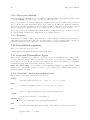
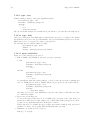
This section is about the test suites and wrappers around existing suites. These wrappers are
part of our overall test infrastructure.
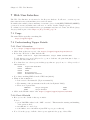
It’s basically about the middle part in the following picture:
We have wrappers for existing test and benchmark suites.
Wrappers just run the suites as a user would manually run them but additionally extract results
and produce TAP (Test Anything Protocol).
We have some specialized, small test suites that complement the general suites, e.g. for extracting meta information or parsing logs for common problems.
If the environment variables
TAPPER_REPORT_SERVER
TAPPER_REPORT_PORT
are set the wrappers report their results by piping their TAP output there, else they print to
STDOUT.
4.1 Available test suite wrappers
Originally we have a lot of direct wrappers available but haven’t them all published as open
source. For OS testing the most important wrapper which is also publicly available is tappertestsuite-autotest aka. Tapper-Testsuite-AutoTest. You should look at that.
4.1.1 tapper-testsuite-autotest
A suite that wraps the autotest client with the export of TAP and sends the resulting TAP
archives to Tapper server.
That is the primary testsuite wrapper for OS testing.
4.2 Environment variables
The TAPPER automation layer provides some environment variables that the wrappers can use:
TAPPER TESTRUN
Currently active Testrun ID.
TAPPER SERVER
The controlling automation Server that initiated this testrun.
18
Tapper User Manual
TAPPER REPORT SERVER
The target server to which the tests should report their results in TAP.
TAPPER REPORT PORT
The target port to which the tests should report their results in TAP. Complements
TAPPER_REPORT_SERVER.
TAPPER REPORT API PORT
The port on which the more sophisticated Remote Reports API is available. It’s
running on the same host as TAPPER_REPORT_SERVER.
TAPPER TS RUNTIME
Maximum runtime after which the testprogram will not be restarted when it runs
in a loop. (This is a more passive variant than a timeout.)
TAPPER GUEST NUMBER
Virtualisation guests are ordered, this is the guest number or 0 if not a guest.
TAPPER NTP SERVER
The server where to request NTP dates from.
These variables should be used in the TAP of the suite as Tapper headers. Important use-case
is "report groups", see next chapter.
Chapter 5: Preconditions
19
5 Preconditions
The central thing that is needed before a test is run is a so called precondition. Creating those
preconditions is the main task needed to do when using the automation framework.
Most of the preconditions describe packages that need to be installed. Other preconditions
describe how subdirs should be copied or scripts be executed.
A precondition can depend on other preconditions, leading to a tree of preconditions that will
be installed from the leaves to the top.
5.1 SYNOPSIS
5.2 Layers of preconditions
5.3 Precondition repository
5.4 Overview Precondition Types
5.5 Details Precondition Types
5.6 Macro Preconditions
5.7 Testplans
5.8 Precondition Producers
• Create a (maybe temporary) file
• Define conditions for a testrun: the preconditions
• Put the precondition into the database, maybe referring to other preconditions
• Create a testrun in the database, referring to the precondition
• Wait until the testrun is executed and results are reported
5.9 Layers of preconditions
There are “normal preconditions” and “macro preconditions”.
5.9.1 Normal preconditions
We store preconditions in the database and assign testruns to them (also in the database).
Usually the preconditions were developed in a (temporary) file and then entered into the database
with a tool. After that the temporary file can be deleted. Note that such a precondition file can
contain multiple precondition as long as they are formated as valid YAML.
Preconditions can be kept in files to re-use them when creating testruns but that’s not needed
for archiving purposes, only for creation purposes.
Please note: Normal preconditions are usually not what you want. It’s the low level mechanism.
Its advantage is in reusing the preconditions by referring to IDs and creating trees of preconditions. This reuse is usually too complex. What you typically want are Macro Preconditions.
20
Tapper User Manual
5.9.2 Macro preconditions
There is another mechanism on top of normal preconditions: Macro Preconditions. These allow
to bundle multiple preconditions at once into a common use-case.
A macro precondition is evaluated when the testrun is added via the cmdline utils (or the web
app, both use the same underlying layer). The result are “normal preconditions” which are
inserted into the DB everytime together with the testrun, so there is no reuse of preconditions
and preconditions are always a list, no tree. Anyhow, they are much easier to handle.
Macro preconditions are template files which should be archived in the precondition repository,
as only the finally resulting preconditions are stored in the database.
5.9.3 Testplans
Testplans are a variant of macro preconditions to control multiple testruns and queue them to
particular hosts and queues. They are mostly useful to provide end-users with complex but
polished frontend use-cases where they can define values to prepared parameters.
5.10 Precondition repository
Macro preconditions can be stored in
/data/tapper/live/repository/macropreconditions/
5.11 Overview Precondition Types
There are two variants of preconditions: Action preconditions and Highlevel preconditions. Action preconditions describe single actions, like “copy a file” or “execute a program”. Highlevel
preconditions can contain other (action) preconditions and are used for instance for virtualization install scenarios where hosts and guests are described.
Please note the wording: A precondition is the particular YAML block with all the details
(think of an object instance). Such a block is of a “precondition type” which defines its allowed
structure (think of a class).
5.11.1 Overview: Action precondition types
The following action precondition types are allowed:
package
A package (kernel, library, etc.), of type .tar, .tar.gz or .tar.bz2
image
A complete OS image of type .iso, .tar.gz, .tgz, .tar, .tar.bz2
prc
Create a config for the PRC module of the automation layer.
copyfile
One file that can just be copied/rsync’d
installer stop
Don’t reboot machine after system installer finished
grub
Overwrite automatically generated grub config with one provided by the tester
fstab
Append a line to /etc/fstab
Chapter 5: Preconditions
21
repository
Fetch data from a git, hg or svn repository
exec
Execute a script during installation phase
reboot
Requests a reboot test and states how often to reboot.
5.11.2 Overview: Highlevel precondition types
Currently only the following high level precondition type is allowed:
virt
Generic description for Xen or KVM
High level preconditions both define stuff and can also contain other preconditions.
They are handled with some effort to Do The Right Thing, i.e., a defined root image in the
high level precondition is always installed first. All other preconditions are installed in the order
defined by its tree structure (depth-first).
5.12 Details Precondition Types
We describe preconditions in YAML files (http://www.yaml.org/).
All preconditions have at least a key
precondition_type: TYPE
and optionally
name: VERBOSE DESCRIPTION
shortname: SHORT DESCRIPTION
then the remaining keys depend on the TYPE.
5.12.1 installer stop
stop run after system installer
--precondition_type: installer_stop
5.12.2 grub
overwrite automatically generated grub config
--precondition_type: grub
config: |
title Linux
root $grubroot
kernel /boot/vmlinuz root=$root"
• Note: multiple lines in the grub file have to be given as one line separated by “\n” (literally
a backslash and the letter n) in YAML
• the variables $grubroot and $root are substituted with grub and /dev/* notation of the
root partition respectively
• $root substitution uses the notation of the installer kernel. This may cause issues when the
installer detects /dev/sd? and the kernel under test detects /dev/hd? or vice versa
• since grub always expects parentheses around the device, they are part of the substitution
string for $grubroot
22
Tapper User Manual
• note the syntax, to get multiline strings in YAML you need to start them with |, a newline
and some indentation
5.12.3 package
•
•
•
•
•
--precondition_type: package
filename: /data/tapper/live/repository/packages/linux/linux-2.6.27.7.tar.bz2
path names can be absolut or relative to /data/tapper/development/repository/packages/
supported packages types are rpm, deb, tar, tar.gz and tar.bz2
package type is detected automatically
absolute path: usually /data/tapper/...
relative path: relative to /data/tapper/(live|development)/
5.12.4 copyfile
a file that just needs to be scp or copied:
--precondition_type: copyfile
protocol: nfs
source: osko:/export/image_files/official_testing/README
dest: /usr/local/share/tapper/
• supported protocols are “scp”, “nfs” and “local”
• the part before the first colon in the unique name is used as server name
• the server name part is ignored for local
• if dest ends in a slash, the file is copied with its basename preserved into the denoted
directory
• whether the “dest” is interpreted as a directory or a file is decided by the underlying “scp”
or “cp” semantics, i.e., it depends on whether a directory already exists.
5.12.5 fstab
a line to add to /etc/fstab, e.g., to enable mounts once the system boots
--precondition_type: fstab
line: "165.204.85.14:/vol/osrc_vol0 /home nfs auto,defaults 0 0"
5.12.6 image
usually the root image that is unpacked to a partition (this is in contrast to a guest file that’s
just there)
--precondition_type: image
mount: /
partition: testing
image: /data/tapper/live/repository/images/rhel-5.2-rc2-32bit.tgz
• partition and mount are required, all other options are optional
• mount points are interpreted as seen inside the future installed system
• if no image is given, the already installed one is reused, i.e., only the mountpoint is mounted;
make sure this is possible or your test will fail!
• can be either an iso file which is copied with dd or a tar, tar.gz or tar.bz2 package which is
unpacked into the partition
Chapter 5: Preconditions
23
• partitions are formated ext3 (only when image is given) and mounted to mount afterwards
(this is why image exists at all, copyfile does not provide this)
• “image”: absolute or relative path (relative to /data/tapper/live/repository/images/)
If not given, then it re-uses the partition without formatting/unpacking it.
• partition: Can be /dev/XXX or LABEL or UUID.
5.12.7 repository
--precondition_type: repository
type: git
url: git://git.kernel.org/pub/scm/linux/kernel/git/avi/kvm.git
target: kvm
revision: c192a1e274b71daea4e6dd327d8a33e8539ed937
• git and hg are supported
• type and url are mandatory, target and revision are optional
• target denotes the directory where the source is placed in, the leading slash can be left out
(i.e., paths can be given relative to root directory ‘/’).
5.12.8 type: prc
Is typically contained implicitely with the abstract precondition virt. But can also be defined
explicitely, e.g., for kernel tests.
Creates config for PRC. This config controls what is to be run and started when the machine
boots.
precondition_type: prc
config:
runtime: 30
test_program: /bin/uname_tap.sh
timeout_after_testprogram: 90
guests:
- svm: /xen/images/..../foo.svm
- svm: /xen/images/..../bar.svm
- exec: /xen/images/..../start_a_kvm_guest.sh
• guest number
If it is a guest, for host system use 0.
• test program
startet after boot by the PRC
• runtime
The wanted time, how long it runs, in seconds, this value will be used to set an environment
variable TAPPER_TS_RUNTIME, which is used by the test suite wrappers.
• timeout testprogram
Time that the testprogram is given to run, at most, after that it is killed (SIGINT,
SIGKILL).
• guests
Only used for virtualization tests. Contains an array, one entry per guest which defines how
a guest is started. Can be a SVM file for Xen or an executable for KVM.
24
Tapper User Manual
5.12.9 type: exec
Defines which program to run at the installation phase.
precondition_type: exec
filename: /bin/some_script.sh
options:
- -v
- --foo
- --bar="hot stuff"
The quotes in this example are actually wrong but left in so you learn the following lesson:
5.12.10 type: hint
Such a precondition provides hints where normal behaviour needs to be changed. It contains
any hash keys needed for the special handling. The special handling itself is done in the
MCP and needs to be prepared for what you specify here.
We currently use it to handle SimNow testing.
precondition_type: hint
simnow: 1
script: family10_sles10_xen.simnow
5.12.11 quote subtleties
Please note some subtlety about quotes.
• This is YAML. And YAML provides its own way of quoting.
So this
precondition_type: exec
filename: /bin/some_script.sh
options:
- --foo
and this
precondition_type: exec
filename: /bin/some_script.sh
options:
- "--foo"
are actually the same (the value is always: --foo) because quotes at the beginning and
end of a YAML line are used by YAML. When you use quotes at other places like in
precondition_type: exec
filename: /bin/some_script.sh
options:
- --bar="hot stuff"
then they are not part of the YAML line but part of the value, so this time the value
is: --bar="hot stuff".
• Quotes are not shell quotes.
So if you used quotes and they are not YAML quotes but part of the value then you
should know that they are not evaluated by a shell when some_script.sh is called,
because we use system() without a shell layer to start it.
That’s why in above example the quoted value "hot stuff" (with quotes!) is given as
parameter --bar to the program. This usually not what you want.
• Summary: Yo nearly never need quotes.
This is good enough:
Chapter 5: Preconditions
25
precondition_type: exec
filename: /bin/some_script.sh
options:
- -v
- --foo
- --bar=hot stuff
5.12.12 type: reboot
Requests a reboot test and states how often to reboot.
Note: Reboot count of 1 actually means boot two times since the first boot is always counted
as number 0.
precondition_type: reboot
count: 2
5.12.13 type: autoinstall
Install a system using autoinstall scripts.
The filename denotes the grub config
to be used.
It is mandatory and can be given as absolut path or relative to
/data/tapper/.../repository/install grub/. The optional timeout is measured in second. If
its absent a default value is used.
precondition_type: autoinstall
filename: suse/SLES10SP3_x86_64.lst
timeout: 1800
5.12.14 type: testprogram
Define which test program to run. This way of defining a test program should be prefered
to using the PRC type precondition. Only the testprogram precondition guarantees parsing
that sets all internal Tapper variables correctly.
Testprograms allow a key chdir which can either contain a particular directory where to
chdir before testprogram execution or the value AUTO (uppercase) which means to chdir to
the dirname of the program.
precondition_type: testprogram
runtime: 30
program: /bin/uname_tap.sh
timeout: 90
parameters:
- --verbose
5.12.15 type: virt
A virtualization environment.
(The linebreaks with \ are not part of the actual file, but only for this document.)
precondition_type: virt
name: automatically generated Xen test
host:
preconditions:
- precondition_type: package
filename: /data/tapper/live/repository/packages/xen/builds/\
x86_64/xen-3.3-testing/\
xen-3.3-testing.2009-03-20.18614_f54cf790ffc7.x86_64.tgz
- precondition_type: package
filename: /data/tapper/live/repository/packages/tapperutils/\
26
Tapper User Manual
sles10/xen_installer_suse.tar.gz
- precondition_type: exec
filename: /bin/xen_installer_suse.pl
root:
precondition_type: image
partition: testing
image: suse/suse_sles10_64b_smp_raw.tar.gz
mount: /
arch: linux64
testprogram:
execname: /opt/tapper/bin/tapper_testsuite_dom0_meta.sh
timeout_testprogram: 10800
guests:
- config:
precondition_type: copyfile
protocol: nfs
name: tapper:/data/tapper/live/repository/configs/\
xen/001-sandschaki-1237993266.svm
dest: /xen/images/
svm: /xen/images/001-sandschaki-1237993266.svm
root:
precondition_type: copyfile
protocol: nfs
arch: linux64
name: osko:/export/image_files/official_testing/\
redhat_rhel4u7_64b_up_qcow.img
dest: /xen/images/
mountfile: /xen/images/001-sandschaki-1237993266.img
mounttype: raw
testprogram:
execname: /opt/tapper/bin/py_ltp
timeout_after_testprogram: 10800
• guest root always needs to name the file to mount since its not easy or even impossible
to get this name for some ways to install the root image (like tar.gz packages or subdir)
• guest root and guest config are installed inside the host, guest preconditions are installed
inside the guest image
• guests can be started with xm create $xenconf, evaluation of $kvmconf or executing
the $execconf script, thus only one of these three must be provided
• ”’Note”’: virt instead of virtualisation is used to reduce confusion for users whether British
English (virtualisation) or American English (virtualization) is expected
• key “arch” arch: linux64 | linux32 (needed for for tapper toolchain)
5.12.16 General precondition keys “mountfile”
These 2 options are possible in each precondition. With that you can execute the precondition
inside guest images:
mountfile: ...
mountpartition: ...
mounttype: @TODO{is this the same as mountfile, mountpartition?}
• 1. only mountfile: eg. rawimage, file loop-mounted
• 2. only mountpartition: then mount that partition
Chapter 5: Preconditions
27
• 3. image file with partitions: mount the imagefile and from that only the given partition
5.13 Macro Preconditions
This
section
describes
macro
precondition
files
/data/tapper/live/repository/macropreconditions/.
as
they
are
stored
in
A macro precondition denotes a file containing one or multiple preconditions and additional
TemplateToolkit code.
In most cases “normal preconditions” for similar tests will only differ in one or very few keys.
Thus precondition files could easily be reused by only changing these few keys. This is made
easier with using “macro preconditions”.
The macro precondition file should contain all “normal preconditions” to be reused. All variable
keys should be substituted by appropriate TemplateToolkit variables. When creating the new
testrun actual values for these TemplateToolkit variables have to provided.
Macro preconditions are not stored in the database. They are only a tool to ease the creation
of preconditions. Only the resulting preconditions are stored in database.
To make parsing macro preconditions easier required and optional fields can be named after a
comment field in the first lines of the file after the keys tapper-mandatory-fields and tapperoptional-fields respectively as in the following example:
# tapper-mandatory-fields: id
# tapper-optional-fields: kernel
These # tapper-* headers are also used in web frontend to render forms out of it and submit
testruns from there.
The values for the placeholders can be filled via such a command line:
$ tapper-testrun new [all usual options] \
--macroprecond=FILENAME \
-Did=value1 \
-Dkernel=2.6.37
The FILENAME is a complete filename with absolute path.
There is no restriction on TemplateToolkit code for variable substitution. The following example
could be used to generate a default value for the precondition key id.
[%id = BLOCK%][%IF id%][%id%][%ELSE%]2009-06-29-perfmon[%END%][%END%]
5.13.1 A real live example - kernel boot test
• Macroprecondition
# tapper-mandatory-fields: kernel_version
# tapper-optional-fields: kernelpkg
--precondition_type: image
arch: linux64
image: suse/suse_sles10_64b_smp_raw.tar.gz
mount: /
partition: testing
--precondition_type: copyfile
name: /data/tapper/live/repository/testprograms/uname_tap/uname_tap.sh
dest: /bin/
protocol: local
---
28
Tapper User Manual
precondition_type: copyfile
name: /data/tapper/live/repository/packages/tapperutils/kernel/gen_initrd.sh
dest: /bin/
protocol: local
--[% kernelpkg = BLOCK %]\
[% IF kernelpkg %]\
[% kernelpkg %]\
[%ELSE%]kernel/linux-[% kernel_version %].tar.gz[% END %]\
[% END %]
precondition_type: package
filename: [% kernelpkg %]
--precondition_type: exec
filename: /bin/gen_initrd.sh
options:
- [% kernel_version %]
--precondition_type: prc
config:
runtime: 30
test_program: /bin/uname_tap.sh
timeout_testprogram: 90
• The test script
The test script uname_tap.sh to which the macro precondition refers is just a shell script
that examines uname output:
#! /bin/sh
echo "1..2"
echo "# Tapper-Suite-Name: Kernel-Boot"
echo "# Tapper-Suite-Version: 1.00"
echo "# Tapper-Machine-Name: " ‘hostname‘
if [ x‘uname‘ != xLinux ] ; then echo -n "not " ; fi
echo "ok - We run on Linux"
if uname -a | grep -vq x86_64 ; then echo -n "not " ; fi
echo "ok - Looks like x86_64"
• Command line
Once you wrote the macro precondition and the test script all you need is this command
line:
tapper-testrun new \
--hostname=dickstone \
--macroprecond \
/data/tapper/live/repository/macropreconditions/kernel/kernel_boot.mpc \
-Dkernelpkg=perfmon-682-x86_64.tar.gz \
-Dkernel_version=2.6.28-rc3
or with some more information (owner, topic):
tapper-testrun new \
--owner=mhentsc3 \
--topic=Kernel \
Chapter 5: Preconditions
29
--hostname=dickstone \
--macroprecond \
/data/tapper/live/repository/macropreconditions/kernel/kernel_boot.mpc \
-Dkernelpkg=perfmon-682-x86_64.tar.gz \
-Dkernel_version=2.6.28-rc3
5.14 Testplans
This section describes testplan files as they are stored in /data/tapper/live/testplans/.
A testplan is very similar to a macro precondition but can additionally bundle several testruns
and specify required hostname and used queue inside. This and the possibility of using TemplateToolkit (see Macro Preconditions) inside makes it most useful for frontend usage: You can take
all parameters, especially queue+hosts from commandline via -Dhosts=affe,zomtec,birne,
split them via Temaplte Toolkit and loop to create multiple testruns.
To tell it’s one test out of a set, we use the type multitest, like this:
--type: multitest
description:
shortname: my-testplan
topic: my-testplan
queue: AdHoc
requested_hosts_all:
- affe
- zomtec
preconditions:
- ...
- ...
The preconditions are then as already described in earlier chapters.
It additionally allows to embed self-documentation which can be viewd with the command
tapper-testrun newtestplan --guide --file my-testplan-file.
To take parameters and create multiple testruns, you could use it like this:
### This is an example testplan
### Allowed params:
### - -Dqueue=QUEUE
### - -Dtests=TEST1,TEST2,TEST3
### - -Dmachines=HOST1,HOST2
[%# define default values %]
[%- IF queue == ’’ %][% queue = ’AdHoc’ %][% END -%]
[%- IF tests == ’’ %][% tests = ’hackbench’ %][% END -%]
[%- IF machines == ’’ %][% machines = ’arges’ %][% END -%]
[% AllTests = tests.split(’,’) %]
[% AllDistros = distros.split(’,’) %]
[% AllMachines = machines.split(’,’) %]
[%- FOREACH machine = AllMachines %]
[%- FOREACH test = AllTests %]
--type: multitest
description:
shortname: [% test %]
topic: Topic-[% AllTests.join(’-’) %]
queue: [% queue %]
30
Tapper User Manual
requested_hosts_all:
- [% machine %]
preconditions:
- ...
precondition_type: testprogram
program: /opt/tapper/bin/tapper-testsuite-autotest
parameters:
- --test
- [% test %]
- ...
From a command line this can be used like below.
Show self-doc:
$ tapper-testrun newtestplan --guide --file my-testplan
This is an example testplan
Allowed params:
- -Dqueue=QUEUE
- -Dtests=TEST1,TEST2,TEST3
- -Dmachines=HOST1,HOST2
Start a new testplan consisting of potentially many testruns:
$ tapper-testrun newtestplan --verbose \
--file my-testplan \
-Dqueue=TrackWorkload \
-Dtests=hackbench,dbench
Plan created
id:
241
url: http://tapper/tapper/testplan/id/241
path: topic/kernel/misc/my-testplan
file: /data/tapper/topic/kernel/misc/my-testplan
Whenever you want to provide a polished use-case to an end-user consider writing a testplan
file. You add all the complexity, details and documentation into the file and provide your user
with just this file. He/she can then specify the prepared parameters for his/her particular needs,
like the tests to run.
We additionally use Testplans to bi-directional map from such testplans to a task in our planning
software where we simply assume a mapping of the task hierarchy to a subdirectory hierarchy.
Based on this mapping the planning software can specify when to execute such a testplan
according to the project plan.
A testplan then typically contains several testruns: some for the known-good sanity tests without
a changed feature and some for the actual tested feature.
5.15 Precondition Producers
Sometimes, parameters for preconditions shall be defined when the testrun, this precondition
is assigned to, is choosen for execution. This might apply for example when you want to test
the newest build of a certain package. Also in combination with autorerun testruns dynamic
assignment of preconditions is useful. These testruns are reinserted into the database automatically as soon as the scheduler chooses them for execution. In this case dynamic precondition
Chapter 5: Preconditions
31
assignment allows these rerun tests to differ slightly. Preconditions with dynamically assigned
parameters are called Lazy Precondition.
Dynamic precondition assignment is implemented using Precondition Producers. A producer is a
modul that is called by the scheduler for handling of lazy preconditions. To use a lazy preconditio
the user has to assign a precondition of type ‘producer’ to the testrun. This precondition has to
contain the basename of an existing producer module and may contain additional parameters.
The producer will substitute the ‘producer’ precondition with a normal precondition that has
values assigned to all parameters.
5.15.1 Lazy precondition
Lets assume for example that you want to include the newest kernel package into your test.
This can be achieved with the existing “Kernel” producer. Instead of a precondition of type
‘package’ with a certain filename you should assign the following precondition to your testrun.
precontition_type: producer
producer: Kernel
This precondition will be substituted with a package precondition that has the latest Sysint
kernel build set as filename.
5.15.2 Producer API
Producer are modules loaded into the scheduler. Thus they need to be written in Perl and reside
inside the Tapper::MCP::Scheduler::PreconditionProducer:: namespace. A producer has
to implement a method ‘produce’. This function gets a job object as first parameter and a hash
containing all additional options from the precondition as second parameter. It suggested that
each producer inherits from Tapper::MCP::Scheduler::PreconditionProducer. Producers
shall return a hash that has the produced preconditions as YAML text assigned to the hash key
precondition_yaml. An optional key topic allows the producer to set the topic for the test.
If the hash key error is set, the associated error string is reported and the testrun is cancled.
In this case the other hash keys are not evaluated.
5.15.3 Existing producers
Currently the following producers exist:
• DummyProducer.pm
Dummy producer for testing.
• Kernel.pm
Produces preconditions for kernel tests.
• NewestPackage.pm
Produces a package precondition that installs the newest package from a given directory.
• SimnowKernel.pm
Produces preconditions for simnow kernel tests.
• Temare.pm
Wraps the existing temare producer utility.
5.15.4 Example: “Kernel” precondition producer
The kernel producer returns a package precondition that contains the latest kernel package from
the kernel package path. Furthermore, it returns an exec precondition that triggers the creation
of an initrd file for the kernel.
Valid options:
32
Tapper User Manual
• arch
May be x86 64 or i686. The latest kernel package from the associated path are used.
• version
Only use kernel packages that contain the given version string
• stable
Use stable kernels when true
5.15.4.1 Lazy precondition
The lazy precondition, pointing to the “Kernel” precondition producer:
precondition_type: produce
producer: Kernel
arch: i686
version: 2.6.32
stable: 1
5.15.4.2 Resulting preconditions
The resulting preconditions may look like this:
--precondition_type: package
filename: kernel/stable/i686/kernel-2.6.32-rc1.tar.gz
--precondition_type: exec
filename: /bin/gen_initrd.sh
options:
- 2.6.32-rc1
Chapter 6: Command line interface
33
6 Command line interface
6.1 Commandline Synopsis
• Get host usage/scheduling overview
• Create hosts
• Create queues
• Create hosts/queue bindings
6.2 Scheduling
6.2.1 Create new queue and new host and bind both together
• Show existing queues with priorities
$ tapper-testrun listqueue -v
10 |
AdHoc
11 |
kernel_reboot
4 | xen-3.3-testing-32
5 | xen-3.3-testing-64
7 | xen-3.4-testing-32
6 | xen-3.4-testing-64
9 |
xen-unstable-32
8 |
xen-unstable-64
|
|
|
|
|
|
|
|
1000
100
100
100
100
100
100
100
• Create new queue oprofile
$ tapper-testrun newqueue --name=oprofile \
--priority=200
12
• Create new host bullock and bind it to queue oprofile
$ tapper-testrun newhost --name=bullock \
--queue=oprofile
10
• Show existing hosts
Note that the new host bullock is initially deactivated.
$ tapper-testrun listhost -v
8 | amarok | deactivated
1 | athene |
active
9 |
azael | deactivated
10 | bullock | deactivated
4 |
cook | deactivated
6 | incubus | deactivated
2 | kobold |
active
5 | lemure |
active
3 |
satyr |
active
7 |
uruk | deactivated
|
|
|
|
|
|
|
|
|
|
free
in use
free
free | oprofile
free
free
in use
in use
in use
free
• Activate host bullock
Note that this command is ID based (bullock has id 10) because you can rename hosts.
$ tapper-testrun updatehost --id=10 --active
10 | bullock | active | free | oprofile
34
• Again, show existing hosts
Host bullock is now activated.
$ tapper-testrun listhost -v
8 | amarok | deactivated
1 | athene |
active
9 |
azael | deactivated
10 | bullock |
active
4 |
cook | deactivated
6 | incubus | deactivated
2 | kobold |
active
5 | lemure |
active
3 |
satyr |
active
7 |
uruk | deactivated
Tapper User Manual
|
|
|
|
|
|
|
|
|
|
free
in use
free
free | oprofile
free
free
in use
in use
in use
free
Done.
6.2.2 Change queue priority
• List existing queues
$ tapper-testrun listqueue -v
10 |
AdHoc | 1000
11 |
kernel_reboot |
100
12 |
oprofile |
200 | bullock
4 | xen-3.3-testing-32 |
100
5 | xen-3.3-testing-64 |
100
7 | xen-3.4-testing-32 |
100
6 | xen-3.4-testing-64 |
100
9 |
xen-unstable-32 |
100
8 |
xen-unstable-64 |
100
• Update queue
$ tapper-testrun updatequeue --name=oprofile \
--priority=1000
12
• Again, list existing queues
$ tapper-testrun listqueue -v
10 |
AdHoc | 1000
11 |
kernel_reboot |
100
12 |
oprofile | 1000 | bullock
4 | xen-3.3-testing-32 |
100
5 | xen-3.3-testing-64 |
100
7 | xen-3.4-testing-32 |
100
6 | xen-3.4-testing-64 |
100
9 |
xen-unstable-32 |
100
8 |
xen-unstable-64 |
100
Done.
6.2.3 requested features
Hosts for testruns can be choosen based on requested features. Supported features are:
• hostname
• mem
• vendor
Chapter 6: Command line interface
•
•
•
•
•
•
•
•
•
35
family
model
stepping
revision
socket
cores
clock
l2cache
l3cache
6.2.4 Cancel current testrun on host
Freeing a host need the config for the currently running testrun. Thus, the command is only
tested on bancroft and may not work on other machines.
$ tapper-testrun freehost \
--name=bullock\
--desc=’I need this host right now’
Chapter 7: Web User Interface
37
7 Web User Interface
The Web User Interface is a frontend to the Reports database. It allows to overview reports
that came in from several machines, in several test suites.
It can filter the results by dates, machines or test suite, gives colorful (RED/YELLOW/GREEN)
overview about success/failure ratios, allows to zoom into details of single reports.
To evaluate reported test results in a more programmatic way, have a look into the DPath Query
Language that is part of the Chapter 8 [Reports API], page 41.
7.1 Usage
The main URL is typically somerthing like
http://tapper/tapper
7.2 Understanding Tapper Details
7.2.1 Part 1 Overview
• Go to https://tapper/tapper/reports
• Click “Last weeks test reports”, aka. https://tapper/tapper/reports/date/7
• Below day “Wed Oct 7, 2009” find the line
20856 2009-10-07 Topic-xen-unstable satyr PASS testrun 9617
To find this report you probably need to go more back into the past than just 7 days, or
you use the direct link below.
• Note that there are other reports in this group that are greyed-out, i.e. all report ids of
this testrun are:
20856
Topic-xen-unstable
20855
LMBench
20854
CTCS
20852
Host-Overview
20851
Hardwaredb Overview
• Note that something FAILed in the CTCS run (20854).
• What we know until here:
• It is a test for Xen-unstable (Topic-xen-unstable)
• The running of the guests+suites itself worked well (20856 PASS)
• There were 2 guest runs:
LMBench
satyr:celegorm
PASS
CTCS
satyr:eriador
FAIL
• Click on the ID link “20856” aka. https://tapper/tapper/reports/id/20856
7.2.2 Part 2 Details
• Here you see the details of this report 20856.
You see:
• green PASSED results for the “MCP overview”. This means the starting and finishing
of the guests worked.
• attachments of console logs.
• some links to more information (raw TAP report, preconditions)
• Note below the group of all the other reports, again it’s the group of those IDs:
38
Tapper User Manual
20856
Topic-xen-unstable
20855
LMBench
20854
CTCS
20852
Host-Overview
20851
Hardwaredb Overview
• The most meta information is in “20852 Host-Overview”.
• Click on the ID link “20852” aka. https://tapper/tapper/reports/id/20852
• Now you see the details of “20852 Host-Overview” with lots of meta information as “Context”.
You see:
Metainfo
cpuinfo: 1x Family: 15, Model: 67, Stepping: 2
ram:
3950 MB
uptime:
0 hrs
XEN-Metainfo
xen_dom0_kernel: 2.6.18.8-xen x86_64
xen_base_os_description: SUSE Linux Enterprise Server 10 SP2 (x86_64)
xen_changeset:
20273:10cfcbef68ee
xen_version:
3.5-unstable
guest_1_redhat_rhel5u4_32bpae_qcow
xen_guest_description:
001-lmbench
xen_guest_flags:
xen_guest_start:
guest_2_suse_sles10_sp3_gmc_32b_up_qcow
xen_guest_description:
002-ctcs
xen_guest_flags:
xen_guest_start:
• If you are interested in what went wrong in the CTCS run, click on ID link “20854” aka.
https://tapper/tapper/reports/id/20854
• Here you see
• one RED bar in CTCS-results
• several RED bars in var log messages
You can click on them to unfold the details.
7.2.3 Part 3 Testrun
• Imagine that the testrun completely failed and no usable reports arrived in, except that
primary one from the MCP, then you can use the link at the end of the line
20856 2009-10-07 Topic-xen-unstable satyr PASS testrun 9617
-----------• Click on that link “testrun 9617” aka. https://tapper/tapper/testruns/id/9617
• That contains the description what was planned in this testrun, regardless of whether it
succeeded.
(That’s the main difference between the two complementary concepts “Testrun” vs. “Reports”. The “Testrun” contains the specification, the “Reports” contain the results.)
You see:
Chapter 7: Web User Interface
Name
Host
Architecture
Root image
Test
Guest number 1
Architecture
Root image
Test
Guest number 2
Architecture
Root image
Test
• That’s it, basically.
39
Automatically generated Xen test
linux64
/suse_sles10_sp2_64b_smp_raw.tar.gz
metainfo
linux32
/redhat_rhel5u4_32bpae_qcow.img
py_lmbench
linux32
/suse_sles10_sp3_gmc_32b_up_qcow.img
py_ctcs
Chapter 8: Reports API
41
8 Reports API
8.1 Overview
There runs yet another daemon, the so called Tapper::Reports::API, on the same host where
already the TAP Receiver runs. This ‘Reports API’ is meant for everything that needs more
than just dropping TAP reports to a port, e.g., some interactive dialog or parameters.
This Tapper::Reports::API listens on Port 7358. Its API is modeled after classic unix script
look&feel with a first line containing a description how to interpret the rest of the lines.
The first line consists of a shebang (#!), a api command and command parameters. The rest of
the file is the payload for the api command.
The syntax of the ‘command params’ varies depending on the ‘api command’ to make each command intuitively useable. Sometimes they are just positional parameters, sometimes they look
like the start of a HERE document (i.e., they are prefixed with << as you can see below).
8.2 Raw API Commands
In this section the raw API is described. That’s the way you can use without any dependencies
except for the minimum ability to talk to a port, e.g., via netcat.
See section [tapper-api], page 44 for how to use a dedicated command line utility that makes
talking to the reports API easier, but is a dependency that might not be available in your
personal test environment.
8.2.1 upload aka. attach a file to a report
This api command lets you upload files, aka. attachments, to reports. These files are available
later through the web interface. Use this to attach log files, config files or console output.
8.2.1.1 upload Synopsis
#! upload REPORTID FILENAME [ CONTENTTYPE ]
payload
8.2.1.2 Parameters
• REPORTID
The id of the report to which the file is assigned
• FILENAME
The name of the file
• CONTENTTYPE
Optional MIME type; defaults to plain; use application/octet-stream to make it downloadable later in browser.
8.2.1.3 upload Payload
The raw content of the file to upload.
8.2.1.4 upload Example usage
Just echo the first api-command line and then immediately cat the file content:
$ ( echo "#! upload 552 xyz.tmp" ; cat xyz.tmp ) | netcat -w1 bascha 7358
8.2.2 download - download a file which is attached to a report
This api command lets you download files, aka. attachments, from reports.
42
Tapper User Manual
8.2.2.1 download Synopsis
#! upload REPORTID FILENAME
There is no other payload neccessary here, just this single line.
8.2.2.2 download Parameters
• REPORTID
The id of the report to which the file is assigned
• FILENAME
The name of the file as it was specified on upload
8.2.2.3 download Example usage
Just echo the first api-command line and redirect the answer into a file.
$ ( echo "#! download 552 xyz.tmp" ) | netcat -w1 bascha 7358 > xyz.tmp
8.2.3 mason - Render templates with embedded query language
To query report results we provide sending templates to the API in which you can use a query
language to get report details: This api-command is called like the template engine so that we
can provide other template engines as well.
8.2.3.1 mason Synopsis
#! mason debug=0 <<ENDMARKER
payload
ENDMARKER
8.2.3.2 mason Parameters
• debug=1
If ‘debug’ is specified and value set to 1 then any error message that might occur is reported
as result content. If debug is omitted or false and an error occurs then the result is just
empty.
• <<ENDMARKER
You can choose any word instead of ENDMARKER which should mark the end of input,
like in HERE documents, usually some word that is not contained in the template payload.
8.2.3.3 mason Payload
A mason template.
Mason is a template language, see http://masonhq.com. Inside the template we provide a
function reportdata to access report data via a query language. See section [Query language],
page 43 for details about this.
8.2.3.4 Example usage
This is a raw Mason template:
% my $world = "Mason World";
Hello <% $world %>!
% my @res = reportdata ’{ "suite.name" => "perfmon" } :: //tap/tests_planned’;
Planned perfmon tests:
% foreach (@res) {
<% $_ %>
% }
Chapter 8: Reports API
43
If you want to submit such a Mason template you can add the api-command line and the EOF
marker like this:
$ EOFMARKER="MASONTEMPLATE".$$
$ payload_file="perfmon_tests_planned.mas"
$ ( echo "#! mason <<$EOFMARKER" ; cat $payload_file ; echo "$EOFMARKER" ) \
| netcat -w1 bascha 7358
The output of this is the rendered template. You can extend the line to save the rendered result
into a file:
$ ( echo "#! mason <<$EOFMARKER" ; cat $payload_file ; echo "$EOFMARKER" ) \
| netcat -w1 bascha 7358 > result.txt
The answer for this looks like this:
Hello Mason World!
Planned perfmon tests:
3
4
17
8.3 Query language DPath
The query language, which is the argument to the reportdata as used embedded in the ‘mason’
examples above:
reportdata ’{ "suite.name" => "perfmon" } :: //tap/tests_planned’
consists of 2 parts, divided by the ‘::’.
We call the first part in braces reports filter and the second part data filter.
8.3.1 Reports Filter (SQL-Abstract)
The reports filter selects which reports to look at. The expression inside the braces is actually
a complete SQL::Abstract expression (http://search.cpan.org/~mstrout/SQL-Abstract/)
working internally as a select in the context of the object relational mapper, which targets the
table Report with an active JOIN to the table Suite.
All the matching reports are then taken to build a data structure for each one, consisting of
the table data and the parsed TAP part which is turned into a data structure via TAP::DOM
(http://search.cpan.org/~schwigon/TAP-DOM/).
The data filter works then on that data structure for each report.
8.3.1.1 SQL::Abstract expressions
The filter expressions are best described by example:
• Select a report by ID
{ ’id’ => 1234 }
• Select a report by suite name
{ ’suite_name’ => ’oprofile’ }
• Select a report by machine name
{ ’machine_name’ => ’bascha’ }
• Select a report by date
Here the value that you want to select is a structure by itself, consisting of the comparison
operator and a time string:
{ ’created_at’ => { ’<’, ’2009-04-09 10:00’ }
}
44
Tapper User Manual
8.3.1.2 The data structure
8.3.2 Data Filter
The data structure that is created for each report can be evaluated using the data filter part of
the query language, i.e., everything after the ::. This part is passed through to Data::DPath
(http://search.cpan.org/~schwigon/Data-DPath/).
8.3.2.1 Data-DPath expressions
8.3.3 Optimizations
Using the query language can be slow. The biggest slowdown occurs with the ‘ANYWHERE’ element
//, again with several of them, because they span up a big search tree.
Therefore, if you know the depth of your path, try to replace the // with some * because that
only spans up on the current step not every possible step, like this:
{ ... } :: //section/stats-proc-interrupts-before//tap//data/TLB";
{ ... } :: /results/*/section/stats-proc-interrupts-before/tap/lines/*/_children/*/data/TL
8.4 Client Utility tapper-api
There is a command line utility tapper-api that helps with using the API without the need to
talk the protocol and fiddle with netcat by yourself.
8.4.1 help
You can aquire a help page to each sub command:
$ /opt/tapper/perl/bin/tapper-api help upload
prints
tapper-api upload --reportid=s --file=s [ --contenttype=s ]
--verbose
some more informational output
--reportid
INT; the testrun id to change
--file
STRING; the file to upload, use ’-’ for STDIN
--contenttype
STRING; content-type, default ’plain’,
use ’application/octed-stream’ for binaries
8.4.2 upload
Use it from the Tapper path, like:
$ /opt/tapper/perl/bin/tapper-api upload \
--file /var/log/messages \
--reportid=301
You can also use the special filename ‘-’ to read from STDIN, e.g., if you need to pipe the output
of tools like dmesg:
$ dmesg | /opt/tapper/perl/bin/tapper-api upload \
--file=- \
--filename dmesg \
--reportid=301
8.4.3 mason
TODO
Chapter 9: Complete Use Cases
45
9 Complete Use Cases
In this chapter we describe how the single features are put together into whole use-cases.
9.1 Automatic Xen testing
This is a description on how to run Xen tests with Tapper using SLES10 with one RHEL5.2 guest
(64 bit) as an example.
The following mainly applies to manually assigning Xen tests. In the OSRC we use temare (not
yet published) to automatically create the here described steps.
9.1.1 Paths
• Host tapper: /data/tapper/live/
• Host osko: /export/image files/official testing/
9.1.2 Choose an image for Dom0 and images for each guest
We use suse/suse sles10 64b smp raw.tar.gz as Dom0 and
osko:/export/images/testing/raw/redhat_rhel5u2_64b_smp_up_small_raw.img
as the only guest.
The SuSE image is of precondition type image. Thus its path is relative to /mnt/images which
has tapper:/data/tapper/live/repository/images/ mounted.
The root partition is named in the section ‘root’ of the Xen precondition. Furthermore, you
need to define the destination partition to be Dom0 root. We use /dev/sda2 as an example.
The partition could also be named using its UUID or partition label. Thus you need to add the
following to the dom0 part of the Xen precondition:
root:
precondition_type: image
mount: /
image: suse/suse_sles10_64b_smp_raw.tar.gz
partition: /dev/sda2
The RedHat image is of type ‘copyfile’.
It is copied from osko:/export/image_files/official_testing/raw_img/ which is mounted
to /mnt/nfs before.
This mounting is done automatically because the protocol type nfs is given. The image file is
copied to the destination named as dest in the ‘copyfile’ precondition. We use /xen/images/
as an example. To allow the System Installer to install preconditions into the guest image, the
file to mount and the partition to mount need to be named. Note that even though in some
cases, the mountfile can be determined automatically, in other cases this is not possible (e.g.
when you get it from a tar.gz package). The resulting root secition for this guest is:
root:
precondition_type: copyfile
name: osko:/export/images/testing/raw/redhat_rhel5u2_64b_smp_up_small_raw.img
protocol: nfs
dest: /xen/images/
46
Tapper User Manual
mountfile: /xen/images/redhat_rhel5u2_64b_smp_up_small_raw.img
mountpartition: p1
9.1.3 PRC configuration
PRC (Program Run Control) is responsible for starting guests and test suites.
9.1.3.1 Guest Start Configuration
Making PRC able to start Xen guests is very simple. Every guest entry needs to have a section
named "config". In this section, a precondition describing how the config file is installed and
a filename have to be given. As for guest images the file name is needed because it can’t be
determined in some cases. We use 001.svm installed via copyfile to /xen/images/001.svm. The
resulting config section is:
config:
precondition_type: copyfile
name: /usr/share/tapper/packages/mhentsc3/001.svm
protocol: local
dest: /xen/images/
filename: /xen/images/001.svm
9.1.3.2 Testsuite Configuration
You need to define, where you want which test suite to run. This can be done in every guest
and the Dom0. In this example, the Dom0 and the single guest will run different testsuites. this
chapter only describes the Dom0 test program. See the summary at the end for details on the
guest test program.
The section testprogram consists of a precondition definition describing how the test suite is
installed. In our example we use a precondition type package with a relative path name. This
path is relative to ”’/data/tapper/live/repository/packages/”’. Since ”’tapper:/data/tapper/”’
is mounted to ”’/data/tapper/”’ in the install system, this directory can be accessed at ”’tapper:/data/tapper/live/repository/packages/”’.
Beside the precondition you need to define an execname which is the full path name of the file to
be executed (remember, it can’t be determined). This file is called in the root directory (”’/”’)
in the test system thus in case you need to use relative paths inside your test suite they need to
be relative to this. The program may take parameters which are named in the optional array
”’parameters”’ and taken as is. The parameter is ”’timeout after testprogram”’ which allows
you to define that your test suite shall be killed (and an error shall be reported) after that many
seconds. Even though this parameter is optional, leaving it out will result in Tapper waiting
forever if your test doesn’t send finish messages. The resulting testprogram section looks like
this:
testprogram:
precondition_type: package
filename: tapper-testsuite-system.tar.gz
path: mhentsc3/
timeout_after_testprogram: ~
execname: /opt/system/bin/tapper_testsuite_system.sh
parameters:
- --report
Chapter 9: Complete Use Cases
47
9.1.4 Preconditions
Usually your images will not have every software needed for your tests installed. In fact the
example images now do but for the purpose of better explanation we assume that we need to
install dhcp, python-xml and bridge-utils in Dom0. Furthermore we need a script to enable
network and console. At last we install the Xen package and a Xen installer package. These two
are still needed on our test images. Package preconditions may have a ”’scripts”’ array attached
that name a number of programs to be executed after the package was installed. This is used in
our example to call the Xen installer script after the Xen package and the Xen installer package
were installed. See the summary at the end for the resulting precondition section. The guest
image only needs a DHCP client. Since this precondition is appended to the precondition list of
the appropriate guest entry, the System Installer will automatically know that the guest image
has to be mounted and the precondition needs to be installed inside relative to this mount.
9.1.5 Resulting YAML config
After all these informations are gathered, put the following YAML text into a file. We use
/tmp/xen.yml as an example.
precondition_type: xen
name: SLES 10 Xen with RHEL5.2 guest (64 bit)
dom0:
root:
precondition_type: image
mount: /
image: suse/suse_sles10_64b_smp_raw.tar.gz
partition: /dev/sda2
testprogram:
precondition_type: package
filename: tapper-testsuite-system.tar.gz
path: mhentsc3/
timeout_after_testprogram: 3600
execname: /home/tapper/x86_64/bin/tapper_testsuite_ctcs.sh
parameters:
- --report
preconditions:
- precondition_type: package
filename: dhcp-3.0.3-23.33.x86_64.rpm
path: mhentsc3/sles10/
- precondition_type: package
filename: dhcp-client-3.0.3-23.33.x86_64.rpm
path: mhentsc3/sles10/
- precondition_type: package
filename: python-xml-2.4.2-18.7.x86_64.rpm
path: mhentsc3/sles10/
- precondition_type: package
filename: bridge-utils-1.0.6-14.3.1.x86_64.rpm
path: mhentsc3/sles10/
# has to come BEFORE xen because config done in here is needed for xens initrd
- precondition_type: package
filename: network_enable_sles10.tar.gz
path: mhentsc3/sles10/
scripts:
48
Tapper User Manual
- /bin/network_enable_sles10.sh
- precondition_type: package
filename: xen-3.2_20080116_1546_16718_f4a57e0474af__64bit.tar.gz
path: mhentsc3/
scripts: ~
- precondition_type: package
filename: xen_installer_suse.tar.gz
path: mhentsc3/sles10/
scripts:
- /bin/xen_installer_suse.pl
# only needed for debug purpose
- precondition_type: package
filename: console_enable.tar.gz
path: mhentsc3/
scripts:
- /bin/console_enable.sh
guests:
- root:
precondition_type: copyfile
name: osko:/export/images/testing/raw/redhat_rhel5u2_64b_smp_up_small_raw.img
protocol: nfs
dest: /xen/images/
mountfile: /xen/images/redhat_rhel5u2_64b_smp_up_small_raw.img
mountpartition: p1
#
mountpartition: /dev/sda3 # or label or uuid
config:
precondition_type: copyfile
name: /usr/share/tapper/packages/mhentsc3/001.svm
protocol: local
dest: /xen/images/
filename: /xen/images/001.svm
testprogram:
precondition_type: copyfile
name: /usr/share/tapper/packages/mhentsc3/testscript.pl
protocol: local
dest: /bin/
timeout_after_testprogram: 100
execname: /bin/testscript.pl
preconditions:
- precondition_type: package
filename: dhclient-4.0.0-6.fc9.x86_64.rpm
path: mhentsc3/fedora9/
9.1.6 Grub
For Xen to run correctly, the defaults grub configuration is not sufficient. You need to add
another precondition to your test. System Installer will replace $root with the /dev/* notation
of the root partition and $grubroot with the grub notation of the root partition (including
parenthesis). Put the resulting precondition into a file. We use /tmp/grub.yml as an example.
This file may read like this:
Chapter 9: Complete Use Cases
49
precondition_type: grub
config: |
serial --unit=0 --speed=115200
terminal serial
timeout 3
default 0
title XEN-test
root $grubroot
kernel /boot/xen.gz com1=115200,8n1 console=com1
module /boot/vmlinuz-2.6.18.8-xen root=$root showopts console=ttyS0,115200
module /boot/initrd-2.6.18.8-xen
9.1.7 Order Testrun
To order your test run with the previously defined preconditions you need to stuff them into
the database. Fortunatelly there are commandline tools to help you with this job. They
can be found at /opt/tapper/perl/perls/current/bin. In our production environment
the server for Tapper is tapper. Log in to this server (as user tapper). Make sure that
/opt/tapper/perl/perls/current/bin/ is at the beginning of your $PATH (so the correct perl
will always be found). For each precondition you want to put into the database you need to
define a short name. Call tapper-testrun newprecondition with the appropriate options, e.g.
in our example:
$ tapper-testrun newprecondition --shortname=grub \
--condition_file=/tmp/grub.yml
$ tapper-testrun newprecondition --shortname=xen \
--condition_file=/tmp/xen.yml
tapper-testrun will return a precondition ID in each case. You will need those soon so please
keep them in mind. In the example the precondition id for grub is 4 and for Xen its 5.
You can now put your test run into the database using tapper-testrun new. This expects a
hostname, a test program and all preconditions. The test program is never evaluated and only
there for historical reasons. Put in anything you like. Add --owner with an appropriate user if
you don’t want the default tapper. The resulting call looks like this:
tapper-testrun new --hostname=bullock \
--precondition=4 \
--precondition=5 \
--test_program=whatever \
--owner=mhentsc3
Please note: There is a more central approach to describe all needed preconditions at once, see
Section 5.13 [Macro Preconditions], page 27 and Section 5.13.1 [A real live example - kernel boot
test], page 27.
When the requested testrun is scheduled Tapper will setup the system you requested and execute
your defined testrun. When everything went well, you’ll see test output soon after. For more
information on what is going on with Tapper, see /var/log/tapper-debug.