1
IP High Speed Dome Camera User’s Manual
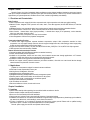
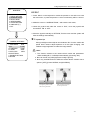
[NEAR] focus on vicinity
[FAR] focus on beyond
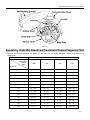
Joystick tilt up: When choosing menu, shows choosing the previous one, when choosing image, shows
camera circumgyrating upwards.
Joystick tilt down: When choosing menu, shows choosing the next one, when choosing image, shows
camera circumgyrating downwards.
Joystick pan left: When choosing menu, shows entering junior menu, or entering setting up or return to
superior menu, when choosing serial number, shows decreasing, when choosing image, shows camera
circumgyrating leftwards.
Joystick pan right: When choosing menu, shows entering junior menu, or entering setting up or return to
superior menu, when choosing serial number, when choosing serial number, shows increasing, when
choosing image, shows camera circumgyrating rightwards.
Three-Dimensional Joystick Circumgyrating Joystick Cap Function: Circumgyrating deasil shows pull
image closer, setting date/time/visitatorial data increased, circumgyrating widdershins shows pull image
farer, setting date\time\visitatorial data decreased.
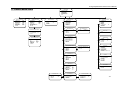
→ Basic Menu Operation
“Return”: return to superior menu
“Open”: open certain setting
“Close”: close certain setting
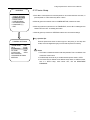
4.4 Camera Language Setting
Switch Chinese/English in language setting menu under main menu.
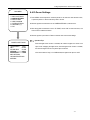
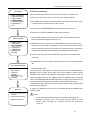
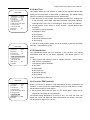
5. Display Settings
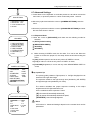
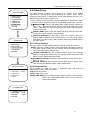
MAIN MENU
1. DISPLAY SETTINGS
2. CAMERA SETTINGS
3. PRIVACY MASK
4. USER PROGRAM
5. SYSTEM SETTINGS
6. LANGUAGE/语言
7. EXIT
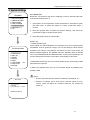
1. Press ‘Menu’ on the keyboard or evoke the presets no. 95 and 64 to enter the main menu, or
press the preset no.1 twice continuously within 1 second.
2. Move the joystick horizontally to enter ‘CAMERA SETTINGS’.
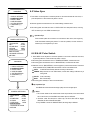
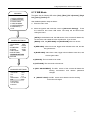
3. Each item in the menu can be set to ‘On’ or ‘off’.
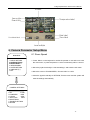
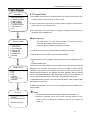
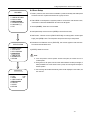
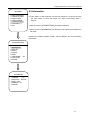
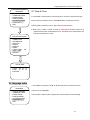
The information of the camera will change while the camera block rotates, and user can see the
inner temperature, zoom times, times, etc on the screen. When all information displays, it will
be as below(’288’ indicates the horizontal angle; and ’68 ’indicates the vertical angle.)
Notice:
1. If there is no any operation within 1 minute after entering the main menu, it will be
closed automatically.
2. Default values of the items in the menu are ‘OFF’.
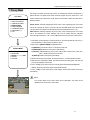
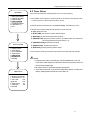
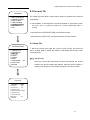
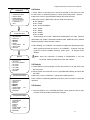
DISPLAY SETUP
1.CAMERA TITLE OPEN
2.ADDRESS
OPEN
3.PRESET TITLE OPEN
4.ZOOM MULTIPLE OPEN
5.COORDINATE OPEN
6.TEMPERATURE OPEN
7.DATE&TIME
OPEN
8.RETURN
-8-