1
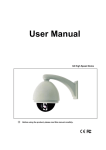
IP High Speed Dome Camera User’s Manual
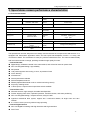
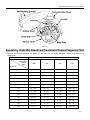
2.2 Panel Illuminate
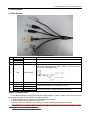
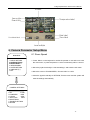
2.2.1 Rear Elevation
Fig. 2.1 Connection Cable
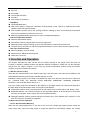
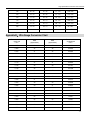
ID
2
Cable
Red/White
Black/Purple
N/A
3
N/A
4
N/A
Pink
Green
Orange
Purple
1
5
Function
Connection
AC24V Input
Please refer to the camera parameter
Video Output
Connect to video cable of monitor, standard BNC interface
3.5mm interface, connect to acoustics device, such as speaker etc for
audio speech output(impedance: >16Ω); connect to audio input device,
such as tone arm(impedance: 1kΩ)
Audio In/Output
Network interface
Connect to Ethernet device, such as Ethernet exchanger, HUB etc.
RS485+
Connect to RS-485 device, such as Pan/Tile, PTZ etc.
RS485-
Alarm in(DC12V)
Connect to alarm input, 1 channel signal alarm(0~DC12V)
Alarm in GND
Chapter 3 Parameter setup
Some network parameters must be setup firstly after finishing installation, includes IP address, submask, port etc, can be
setup through many kinds of ways, see below two kinds for examples:
1. Setup parameters such as IP address and PPPoE etc through IE browser
2. Setup parameters through applications on client’s side.
Please be confirm PC and network camera already be connected, and the network camera can be PING!
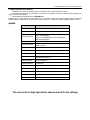
The Preset No.95 is to invoke the camera menu.Press the left key to cancel or return to the previous menu, and press
the right key to confirm or access to the next menu.
Please refer to the camera manual for the settingd.