1
2.
Exclusion
1.
2.
Reset
1.
2.
3.
Association
1.
Pressing Include button three times
within 1.5 seconds will enter
inclusion mode.
Have Z-Wave Controller entered
exclusion mode.
Pressing Include button three times
within 1.5 seconds will enter
exclusion mode.
One press one flash
Overload
Node ID has been excluded.
2-second on, 2-second off
Pressing Include button three times
within 1.5 seconds will enter
inclusion mode.
Within 1 second, press Include
button again for 5 seconds until LED
is off.
IDs are excluded.
One press one flash
Have Z-Wave Controller entered
association mode.
Or Pressing Include button three times
within 1.5 seconds will enter
association mode
2. There are 1 group (Group 1) for the
PAN08
Choosing a Suitable Location
1. Do not locate the PAN08 facing direct sunlight, humid or dusty place.
2. The suitable ambient temperature for the PAN08 is 0°C~40°C.
3. Do not locate the PAN08 where exists combustible substances or any source of
heat, e.g. fires, radiators, boiler etc.
4. After putting it into use, the body of PAN08 will become a little bit hot of which
phenomenon is normal.
2-second on, 2-second off
One press one flash
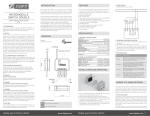
Installation and operation
Including a node ID allocated by Z-Wave Controller means inclusion. Excluding a node
ID allocated by Z-Wave Controller means exclusion.
Failed or success in including/excluding the node ID can be viewed from the Z-Wave
Controller.
LED Indication
To distinguish what mode the PAN08 is in, view from the LED for identification.
State Type
Motor
activate
No node ID
node ID, the LED flashes on and off alternately at 2-second
intervals. By pressing S1 S2 or Include button, it will stop flashing
temporarily. However, after disconnect and reconnect the power of
PAN08, the LED will flash on and off alternately at 2-second
intervals.
When overload state occurs, the PAN08 is disabled and LED
flashes on and off alternately at 0.5 second intervals. PAN08 will
send alarm_type=8 alarm_Level=0xFF to Group1, Overload
state can be cleared by disconnect and reconnect the PAN08 to the
main power
LED Indication
No matter up or down, close or open, Led will flash every second
while Motor activate.
When S1 or S2 close to L, the LED will flash even when the motor
stop by itself, this is to let user know the S1 or S2 still close and not
been release yet.
Under normal operation, when the PAN08 has not been allocated a
2