1
1. put the in wall PAN08 into a wall box and connect the AC power wire L,N to
PAN08 connector L, N.
1.1 BASIC_GET
When PAN08 receive Basic Get Command,it will send Basic Report Command
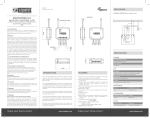
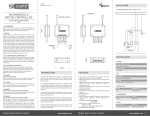
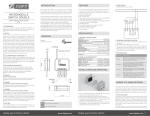
2. Connect the wall switch to the PAN08 as Fig1 .
to report the position of the shutter. When the report value is 0x00, that mean the
3. It is important to carry out a shutter calibration process before you control the
shutter to move. Press inclusion button over 3 seconds and release before the
6th second, the roller shutter controller will start the shutter calibration process.
The process is composed of three continue stages. The shutter move to the TOP
in first stage, and move to the BOTTOM in second stage, and move to the TOP
again in third stage. Then PAN08 will know the total range of UP and DOWN.
shutter is at the Bottom, if the report value is 0x63 or 0xFF that mean the shutter
is at the Top, any other value between 0x01~0x62 imply Shutter at the position
between top and bottom.
Basic Get Command: [Command Class Basic, Basic Get]
4. During the shutter calibration process, any emergencies happen you can press
and release the include button to stop the process
Basic Report Command:
[Command Class Basic, Basic Report, Value = 0x00 (BOTTOM)]
5. If user found the direction is reverse, this may cause by the wrong connection of
NC and NO to the motor, please change NC and NO connection and execute
calibration process again.
[Command Class Basic, Basic Report, Value = 0x01~0x62 (Between
BOTTOM and TOP)]
[Command Class Basic, Basic Report, Value = 0x63/0xFF (TOP)]
6. For safe issue, please select the motor which can stop by itself when go to
bottom end or top end.
1-2 BASIC_SET
7. To manually switch up and down of the shutter, simply press the external switch
S1 or S2. The detail is described in 7-5.
PAN08 can accept Basic Set Command which value is either (0x00)Bottom or Top
8. PAN08 built in meter function and can read the Watt, KWh, V(Voltage), I(Current),
PF(Power Factor) of the load by using Z-Wave command class, user can set a
threshold watt to get the warning caused by abnormal operation
(0x64-0xFE) is not acceptable.
(0x63/0xFF) or (0x01-0x62) the position between TOP and Bottom. Other value
[Command Class Basic, Basic Set, Value = 0x63 or 0xFF] control the
shutter to the top (0xFF)
9. PAN08 have overload protection function, and can help to prevent short circuit
caused by load.
[Command Class Basic, Basic Set, Value = 0x00(0)] control the shutter to
the bottom(0x00)
[Command Class Basic, Basic Set, Value = 0x01-0x62] control the shutter
to the position between bottom and top
Programming
1.
Basic Command Class
The PAN08 will respond to BASIC and BINARY commands that are part of the
Z-Wave system.
2 Binary
Switch Command Class
2-1 BINARY_SWITCH_GET,
3