1
3/27/2002
Depth Panel
26-2
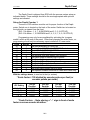
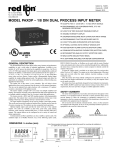
The Depth Panel is shipped from SDS with the process meters setup as
indicated below. These settings should be the most appropriate with optional
settings as indicated.
Setup for Depth Counter 1
Two sets of DIP switches must be set for proper function of the Depth
meter. Switch one is located on the back of the meter. Switch two is located on
the right side, as viewed from the front,
(SW-1 On Meter - 1, 4, 7, 8 ON/DOWN and 2, 3, 5, 6 OFF/UP)
(SW-2 On Meter - 1, 2 ON/DOWN and 3, 4, 5, 6, 7, 8, 9, 10 OFF/UP)
Programming may only be accomplished by activating the `program
enable’ switch at the rear of the panel. Other than changing the scale factor, reprogramming should only be necessary upon installation of a new meter.
CODE
ENTRY
41
1
Set unit personality to COUNTER
43
2
Set inputs to COUNT with UP/DOWN Control
44
1
Set to SINGLE EDGE COUNTING
45
2
Set scale multiplier to .01
46
2
Set decimal point and leading zero blanking
51
-2
Set reset mode to manual reset to preset
52
-6
Set Output1 Alarm control to Boundry
53
0.01
Set Output1 Time Delay to minimum
54
3
Set Output2 Termination to Terminate at Reset
55
0.01
Set Output2 Time Delay to minimum
61
4
Set Right hand Dummy Zeros to None
66
2
Set 0perator enabled functions to Reset and Preset only
With the settings above, to read out in feet (or meters)
* Scale factor = 100 divided by encoder pulses per foot (or
encoder pulses per meter)
JP5 Setting
1-2 No Divide
3-4 /2
5-6 /4
7-8 /8
120 ppr
Encoder
0.8333
1.6667
3.3333
6.6666
400 ppr
Encoder
0.2500
0.5000
1.0000
2.0000
600 ppr
Encoder
0.1667
0.3333
0.6666
1.3333
1200 ppr
Encoder
0.0833
0.1666
0.3333
0.6666
*Scale Factors - Note placing a “–“ sign in front of scale
factor reverses encoder direction.
26-2