1
3/27/2002
Depth Panel
26-3
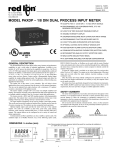
Setup for Depth Counter 2 / Line Speed
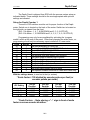
Two sets of DIP switches must be set for proper function of the
Depth/Line Speed meter. Switch one is located on the back of the meter. Switch
two is located on the right side, as viewed from the front,
(SW-1 On Meter - 1, 4, 7, 8 ON/DOWN and 2, 3, 5, 6 OFF/UP)
(SW-2 On Meter – 1, 2,10 ON/DOWN and 3, 4, 5, 6, 7, 8, 9 OFF/UP)
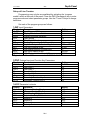
Programming may only be accomplished by activating the `program
enable’ switch at the rear of the panel. Other than changing the scale factor, reprogramming should only be necessary upon installation of a new meter.
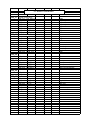
CODE
ENTRY
41
1
Set unit personality to RATEMETER/COUNTER
42
3
Set Reset for both Rate and Counter
43
2
Set inputs to COUNT with UP/DOWN Control
44
1
Set to SINGLE EDGE COUNTING
45
2
Set scale multiplier to .01
46
2
Set counter decimal point and leading zero blanking
51
1
Set Output1 to Rate and Output2 to Counter
52
6
Set Rate Alarm control to Boundry
53
0.01
Set Rate Time Delay to minimum
54
3
Set Counter Termination to Terminate at Reset
55
0.01
Set Counter Time Delay to minimum
56
-2
Set Reset Counter to Preset 2
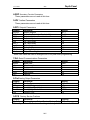
61
4
Set Right hand Dummy Zeros to None
62
1
Set Time Rate to 1 Second
63
1
Set Rate Update Time
64
3
Set Rate Scale Multiplier to 10
65
2
Set Rate decimal point and leading zero blanking
66
2
Set 0perator enabled functions to Reset and Preset only
With the settings above, to read out in feet per minute (or meters per minute)
* Scale factor = 60 divided by encoder pulses per foot (or meter)
JP5 Setting
1-2 No Divide
3-4 /2
5-6 /4
7-8 /8
120 ppr
0.5000
1.0000
2.000
4.0000
400 ppr
0.1500
0.3000
0.6000
1.2000
600 ppr
0.1000
0.2000
0.4000
0.8000
1200 ppr
0.0500
0.1000
0.2000
0.4000
Scale factor for the Depth 2 Counter is the same as the Depth 1
Counter above.
26-3