1
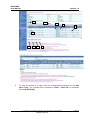
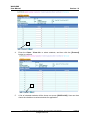
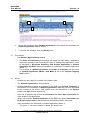
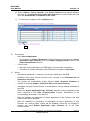
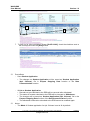
WebSAMS User Manual Version 1.9 - User should input Chinese characters for Chinese Name, alphabets for English Name, and valid format for Email. - Duplicated records of the same mode and same cohort will not be allowed. - Saving is not allowed when e-mail field is null or blank. 2.2.2 Add Student Application by Course Function Description User can add student applications by course. Pre-requisites - ‘ApL Parameter’ file should have been imported successfully through the Process Incoming Data function for application for the coming cohort. - Contact Information of the corresponding mode of application should have been prepared and submitted to the EDB. - For Student Application (Mode 2), the corresponding 'School Application (Mode 2) should have been prepared and submitted to the EDB. - All ineligible applications should have been withdrawn and submitted to the EDB. User Procedures 1. Click [Applied Learning] [Application] [Student Application (Mode 1 and Mode 2)] on the left menu. 2. Select a course by choosing the Mode, Subject, Course Provider, Course Deliverer, Class Seq. No. (for Mode 2 applications only) and ApL Class Code (for Mode 2 applications only) and click the [Proceed] button. 2 3. To add more student(s), click [Add] button. Copyright © 2014. Education Bureau. The Government of the HKSAR. All Rights Reserved. Page 18