1
the user how the packaging fits around the inner box, and let them help remove it.
If there is a Mimic included, it will be packaged between the end of the inner box and one
end-piece of the packaging; show your user where it is, and put the Mimic in its box to one
side.
Then open the inner box.
Opening the inner box
Inside the inner box you will find the Mountbatten. It is wrapped in one layer of bubblewrap, which must be removed. Put the inner box and the bubble-wrap to one side. You
now have a pile of boxes, packaging, cables, manuals, Mimic and software CDs off to one
side, and on the table a Mountbatten and its power pack and power cord. Leave the power
pack and cord unplugged for the moment.
Lay the Mountbatten on the table so that the keyboard is facing the user as if they were
about to type Braille. Make sure they can reach the keyboard and the sides of the
Mountbatten while seated; take your seat beside them.
Unpacking the Mountbatten
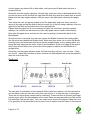
The Mountbatten is shipped with an insert to stop the Braille head from moving. To remove
the insert, first you need to remove the cover.
Show the user how to remove the cover by reaching over the Mountbatten and lifting the
centre back strut of the cover. Then show them how to put it back on by fitting the two front
corners into the grooves at either side of the ruler in front of the Brailling mechanism; then
have them lift it off again. This is a good opportunity to show the ruler itself; it can be
shown again after the paper is loaded. The markings are there to tell the user how many
Braille characters will fit across the paper they're using.
Orientation
Braille and paper mechanisms
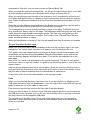
Once the cover has been removed, you can make removing the insert part of the user's
orientation, beginning with the paper lever, paper bail, Braille head and reading table.
In order for the insert to come out, the paper bail needs to be removed. Before that, the
paper lever must come up. Show the user the paper lever, and have them lift it; show them
Page 3 of 12