1
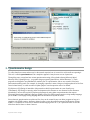
“Programs” and “Configuration”. The
first one allows access to all programs installed in the device, the latter is
a "control panel" to configure the device.
Windows Mobile allows to execute several programs at a time, but all programs work in full screen so only the
active one will be visible. If access is needed to a program running in the background, one may press the[X] on the
upper right corner of the screen until such program is visible again, or well, by invoking the program again from the
Start Menu.
Notice that the [X] on the upper right corner has a misleading effect, it doesn't close the program, but minimizes it
and will still run on the background. If terminating a program is intended, do so by clicking "Start |
Configuration | System | Memory | Running".
5.1.2. Introduction to Palm OS
Palms usage is very similar to traditional computers, but some differences must be bear in mind. These devices are
notoriously more limited than desktop computers, but useful enough for collecting statistical data.
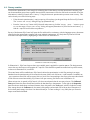
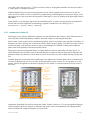
Palm's screen is touch sensitive and is operated using a plastic pencil or stylus kept in the right side of the device, as
Illustration 20 shows. Pressing over an area in the screen is known as tap or tapping. The whole area of the screen is
sensitive and must not be pressed in excess in order to avoid damages. It's advisable to add protective adhesive
plastic sheets sold separately as accessories (sold by Palm).
Palms power up from a rechargeable battery, its charge duration is in direct relationship with many factors. To
extend the battery's life the device turns off automatically after 2 minutes of inactivity (this may be changed in the
preferences menu). A palm device can be turned on and off as desired, at any time, without incurring into any data
loss.
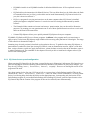
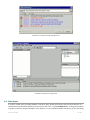
Available programs are presented as icons (drawings) in the Application's Launcher menu, shown in Illustration 21.
To start a program just tap over it's icon. Only one program may be active at a time. To exit a program or to start
another, return to the application's launcher by tapping over the “Home” icon located near the lower left corner of
the screen.
On/off button
Stylus
Battery level
indicator
Application
categories
to input
A Area
letters
B
Area to input
numbers
System time
Returns to the
application launcher
Application's menu
Screen keyboard
(letters)
Brightness control
A B
Screen keyboard
(numbers)
Hardware
buttons
Illustration 20. Palm OS hardware controllers
Illustration 21. Palm Os start menu
Applications (programs) are sorted into categories( Games, Utilities, System, etc.). To show programs belonging to
a certain category, select such category on the upper right corner of the screen (Illustration 20). Tapping several
times over Home will change the categories in a cyclic order.
5.Data collecting
22 / 24