1
1. Introduction
EQ-Software is a set of tools for collecting statistic data from census and surveys using computer aid and electronic
devices, due to this, instead of filling out paper forms, data is gathered using an electronic questionnaire (EQ:
Electronic Questionnaires) which is a way to represent the questionnaire relying on the advantages computer
usage allows.
Warning: EQ-Software is currently under development. Many features are not yet available. This
manual is valid for partially working applications, but functional enough for census’ and survey’s data
collection.
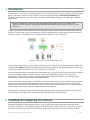
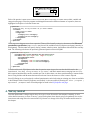
In order to successfully collect data from the field using this software, the process shown in Illustration 1 must be
followed. The first thing to get done is building an electronic questionnaire, for this purpose is that EQ-Software’s
EQ-Design exists, it is intended to help in the questionnaire's design in a user friendly way.
Illustration 1: Steps needed to conduct an EQ-Software survey.
Once a questionnaire is built, you must identify which places are of interest for you, and potential informants. This
is known as the sample and must be divided among the interviewers (Step 3). EQ-Software provides a tool known
as EQ-Control with is intended to help in field work tasks’ coordination.
Once the enumeration areas are assigned to the interviewers, they will apply the survey and write down the answers
from the informants using EQ-Collector (Step 4). The previously mentioned program is in charge of the
questionnaire’s filling out flow control, executing the appropriate jumps automatically, and checking for data
inconsistencies, which is in great help for assuring data quality.
As each interviewer enters the answers, EQ-Collector will save them. Logically you’re interested in the statistical
analysis of the data extracted and accumulated in the data base, to answer this need, EQ-Control will aid in the
extraction and visualization of the collected data (Step 5), while also allowing to export them in formats that Stata,
SPSS and many other statistic analysis programs may understand (Step 6).
This document is intended as to describe in much more detail the process previously mentioned, and to show the
way EQ-Software suite takes part in the different stages that take place in a typical survey.
2. Installing and configuring EQ-Software
Although EQ-Software is multi platform software, only the Microsoft Windows procedure is described in this
document. EQ-Software can use handheld devices such as Palm OS or Windows Mobile to collect data. In order to
do this it's necessary to have access to Palm Desktop or Microsoft Active Sync software according to the device
2.Installing and configuring EQ-Software
3 / 24