1
Custom Projector Enclosure
Installing the Projector inside the PJE
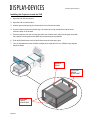
1. Open the PJE side access door.
2. Open the PJE front access door.
3. Unlatch right and left spring pins located at the front of the drawer slides.
4. Use two hands and pull the AVStack cage. Be careful when fully extended out that the entire
enclosure does not tip forward.
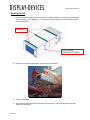
5. Place the projector onto the mounting pan within the AVStack frame, align mounting pan holes with
the projector mounting points and attach with enclosed mounting hardware.
6. Push the AVStack frame back into the enclosure and lock the spring pins.
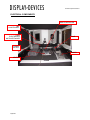
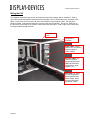
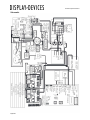
7. Turn the thumbwheels on the AVStack to adjust pitch, height and roll. See AVStack Cage diagram
below for details
AVSTACK
FRAME
PITCH AND
HEIGHT
ADJUSTMENT
ROLL AND
HEIGHT
ADJUSTMENT
4/18/2011